Windows 11’s New Xbox Mode is Now Available for More Insiders
- Laurent Giret
- Apr 17, 2026
-
0
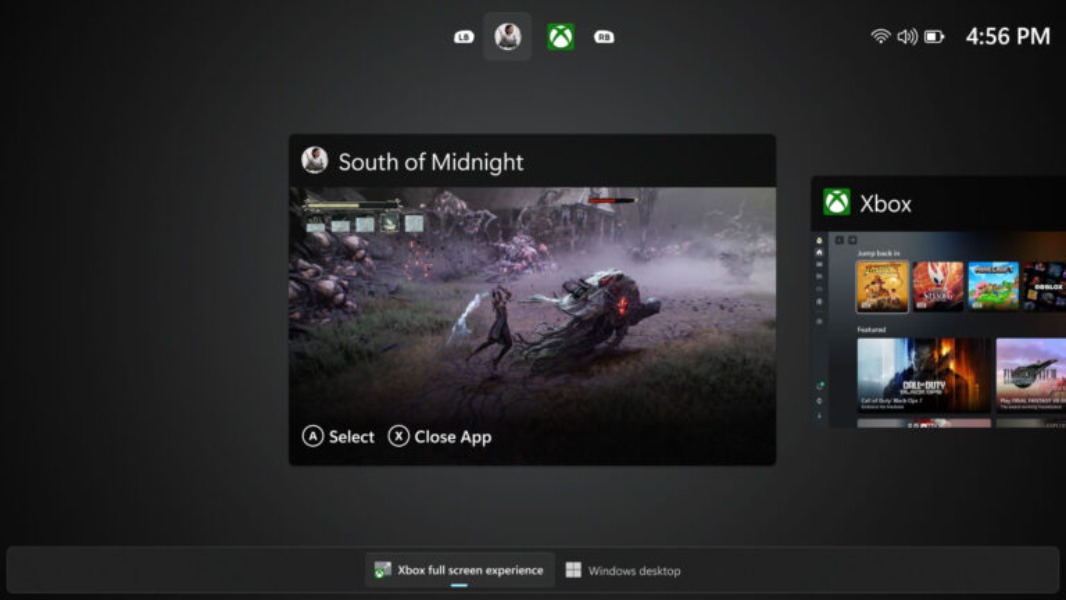
Microsoft is bringing its new Xbox Mode, previously known as the Xbox Full Screen Experience, to more Insiders today. The new full-screen interface is available for Canary testers who opted in to test 29500 series builds, as well as Insiders on the Release Preview Channel.
New Windows 11 Preview builds are actually available across all Insiders Channels today, but the biggest updates are on the Canary and Release Preview Channels. As often, Dev and Beta testers are getting the same set of minor changes, but I’ll detail what you should know about below.
Canary Channel
Let’s start with the build 29570.1000 for Canary testers who opted in to receive optional 29500 series builds. This latest flight includes the new Xbox mode, which can be enabled from the Xbox app, Game Bar settings, or by pressing Win + F11. This new mode provides a streamlined full-screen interface for accessing PC games, and it’s part of the work Microsoft is doing to bring the PC gaming experience closer to what’s available on Xbox consoles.
Today’s optional build 29570.1000 for Canary testers also adds a new Touchpad setting to choose how large the right-click zone size is on touchpads that have a pressable surface. It also expands lock screen widget personalization options to all regions.
For Canary testers who stayed on 28000 series builds, the new build 28020.1863 fixes an issue that prevented some apps from signing in due to a false report of no internet connectivity. The release notes don’t mention any new features in this flight.
Dev and Beta Channels
The Dev build 26300.8276 and Beta build 26220.8271 bring reliability improvements to File Explorer, Windows Hello fingerprint authentication, and the Settings app. Insiders will also notice that when Location services is turned off in Settings > Privacy & Security > Location, options like Default location and Allow location override now appear disabled (greyed out).
Release Preview Channel
Windows Insiders on this Channel are previewing all the changes coming in the optional April update for Windows 11, as well as the next Patch Tuesday update coming in May. All the changes listed below will be gradually rolled out to Release Preview testers:
New Xbox mode: This is the same full-screen experience that’s included in today’s Canary build 29570.1000, and it’s also already available for Dev and Beta Insiders.
File Explorer improvements: The app’s preview pane is getting a new “preview anyway” button to view files downloaded from the Internet. It’s also adding support for new archive formats, including uu, cpio, xar, and NuGet Packages (nupkg).
Haptic signals: Users with a Surface Slim Pen 2, ASUS Pen 3.0, and MSI pen 2 with haptic feedback can go to Settings > Bluetooth & devices > Mouse, Touchpad, or Pen > Haptic signals to enable new haptic feedback effects when performing certain actions, such as aligning objects in PowerPoint, snapping or resizing windows.
Drop Tray: The existing Drag Tray is being renamed Drop Tray, and it now uses a smaller peek view. Its settings have also moved from Nearby sharing to Settings > System > Multitasking.
Agents on Taskbar: It’s now possible to monitor the work of AI agents like the Microsoft 365 Researcher agent right from the taskbar by hovering over the Microsoft 365 Copilot icon.
Voice typing improvements: Voice typing on the Windows 11 touch keyboard has been redesigned to remove the full‑screen overlay and show voice typing animations directly on the dictation key.
This update also brings reliability improvements for Windows Hello, the Microsoft Store, the Storage section of the Settings app, File Explorer, and more. You can see more details in the full release notes for this KB5083631 update.