Need to Know: Windows Hello Enhanced Sign-In Security (Premium)
- Paul Thurrott
- Jun 23, 2024
-
23

Windows Hello Enhanced Sign-In Security (ESS) is one of several mysterious Windows 11 features that most people have never experienced. In this case, there’s a good reason: You can’t just enable it on any PC, it has to be configured by your PC maker at manufacture time, and, to date, few have done so because of the expense and difficulty of doing so. But with this month’s Copilot+ PC launch, that’s about to change.
For those unfamiliar–i.e. just about everyone–Windows Hello ESS does exactly what its name suggests in that it enhances the security of biometric user authentication in Windows 11. This requires specific hardware components, which helps explain why it’s so rare: PC makers generally try to maximize margins by keeping costs as low as possible, and the components required by ESS are an added cost. So you will only find this feature, and the hardware it requires, in select premium laptops.
Windows Hello ESS uses a technology called Virtualization Based Security (VBS) to secure the data communication channel and isolate and protect a user’s authentication data, ensuring that it cannot be spoofed. And VBS is the primary source of Windows ESS’s hardware requirements: You can see the lengthy list of these requirements on the Microsoft Learn website.
Like you, I don’t understand a lot of this, but the requirements boil down to a modern 64-bit microprocessor with support for hardware-based (hypervisor) virtualization capabilities with support for virtualization extensions and Second Level Address Translation (SLAT); Secure Boot, a Trusted Platform Module (TPM) 2.0 security chip; firmware that conforms to the Windows SMM Security Mitigations Table (WMST) specification and supports the UEFI v2.6 Memory Attributes Table (MAT) memory map format, EFI Page Protections, and Secure MOR v2 memory attack protections; IOMMU (input-output memory management unit) or SMMU (system memory management unit)protected DMA-capable I/O devices; and hardware drivers that conform to Microsoft’s Code Integrity compatibility checks. If any of those conditions are not met–if your PC has even a single DMA-capable I/O device that is not behind an IOMMU or SMMU, for example–your PC cannot support Windows Hello ESS.
But those are just the requirements for VBS. Windows Hello ESS has other requirements, too. It only works with select IR cameras and fingerprint readers that specifically support ESS in firmware and have a Microsoft-issued certificate burned into the device during manufacturing. The fingerprint reader must have a match-on-sensor fingerprint sensor (which includes its own microprocessor and memory to isolate and protect your authentication data from the rest of the system). And these devices can only be installed and certified at manufacture time: You cannot add an external facial or fingerprint recognition device to a PC later and use it with Windows Hello ESS; they’re not secure enough: Windows will recognize it but not make it available to users.
You can read more about this even more daunting list of requirements on Microsoft Learn. But I assume this makes it clearer why the faux outrage over the Copilot+ PC Recall feature was so pointless: Windows Hello ESS is only one of the ways in which Microsoft protects these PCs and the data that Recall collects from malicious actors. But it’s pretty impressive in its own right.
Windows Hello ESS works its magic by certifying that the system is secure online or off, and during boot, and that the biometric authentication devices in the PC securely store and transmit authentication data. The hypervisor in the PC runs at the same level as, but separate from, Windows 11 on the hardware, and it ensures that when memory is used to store this data it’s isolated and protected from the OS and anything running within it. With Windows Hello ESS enabled, users must use some form of Windows Hello to authenticate, but what they can’t do is authenticate using the password for their online account: This system is completely passwordless.
This is a subtle but important distinction: In its default configuration, Windows 11 (any version) requires a Microsoft Account (MSA, or a Microsoft work or school account (WSA) for managed PCs), and these account types require Windows Hello sign-ins. But you can, as the user, disable this requirement and sign-in to your MSA or WSA using its password. Why anyone would want to do such a thing is unclear, but it’s an option.
To users, Windows Hello ESS is seamless in that it works exactly like “normal” Windows Hello from an authentication perspective: You wake up the PC, sign-in to your user account using a PIN or facial or fingerprint recognition, and you get to work. The only obvious indication I’ve seen as an individual that Windows Hello ESS is enabled can be found in the Settings app in Accounts > Sign-in options. There, you will see a single additional setting, “Sign in with an external camera or fingerprint reader,” that isn’t present on most PCs.
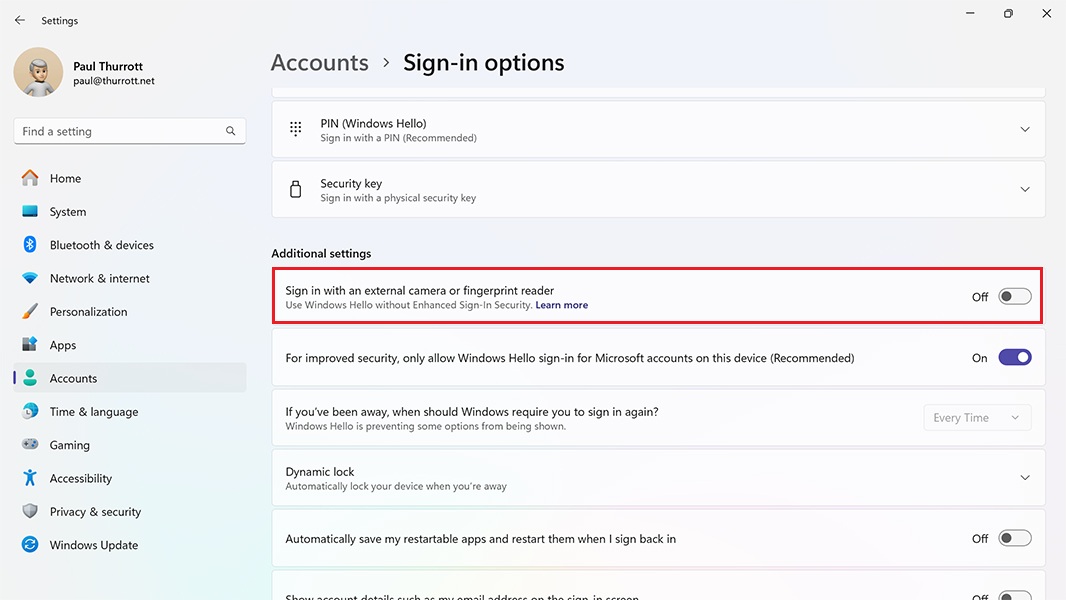
If Windows Hello ESS is enabled, this feature is disabled. And as it notes, enabling it will disable Windows Hello ESS and dramatically reduce your PC’s security protections. This Microsoft Support article provides a bit more information about that change.
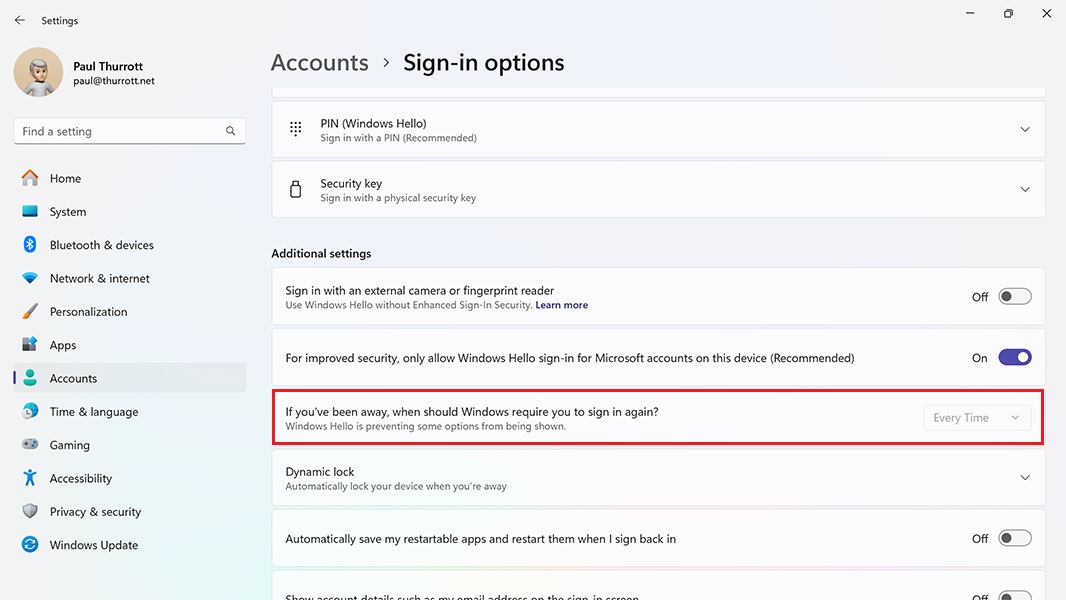
I’ve also noticed that the “If you’ve been away, when should Windows require you to sign in again?” option is disabled when Windows Hello ESS is enabled; normally, you can choose between “15 minutes” (the default), “5 minutes,” “3 minutes,” “1 minute,” “Every Time,” and “Never.” But with Windows Hello ESS, you are required to sign in–authenticate, really–every time.
In addition to shining a bit more light on the Recall debacle, Windows Hello ESS and its being a requirement of meeting the Copilot+ PC specification speak to Microsoft’s ongoing efforts to require individuals to sign in to Windows 11 using an MSA. That is, this requirement, and the tightening noose around it, may not just be self-serving on Microsoft’s part.
As most know, the MSA sign-in requirement has become more onerous with each passing Windows 11 version. And with Windows 11 version 24H2, Microsoft is finally blocking most of the Windows 11 install-time workarounds that bypassed this and other requirements. Indeed, Windows Setup in 24H2 blocks all the workarounds I currently document in the Windows 11 Field Guide. (There is still one workaround for those who wish to sign in with a local account; I will add that to the book and create a related tip on Thurrott.com soon.)
Depending on your view, this requirement is either a nuisance (you can, after all, create a local account after the initial sign in and use that instead) or a gross corporate strategy by which Microsoft hopes to track you more online, put you in front of more of its paid services, and otherwise advance its goals. Both of those are accurate to some degree, but there are also very real advantages to signing in with an MSA, and some of them are security-related: Because an MSA can be protected with two-step verification methods (and should be), your account and your PC are more secure, and when you do sign-in to Windows with an MSA when you first set up the PC, the PC’s storage is protected with full-disk encryption automatically (with the recovery code stored in your MSA).
We might view Windows Hello ESS in this light as well. Where Windows 11 somewhat artificially requires a TPM 2.0 security chip, PCs that use Windows Hello ESS (including Copilot+ PCs) must meet a much more stringent list of other hardware requirements with the express aim of keeping your and your data safe. The resulting configuration is dramatically different from that of a typical Windows 11 PC, and it’s specifically designed to be resilient against a wide range of attacks.
Interesting stuff. I’ll update the Windows 11 Field Guide to address Windows Hello ESS and that local account sign-in workaround for 24H2 soon.

Gain unlimited access to Premium articles.
With technology shaping our everyday lives, how could we not dig deeper?
Thurrott Premium delivers an honest and thorough perspective about the technologies we use and rely on everyday. Discover deeper content as a Premium member.