Microsoft is Updating Copilot in Windows 11 Again. Yes, Really
- Paul Thurrott
- Mar 03, 2025
-
13
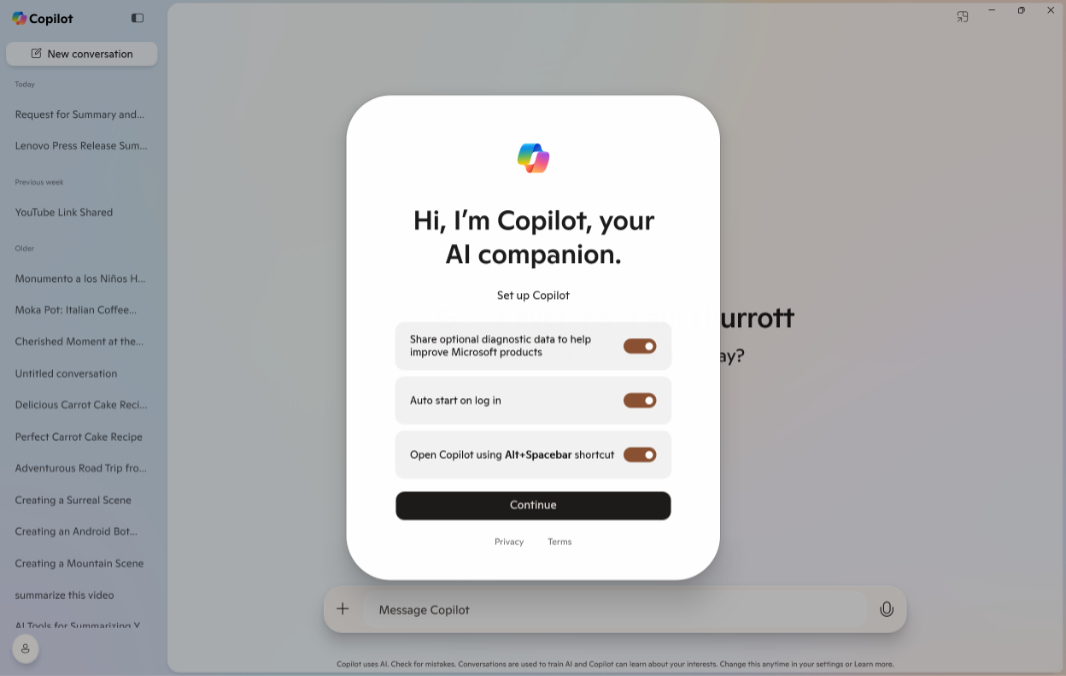
If you’ve lost count of how many times Microsoft has updated the Copilot app in Windows 11, you’re not alone. Indeed, even though this app has only been available since September 2023, about 18 months ago, it feels like a lifetime. And just like that annoying uncle you have to deal with every year during Thanksgiving or whatever holiday he always ruins, Copilot is always there now, whether you want it or not. And. It. Just. Keeps. Changing.
It’s changing again.
Earlier today, Microsoft revealed that a new version of Copilot app for Windows 11 is now rolling out in PCs enrolled in every channel in the Windows Insider Preview Program. And that suggests that this updated app will hit stable sooner rather than later. Like within the next few weeks.
Here’s what’s new.
New user interface. The warm, tan UI you just got used to is already gone: Now you can enjoy–or deal with–a new light blue look and feel instead. No, you can’t change it. But it does at least respect your Light/Dark color mode choice, while not offering to override it like a real modern app. (The previous version offered that featured.) Speaking of which…
“Native” XAML. Microsoft previously claimed that the last major update to the Copilot app in Windows 11 was somehow a native app. But they were just kidding. It was a web app, as always, but that time wrapped in a native app shell of whatever kind. But this time, Microsoft describes Copilot as a “native XAML app,” so they must really mean it now. Or something.
Side panel with conversation history. I’m amused that Microsoft is touting this as a new feature, since it already had this feature two revisions ago, and Microsoft removed it as part of the last major update. It’s back! And speaking of features that Copilot used to offer in Windows 11…
OS content. When Copilot first launched on Windows 11, Microsoft bragged that it could turn ordinary users into “power users,” but the resulting OS integration was, well, lame. And then they disappeared. And now it’s back. “Ask questions about your PC, like ‘How do I set up a Bluetooth headset on this device?’ and Copilot provides information tailored to your current version of Windows,” Microsoft writes. Hoping you won’t remember how long this feature had been missing in previous Copilot app versions.
What Microsoft isn’t promoting. If you examine Copilot settings, you will see new options under a Privacy link. “Model training on text” is now enabled by default, though I could have sworn Microsoft previously promised it would not use Copilot that way*. “Model training on voice,” at least, is disabled by default, as in an option called “Personalization” that lets “Copilot use your chats, Bing, and MSN activity, and any inferred interest [sic?] for personalized experiences.” That option links to a FAQ on Microsoft.com where you can find out what Copilot can do if you enable personalization.
What else Microsoft isn’t promoting. There is also a new Phone Connection option in settings, enabled by default if you’re using Phone Link with an Android phone, that “links your Android [phone] to make Copilot even smarter.” That option provides a link to the Phone Connection page on Microsoft Support, which explains that this feature was previously called Phone Plugin and makes “Copilot more personalized by integrating the rich data stored on your Android, including messages and contacts.” There is also a hilarious note about how this feature wasn’t just renamed, it was “restored with enhanced performance and refreshed visual designs!” Yes, with the exclamation point. Good God, Microsoft.
* The Copilot FAQ linked above does say that you have to opt-out of training. Hm.