Copilot Vision in Windows 11 Gets Two New Features in Insider Preview
- Paul Thurrott
- May 12, 2025
-
4
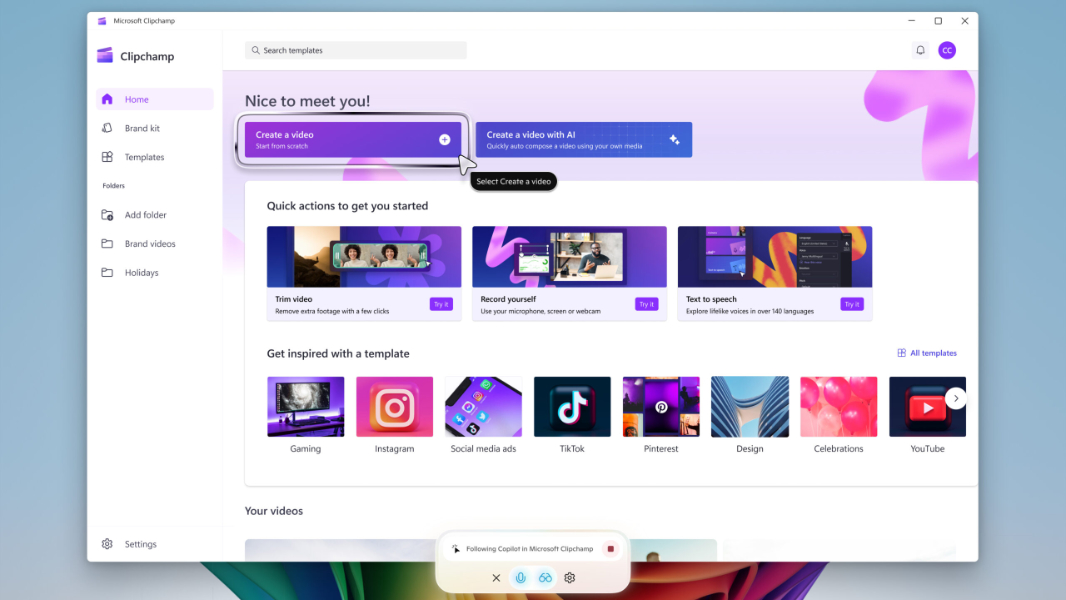
Microsoft is rolling out an update to Copilot Vision in Windows 11 in the Windows Insider Program that adds two new features: Highlights and 2-app support.
The new features are available as part of a Copilot app update (version 1.25044.92.0 or higher) that will install through the Microsoft Store in all Insider channels. Copilot Vision is currently limited to users in the United States, and because everything is A/B tested these days, this update is rolling out gradually, so you probably won’t see it immediately.
Here’s what’s new.
Highlights. This feature adds visual cues to Copilot Vision so it can guide, navigate, and coach you through specific tasks more clearly. When you ask Copilot to “show me how,” for example, it will highlight the interface in the shared app or browser window to click. Highlights works only with a single app at a time for now, and when you’re done stepping through a task, you can click a “Stop” (“X”) button in the Copilot Vision window to resume the normal Vision session. Microsoft recommends the following things to try:
- Ask Copilot to “Show me how to turn on Night light” when sharing the Windows 11 Settings window.
- Ask Copilot to “Show me how to add a footer” when sharing Microsoft Word or a similar productivity app.
- Ask Copilot to “Show me how to add text to my video” when sharing Clipchamp or another video editor.
2-app support. This feature lets you share two apps with Copilot Vision in Windows 11 at the same time. It can then “help analyze, offer insights, and answer your questions across the shared apps,” Microsoft says. Here, the example is on both vague and lame: “Share the apps for your backpacking adventure packing list and an online list, and ask Copilot ‘“’Is there anything missing from my packing list, compared to the online list?'” One assumes this will expand to an arbitrary number of apps at some point, but the details are light.
Interesting stuff, though.