Copilot on Windows 11 Gets Text Editing Actions in Preview
- Paul Thurrott
- Dec 19, 2025
-
0
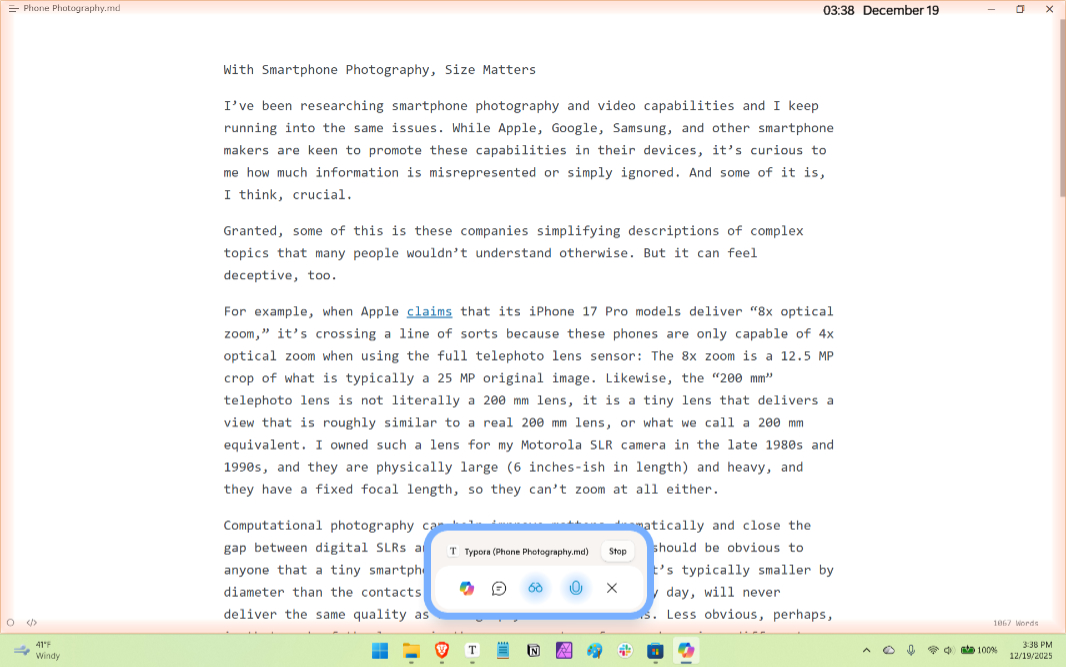
If you have a PC enrolled in any Windows Insider Program channel, you have a new Copilot app update to install that adds Copilot Actions for text editing.
“Windows Insiders can use Copilot to rewrite, refine, or edit text in real time during Copilot Vision sessions, enabling smooth, in‑flow collaboration and editing,” the Microsoft Copilot team writes. “We’re continuously exploring how Copilot can empower users to be more productive, craft high-quality content, and reduce the friction of getting started. We’re actively refining this feature based on feedback and real-world use to better support those goals.”
This update adds a set of text editing actions to Copilot Vision sessions, allowing you to rewrite, refine, and edit text in real time. To experience this, you have to enable Copilot Actions in Copilot settings, enable Copilot Vision, and then share whatever app you’re using to edit text. You’ll see a Copilot “gleam” appear around the app, and Copilot will begin discussing the document it contains with you.
You can also click anywhere in the document and speak commands like “rewrite this to be more formal”, “make this clearer”, or “simplify this text”. Copilot will suggest edits directly, with a preview before changes are made, and you can accept or refine the suggestions as needed. I tried this briefly using an article I published earlier this week, and while it made one obvious mistake (it commingled the physical size of a camera lens sensor in millimeters with the resolution in megapixels), it was a natural and seamless interaction that I suspect many would enjoy and benefit from.
To access this functionality, you need Copilot app version 1.25121.60.0 and higher and Windows 11 build 26200.6899 or later.