Lenovo ThinkPad T16 Gen 3 First Impressions
- Paul Thurrott
- Nov 30, 2024
-
3
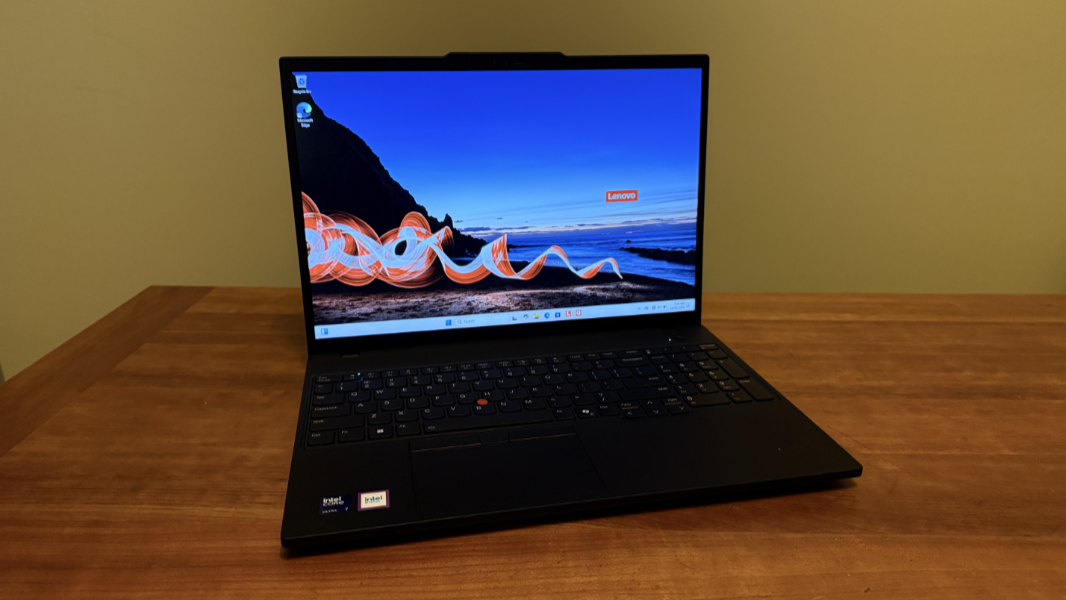
The third generation ThinkPad T16 is an incredible deal as I write this, assuming you can live with the base configuration. It delivers previous-generation Intel Core Ultra processors, which seems the right choice given the issues with Lunar Lake, solid display, RAM, and SSD choices, and even optional 4G and 5G cellular data if needed. But the upgrades can add up, and ThinkPad customers looking for a large format T-series laptop are no longer offered a dedicated graphics upgrade.

So this may be a mixed bag, depending on your perspective. But lets start with that base configuration. For $1200–a savings of 50 percent off its street price–Lenovo is now offering a ThinkPad T16 with an Intel Core Ultra “Meteor Lake” 5 124U processor, 16 GB of DDR5-5600 RAM, 256 GB of M.2 2280 PCIe Gen 4 Performance TLC Opal SSD storage, and a 16-inch Full HD+ (1920 x 1200) non-touch IPS display panel with an anti-glare coating that throws off 300 nits of brightness.

That’s a terrific price for a 16-inch T-series ThinkPad. But you’ll want to add Windows Hello capabilities to the webcam, which costs just $15, and maybe a fingerprint reader, too, for $30. And bump the battery from the base 52.5 watt-hours (Wh) to 86 Wh for $20. All that combined, and you’re still under $1300. Excellent.

But more meaningful upgrades can get expensive. You can upgrade to more capable Intel Core Ultra 5 135U vPro ($134). Core Ultra 7 155U ($253), or Core Ultra 7 165U vPro ($402) processors (with only that middle option making an sense for individuals or non-managed small businesses). RAM can get expensive, with the jump to 32 GB costing $224, or you can push it to 48 GB for $371. SSD upgrades likewise add up, with 512 GB ($164), 1 TB ($432, yikes), and even 2 TB ($700, holy guacamole) options. And while the two Full HD+ upgrades–a 400 nits non-touch panel or a 300 nits touch panel, both $89–are inexpensive, the 4K UHD (3840 x 2400) non-touch OLED panel with an anti-reflection/anti-smudge coating, Dolby Vision, and 400 nits of brightness is $343 more. Not unreasonable, but, again, it starts to add up.

Consider the review unit. It includes the Core Ultra 7 155U (non-vPro) upgrade, 16 GB of RAM, a 1 TB SSD, and a Full HD+ touch IPS panel, and Windows Hello facial and fingerprint recognition (the former is added automatically with the display upgrade), plus Windows 11 Pro (another $60), and if my math is correct, it should cost about $1700 right now. (I’m assuming the battery upgrade here, but will need to check.) And at that price, it’s a little iffier. Configuring this for myself, I’d prefer 32 GB of RAM and might downgrade to 512 GB of storage to save a bit. But it’s still a bit under $1700. (You can save $100 to $200 if a preconfigured model lands near your preferred configuration.)

Is it worth it?
It depends. We live in quite a world where I can now say that the Meteor Lake processors I was so suspicious of in early 2024 suddenly look like the more stable and reliable choice (compared to Lunar Lake), but here we are. That said, this PC is what we call an AI PC–i.e. it has an NPU and can take advantage of Windows Studio Effects, which is useful–but it’s not a Copilot+ PC class device and will never get Recall or the other unique experiences. The day-to-day performance is likely fine, but it will never play games as well as the current-generation AMD Zen 5- and Lunar Lake/Arrow Lake-based laptops. Which may not matter in the slightest, but you also can’t add dedicated graphics to these PCs anymore, as was the case with the first-generation T16 I reviewed last year.

The T16 isn’t just a ThinkPad, it’s also a T-series ThinkPad, and that means a certain level of quality in addition to the classic Eclipse Black design with red accents and the accoutrements that all ThinkPad owners enjoy, from the dual pointing system to the high-quality scalloped keyboard keys, and the mix and modern and legacy ports businesses demand.

On that note, you’ll find two 40 Gbps Thunderbolt 4/USB4 Type-C ports, a full-sized HDMI 2.1 port (with 4K@60 Hz), and a full-sized 5 Gbps USB-A port on the left, alongside a headphone/microphone combo jack on the left.

And on the right, Lenovo supplies a smart card slot (if configured), a nano SIM card slot (if configured), a second 5 Gbps USB-A port, a full-sized Ethernet port (a rarity these days), and a nano Kensington lock slot.

Connectivity is modern–Wi-Fi 7 and Bluetooth 5.4 are available, though some configurations provided Wi-Fi 6E. And as noted, you can upgrade to 4G LTE ($134) or 5G ($298) if required.

The keyboard is Lenovo’s latest, and while it’s encumbered by a numeric keypad (numpad)–I would love to see an option without that–the only other gripe is the dedicated PgUp and PgDn keys around the arrow keys.

Well, that and the offset touchpad. Did I mention that numpads are a nightmare for usability and unnecessary for most people? Ah well. I would get used to it.

The ThinkPad T16 Gen 3 is a big laptop–0.77 x 14.2 x 9.87 inches, but its 3.59 pound curb weight is reasonable, thanks no doubt to the build materials. It feels light for its size. And you can’t beat the minimalist, no-crapware software loudout. You get Windows 11, of course, Dolby Access and Realtek Audio Console, Intel Graphics Command Center, and four Lenovo utilities, and that’s it.

As a big screen productivity laptop for users with traditional productivity needs, the ThinkPad T16 may just make sense, especially at its current pricing. But I’ll find out.