Recent Windows 11 Insider Builds Hide Larger and More Customizable Start Menu
- Laurent Giret
- Apr 08, 2025
-
3
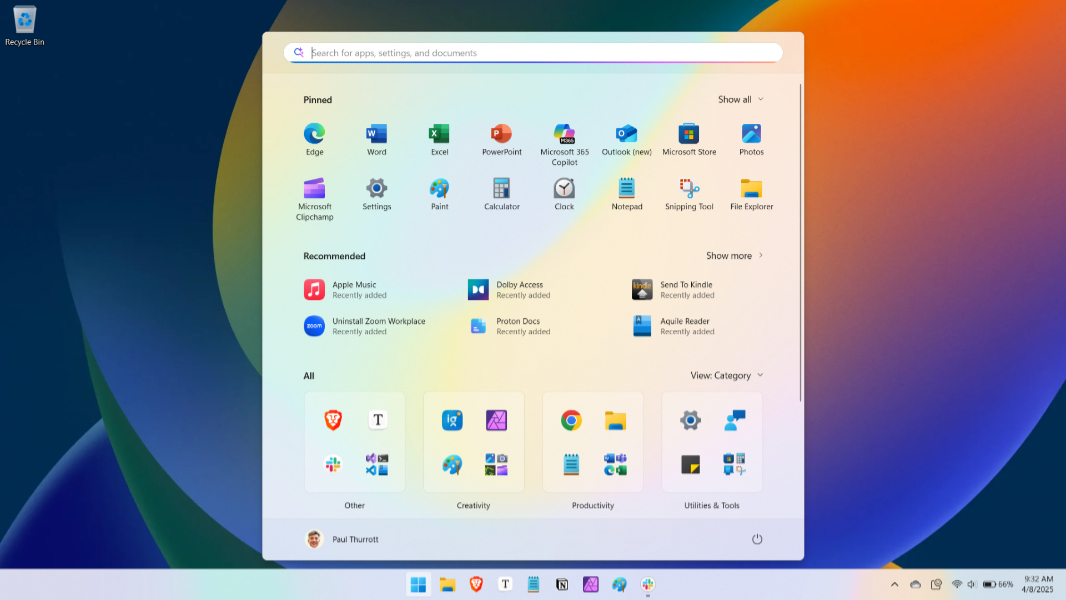
Microsoft is testing a redesigned version of the Windows 11 Start Menu internally with a larger layout and more granular controls. This new version of the Start Menu is hidden in recent Windows 11 24H2 and 23H2 preview builds, but enthusiasts can already enable it using third-party tools.
X user @phantomofearth spotted this redesigned Start Menu last week on new 24H2 preview builds for the Dev and Beta Channel. The 23H2 build 22635.5170 Microsoft released on the Beta Channel yesterday also hides it.
The hidden major Start menu update has been backported to 23H2 Beta in build 22635.5170 https://t.co/rirYAqxEt1
— phantomofearth ? (@phantomofearth) April 7, 2025
This new version of the Start Menu is larger and can welcome eight pinned apps per row at the top. However, the most important changes are that it’s now possible to hide the “Recommended” section below the Pinned section of the Start Menu, and the “All Apps” list now appears at the bottom where it’s fully scrollable. As of today, the All Apps list can only be accessed by clicking/tapping on the All Apps buttons at the top right corner of the Start Menu, which isn’t really convenient.
In Settings > Personalization > Start, it’s now possible to turn off recommended content in the Start Menu, but that currently requires Insiders to turn off recently added apps as well. Enabling this new Start Menu will also disable the Phone Link side panel, but it can be brought back quite easily.
Users can still choose between three different views for the all apps list: The classic Name list view, the more spacious Name grid view, and the new Category view that intelligently puts apps into different folders. Overall, the ability to have the Windows 11 Start Menu only display the “All Apps” list should please nostalgics of the Windows 10 or Windows 7 Start Menu.
Microsoft rebuilt the Windows 11 Start Menu from scratch, and it’s still a work in progress after almost four years. Hopefully, it won’t be too long before Microsoft makes this redesigned Start Menu available for Windows Insiders.