Firefox 148 Arrives with AI Kill Switch
- Paul Thurrott
- Feb 24, 2026
-
3
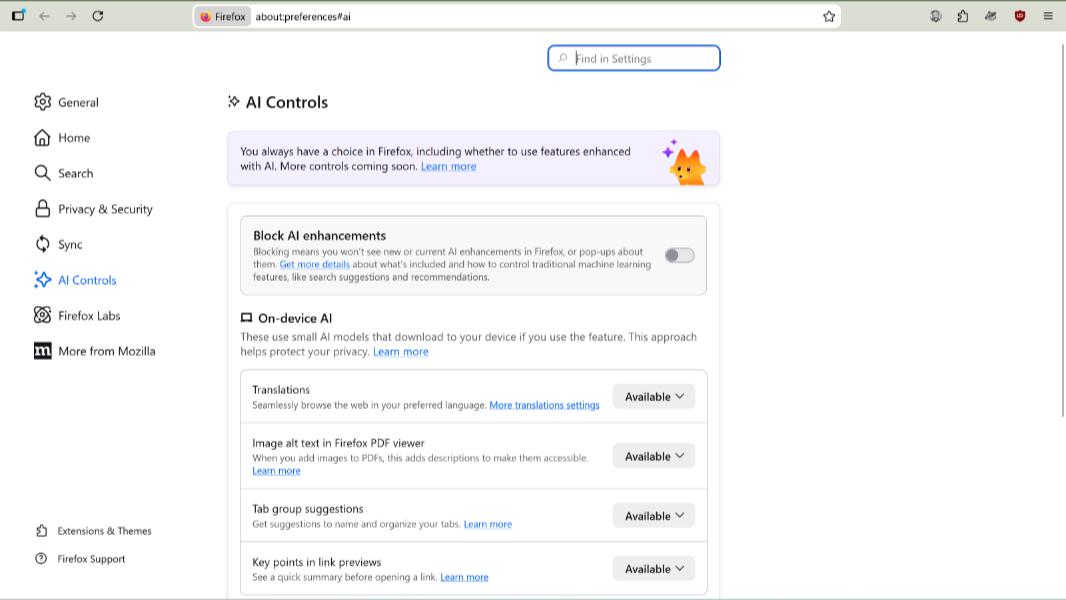
Back in December, Mozilla’s new CEO promised that Firefox would evolve into a modern browser with an AI kill switch for the haters. Today, that interface finally appeared in stable form with the release of Firefox 148.
“Firefox includes optional features enhanced by AI to help you work more efficiently,” a Mozilla Support document explains. “On desktop, you can review and block these features at any time in Firefox Settings, which [now] includes an AI Controls panel starting in Firefox version 148.”
The AI Controls Panel lets you block AI features like translation, alt text for PDF images, AI-enhanced tab groups, key points in link previews, and the AI chatbot in the sidebar. Mozilla adds that as it makes new AI-powered features available in Firefox, they will also be covered by the AI Controls Panel.
As for a literal AI Kill Switch, that exists now, too: Mozilla added a “Block AI enhancements” toggle switch to AI Controls that lets you turn off every AI feature with a single click. This switch also lets you then individually enable existing AI features while ensuring that future AI features will be disabled by default.
In addition to the new AI features, Firefox 148 also includes improved support for screen readers accessing mathematical formulas embedded in PDFs, a decoupling of remote improvements and telemetry requirements in Firefox settings, improvements to Firefox Backup for Windows 10 users, new translation language support (translation into Traditional Chinese and Vietnamese), new tab wallpaper improvements, and several fixes.
You can learn more on the Firefox 148 release notes page. And you can download Firefox for free from the Firefox website.