OneDrive Now Supports Markdown on the Web
- Paul Thurrott
- Apr 21, 2026
-
3
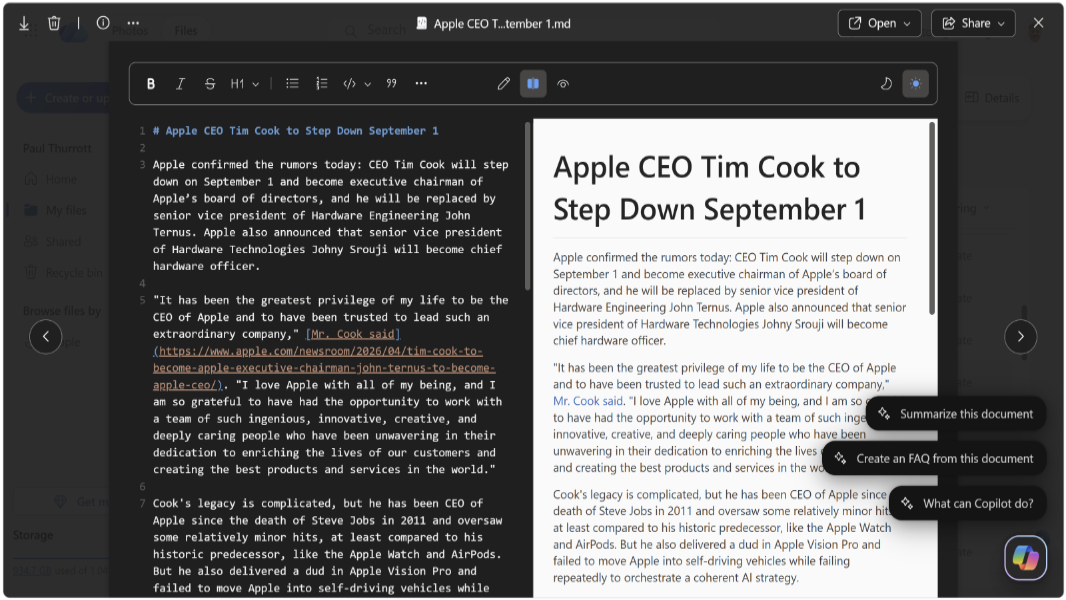
Microsoft announced today that native Markdown support is generally available in OneDrive on the web for consumers. A similar capability is also available to businesses through SharePoint and OneDrive for Business.
Markdown files are increasingly becoming the foundation for the instructions and context that guide how AI operates, acting as durable AI artifacts that capture rules, preferences, and repeatable processes,” Microsoft’s Arwa Tyebkhan writes. “Today, we’re introducing native Markdown support in OneDrive, now rolling out to general availability. OneDrive makes it easy to view and edit these files in the browser when precision, intent, or changes are required. Markdown files are now fully integrated into the Microsoft 365 file experience, behaving like any other file in your workflow.”
Here’s how OneDrive now supports Markdown on the web.
View Markdown files. OneDrive for the web now has a modern reading experience so you can view Markdown files directly from your web browser. “Markdown files now render with modern typography, replacing the outdated styling of the previous experience,” TyeBkhan says “Tables, checkboxes, links, and code blocks all render correctly, with full syntax highlighting code blocks. Changes you make are reflected in real time.”
Edit Markdown files. OneDrive now supports a modern Markdown editor in the web browser so you can switch between View, Edit, and Split modes with side-by-side editing and preview capabilities. There’s a formatting toolbar for headings, code blocks, links, images, and lists so you don’t need to learn Markdown syntax.
Create and access Markdown files. You can now create Markdown files directly in OneDrive for the web using the “Create or upload” button. Markdown files support the same actions and commands as other Microsoft 365 files, Microsoft says.
“This new Markdown experience is just the beginning,” TyeBkhan adds. “Stay tuned as we continue to bring more innovation to .md files and AI across OneDrive and SharePoint, so you can turn knowledge into action faster.”