Microsoft Makes New Windows Accessibility Features Available for Insider Testing
- Laurent Giret
- May 22, 2026
-
0
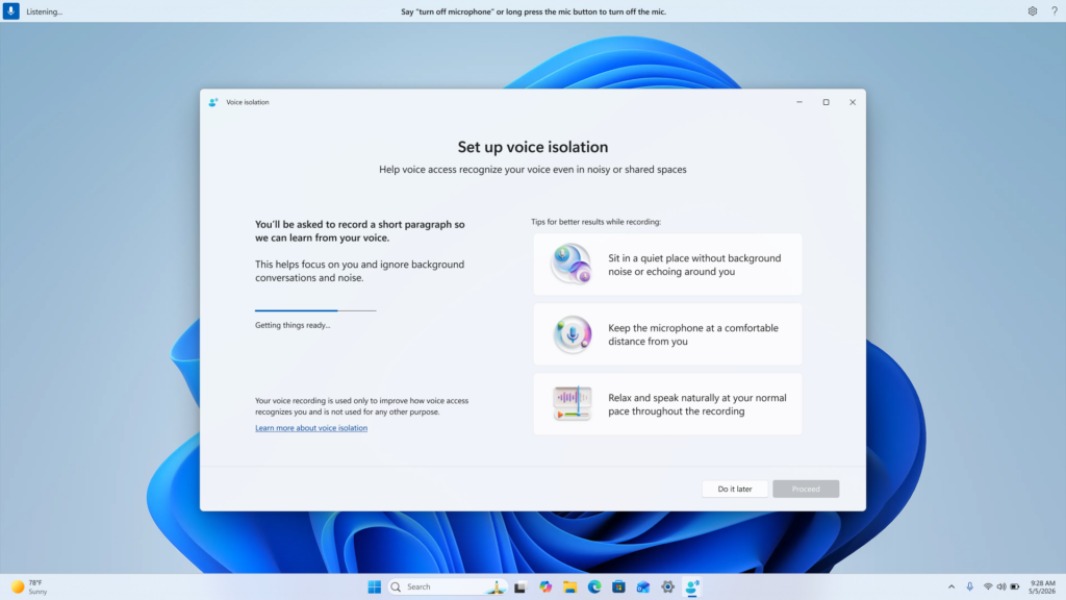
Microsoft is staying consistent with its Windows Insider flights on Fridays, and this week, testers on the Beta and Experimental Channels can test various new accessibility features. There’s a new screen tint option in display settings to reduce eye strain, and a new Voice Isolation feature to help the existing Voice Access feature recognize voices in noisy and shared spaces.
There are new builds for all Insider channels today, including for Canary testers who opted in to receive 29595.1000. Microsoft will soon transition them to a new “Experimental (Future Platforms)” Channel, but in the meantime, today’s build 29595.1000 only includes “platform changes in moving to a new active development build.”
Insiders on the Experimental (26H1) Channel (previously the Canary 28000 series Channel) are getting the build 28020.2149, which only brings reliability improvements for File Explorer and the Dev Drive feature.
The Experimental Build 26300.8497 includes the biggest changes, with the new Screen tint feature available in the Vision section of the Accessibility page. Insiders will find color presets and a strength slider, and Screen tint can work simultaneously with the existing Night Light feature that reduces blue light at night.

The new Voice Isolation feature in Voice Access, which requires a one-time voice setup, will filter out other speakers and background noise. All processing happens locally, and the voice data that’s collected to recognize users’ voices also never leaves the PC.
With this build, Microsoft is also making refreshable braille displays easier to use by connecting them instantly with Narrator, which now supports the HID standard. The list of compatible HID displays that can be seamlessly connected via USB and Bluetooth includes the Orbit Reader 20, Orbit Slate 340, Freedom Scientific Focus 40, and APH Mantis Q40.
Lastly, the Beta build 26220.8491 also includes the new Voice Isolation feature in Voice Access, as well as a couple of bug fixes. In case you missed it last week, Microsoft introduced last week the ability to move the taskbar to other sides of the screen, but this is still only rolling out to Insiders on the Experimental Channel.