Uno Platform and Studio Get Major Agentic AI Updates
- Paul Thurrott
- Nov 12, 2026
-
0
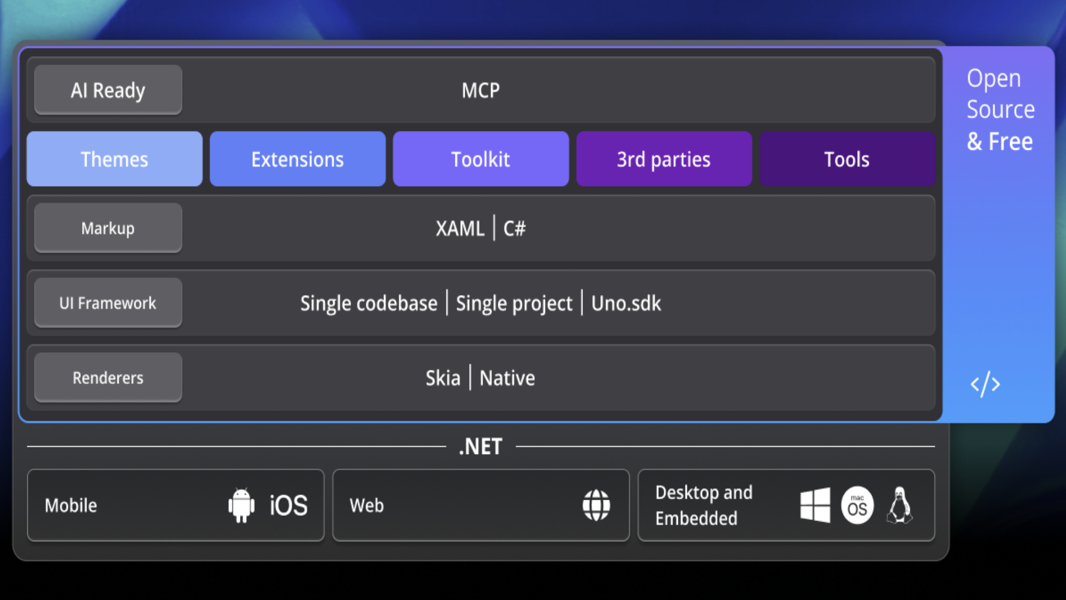
Uno Platform today announced major updates to its platform and developer IDE sidekick, with support for AI agents, .NET 11, Microsoft.UI.Reactor, and more.
“Uno Platform 7.0 is out and it is the largest release we have shipped,” the Uno Platform team writes. “AI agents can write code faster than ever. What turns that code into a great application is the foundation underneath it: how fast it runs, how small it ships, how many platforms it reaches, and how faithfully it behaves the way you and your agents expect. Uno Platform 7.0 strengthens every one of those layers.”
Uno Platform is an open source platform built on .NET that gives .NET and now WinUI developers a way to bring their existing codebases to just about every platform imaginable across desktop, web, mobile, and more. Compared to its predecessor, Uno Platform 7.0 is about twice as fast and 5 times smaller, and it now uses SkiaSharp 4 as the default graphics pipeline across Android, iOS, tvOS, WebAssembly, Windows, macOS, and Linux while supporting .NET 11 (and .NET 10) and the Microsoft.UI.Reactor declarative UI framework for building modern Windows apps. This release also brings third-party .NET MAUI controls to all supported platforms, including the web and Linux, the ability to bring existing .NET apps to Apple TV, new RichTextBlock and RichEditBox controls, and new WinUI controls and styles.
And then there’s Uno Platform Studio 3.3, the new version of the company’s AI workbench for developers. This app runs alongside your IDE and AI agents on Windows, Mac, and Linux, and there’s a companion app for iPhone and Android, plus a new themes editor. It can set up your PC for you, and it checks for missing or out-of-date dependencies each time it runs so you and your AI agent always start with a working environment.
Uno Platform Studio 3.3 lets you roll back projects to a previous point, and that includes the code and conversations you’ve worked on with AI agents. That way, you can return to a known good state without having to manually undo changes. It provides a Preview Variants view for previewing your apps in different form factors and in light and dark themes simultaneously, and the new Uno Platform Studio Mobile lets you open projects on your phone or tablet while working from Uno Platform Studio, your IDE, or the command line interface (CLI) and use Hot Reload over the air to the device.
You can learn more about the Uno Platform and download Uno Platform Studio 3.3 for desktop from the Uno Platform website, and there’s a web version available as well.