Microsoft Tests Settings Search Improvements With Insiders on Copilot+ PCs
- Laurent Giret
- Apr 11, 2025
-
0
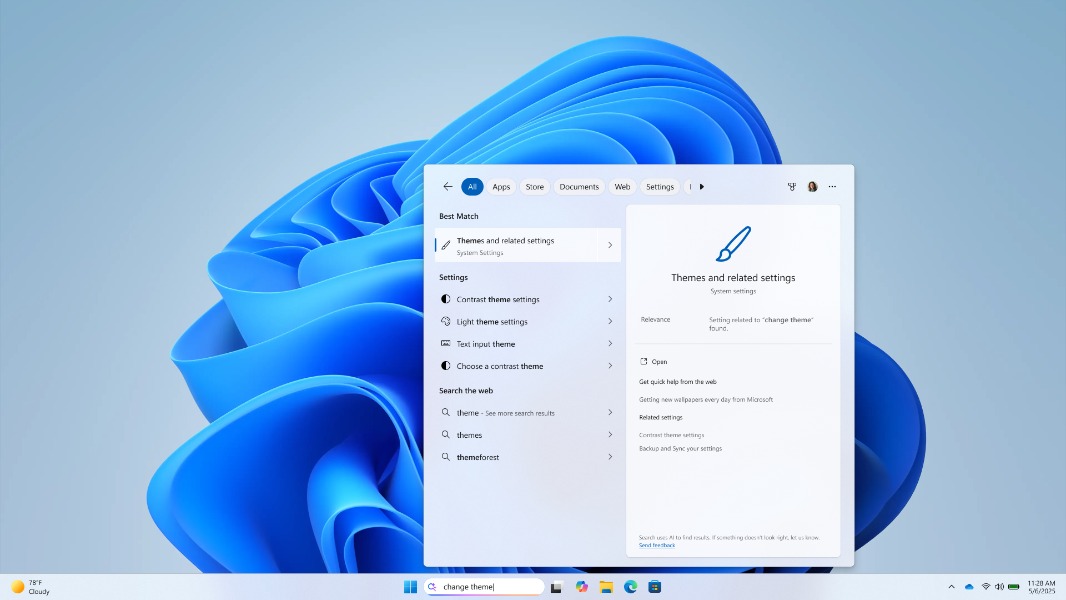
Microsoft is continuing to refine the AI-powered search experience that’s now available on Copilot+ PCs. With the just-released 24H2 builds 26200.5551 and 26120.3863, Windows Insiders on the Dev and Beta Channels can test using Windows Search to search for Windows settings using natural language.
“As part of improving Windows Search on Copilot+ PCs, we’re beginning to roll out the ability to type a setting you’re looking for in the Windows search box on your taskbar without needing to remember the exact setting name,” the Windows Insider team explained today. “For example, you can use your own words to find settings like “change my theme” or “about my PC”. You no longer need to remember the exact setting name you are looking for.”
This semantic settings search experience leverages the NPU on Copilot+ PCs, and it works without an Internet connection. In addition to Windows settings, Copilot+ users can also use natural language prompts to find files and pictures by just describing what’s in them.
The two new Dev and Beta builds released today also make visual content more accessible on Copilot+ PCs. Windows 11’s Narrator feature can now more accurately describe images by detailing the people, objects, colours, text, and numbers in them. This experience is currently only available on Qualcomm-powered Copilot+ PCs, with support for Intel and AMD models coming soon.
The other notable changes in the two new Insider builds released today include the ability to read full articles, slideshows, and videos within the MSN feed in the widgets board. The Lock screen weather widget is also getting new customization options that will come soon to other lock screen widgets.