Google Chrome Adds Immersive Reading Mode and Vertical Tabs Support
- Laurent Giret
- Apr 07, 2026
-
3
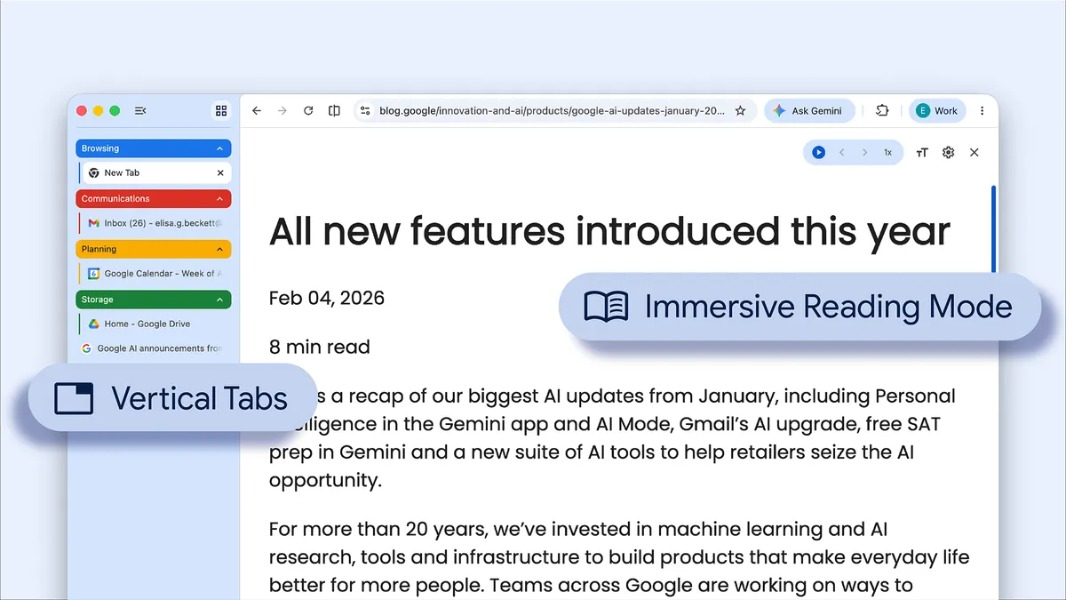
Google is starting to roll out two new features to its Chrome browser, an improved reading mode and vertical tabs support. Many web browsers, including Microsoft Edge, Mozilla Firefox, and Brave, already support vertical tabs, so it was time for Chrome, the most popular web browser on the market, to finally catch up to the competition.
By moving your tabs to the side of your browser window, you can read full page titles and manage tab groups with ease — even when your tab count hits double digits. This layout is perfect for multitasking, saving you time by making sure you never lose a tab,” the Chrome team explained today.
To try the new vertical tabs layout, Chrome users just need to click on a Chrome window and select “Show Tabs Vertically.” This may not appeal to everyone, but getting more options is always good. Microsoft also understands that, and in case you missed it, the company is also working to bring back the option to move the Windows 11 taskbar to another corner of the screen.
As for the new immersive reader mode, it now provides a full-page interface for reading web content. The distraction-free experience can be enabled by just right-clicking on any page and selecting “Open in reading mode.”