Brave for Android Lets You Block Site Elements
- Paul Thurrott
- May 06, 2025
-
5
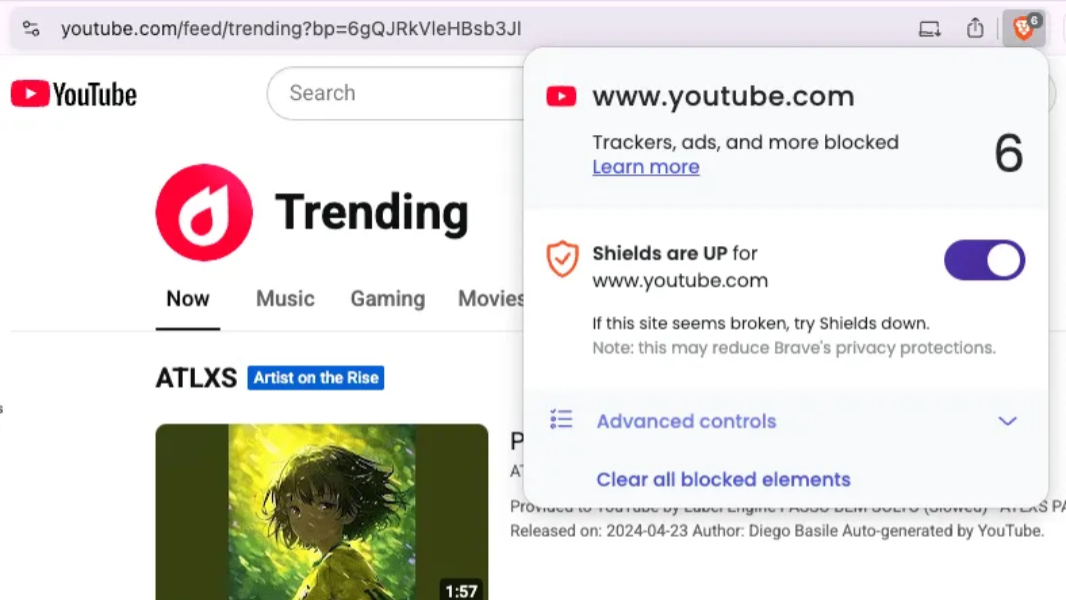
Brave for Android has added a key feature from the desktop version of this web browser: The ability to block individual website elements.
“Most websites are crowded with visual clutter, largely due to third-party advertising. This problem is even worse on mobile devices, where limited screen real estate makes every banner feel even more intrusive, especially on news or recipe websites,” Brave vice president Shivan Kaul Sahib explains. “Brave for Android 1.78 introduces a new Shields option called Block Elements, which lets you tap any on-page annoyance and hide it.”
Brave for Android already protects users against most web-based annoyances, thanks to its built-in ad, tracker, cookie consent notice, and “Open in app” blockers. But with this addition, it will help you block even more annoyances, Sahib says. You can use Block Elements, a feature of Brave Shields, to block any individual website element–promo banners, sidebars, or anything else that gets in the way–on the fly.
To use this feature, display a web page, tap the Shields icon in the Brave address bar, and then choose “Block element.” Then, tap the page element you wish to block. (This works similarly on the desktop versions of Brave.)
“We designed Block Elements on Android to be a usable and fun feature that gives you more control over your browsing experience,” Shahib says. “However, note that blocking elements on a page might cause the website to break, especially if the website changes over time.”
You can also undo these changes on a per-website basis by Tapping Brave Shields and then “Clear all blocked elements.”