Microsoft Previews Edge Scareware Blocker
- Paul Thurrott
- Jan 28, 2025
-
3
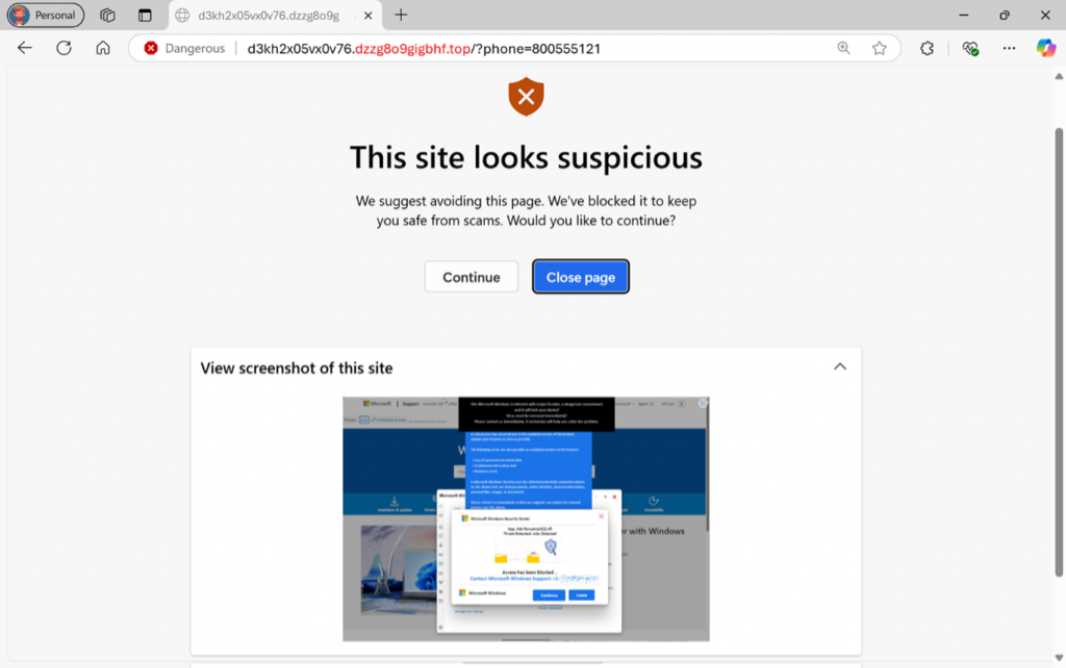
Microsoft said today that its recently announced Scareware blocker in Edge is now available in preview on Windows. The firm announced Scareware blocker as a feature of Edge for Business at Ignite 2024 back in November, but it now says it’s coming to “all Edge users on Windows PCs.”
“Scareware blocker uses a machine learning model to recognize the tell-tale signs of scareware scams and puts users back in control of their computer,” the Microsoft Edge team explains. “Scareware scams are a particularly convincing type of tech support scam. They use aggressive web pages to convince victims into thinking their system is infected with malware, pressure them to call a fake tech support number, and try to gain access to the computer.”
To date, Edge has used Microsoft Defender SmartScreen to block known scams, but because new scams appear so frequently and have become more sophisticated, Microsoft feels that real-time protection is now necessary. So Scareware blocker is what it calls “a new, first line of defense” that protects users exposed to new scams that attempt to open a webpage full-screen. The machine learning model runs locally on the PC and uses computer vision to compare full-screen webpages with thousands of sample scams it’s collected with the scam-fighting community. The model does not save images or send images to the cloud.
When Scareware blocker identifies a potential scam, it exits full-screen mode, halts audio playback, and warns the user while displaying a thumbnail of the page they were just viewing. It identifies the page as suspicious and explains that it’s been blocked to protect the user. You can continue to the page or close it. And there’s an option to report the malicious site to protect others. If you agree to do that, you can then share a screenshot and other information with Microsoft that will help improve Microsoft Defender SmartScreen. You can also report mistakes if the page is known to you to be OK.
Scareware blocker is rolling out now in preview to all Edge users on Windows. To make sure you have the feature, Microsoft recommends checking for updates in Edge and restarting the browser. (I don’t see it yet.) Scareware blocker has to be manually enabled: You can find it on the Privacy, search, and services page in Edge settings.