Firefox 136 Adds Updated Sidebar and Vertical Tabs
- Paul Thurrott
- Mar 04, 2025
-
2
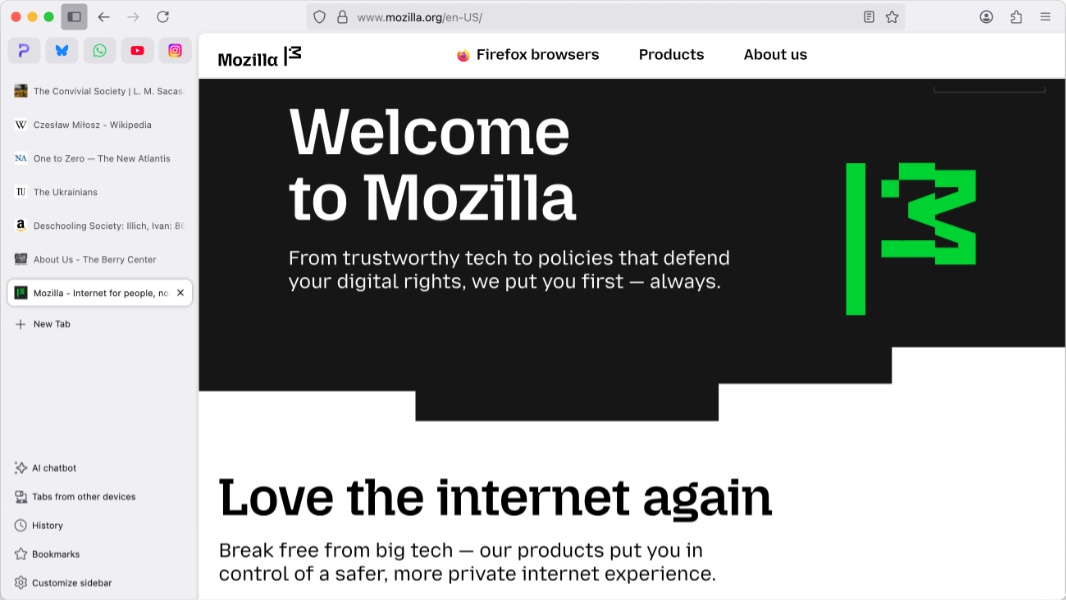
Mozilla today released Firefox 136, the latest version of its flagship web browser. This one is a major update with two big new features and several other changes. And it arrives on the heels of a major change to the Firefox terms of use that got Mozilla in trouble with fans before a necessary correction.
So let’s start with that.
Last week, Mozilla updated its terms of use for Firefox and its privacy notice. This seems straightforward, but the organization’s most privacy-obsessed fans noticed that some of the new language–including users giving Mozilla “a nonexclusive, royalty-free, worldwide license to use information” they uploaded or input in Firefox–was problematic. Mozilla quickly course-corrected, noting that the license “does NOT give [it] ownership of your data or a right to use it for anything other than what is described in the Privacy Notice.” Instead, it “needs a license to allow [it] to make some of the basic functionality of Firefox possible.”
This didn’t address the concerns, and so Mozilla issued another update to its Firefox terms of use and privacy policy.
“You give Mozilla the rights necessary to operate Firefox,” the updated terms of use reads. “This includes processing your data as we describe in the Firefox Privacy Notice. It also includes a nonexclusive, royalty-free, worldwide license for the purpose of doing as you request with the content you input in Firefox. This does not give Mozilla any ownership in that content.” It also removed the reference to an acceptable use policy and issued an updated privacy FAQ to “address legal minutia.”
“Mozilla doesn’t sell data about you (in the way that most people think about ‘selling data’), and we don’t buy data about you,” it explained. “We changed our language because some jurisdictions define ‘sell’ more broadly than most people would usually understand that word. Firefox has built-in privacy and security features, plus options that let you fine-tune your data settings.”
With that out of the way, here’s what’s new in Firefox 136 for desktop.
Updated sidebar. The updated sidebar that Mozilla has been working on for the past several months is now fully available in stable. You can enable it in Settings > General > Browser, along with tools like an AI chatbot (which works with the models of your choice), bookmarks, history, and tabs from devices you sync with your Mozilla account.
Vertical tabs. Common on other web browsers, Firefox now supports vertical tabs, and they’re available in the updated sidebar noted above.
Clear browsing data and cookies. This UI has been updated so that you can now clear saved form data independently of browsing history.
HTTPS-first. Firefox now automatically loads the HTTPS version of a website by default and then falls back to HTTP when that is not available.
Smartblock Embeds. This new feature lets you selectively unblock certain social media embeds that are blocked by Firefox’s ETP Strict and Private Browsing modes. Support is limited to a few embed types for now, but more will be added in future updates, Mozilla says.
Linux on Arm support. Firefox for Linux is now available natively on Arm64 PCs via APT and tarball install types, with Flatpak support coming soon.
Platform-specific updates. On macOS, Firefox will now use lower power M-based processor cores for some background tabs to reduce power consumption, and hardware-accelerated HEVC video playback is now supported. On Linux, hardware video decoding with AMD GPUs is now supported.
Region-specific updates. In the UK, Address autofill is now enabled. In Argentina, Brazil, Chile, and Mexico, you can now use the Weather forecast on the New tab page.