Android 16 QPR3 Delivers Long-Awaited Desktop Mode
- Paul Thurrott
- Mar 06, 2026
-
4
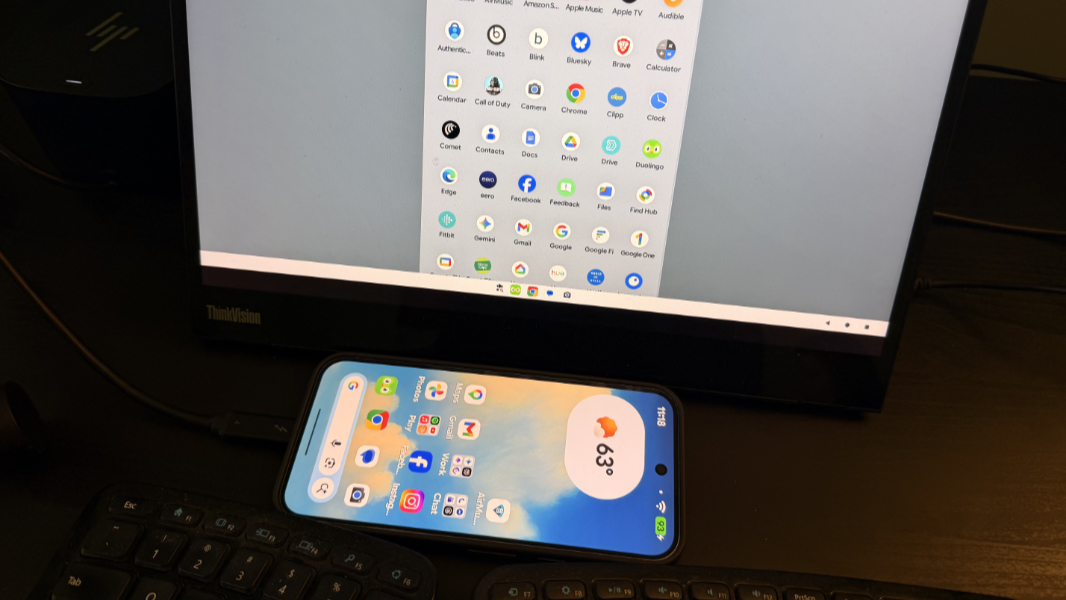
Earlier this week, Google released a quarterly Android 16 update that we now know to be QPR3, or Quarterly Platform Release 3. And in addition to the new features it discussed at that time, QPR3 brings an important Android platform capability, a Desktop mode that Google collaborated on with Samsung.
“Connected displays allow users to connect their Android devices to an external monitor and instantly access a desktop windowing environment,” Android senior developer relations manager Francesco Romano explains. “Apps can be used in free-form or maximized windows and users can multitask just like they would on a desktop OS.”
This capability has been in the works for years and it will seem familiar if you’ve ever used Samsung DeX. I’m surprised that Google isn’t playing this up more, but the external display support, while important, is just part of the functionality that this update supplies. That is, instead of just connecting a display, you could also connect a USB dock and then a keyboard, mouse, display, and more, enabling a desktop setup that one has to assume is the basis for the coming Aluminum OS mashup of Android and Chrome OS and a new kind of laptop.
Here’s how it works. With a supported device running Android 16 QPR1—today, that’s Pixel 8, 9, and 10 series phones and “a wide array of Samsung devices” that includes the Galaxy S26, Fold7, Flip7, and Tab S11—you simply connect an external USB display, and it will prompt you to enter Desktop mode or just mirror the display (the previous behavior). If you choose the former, a desktop environment similar to that on DeX or Chrome OS appears on the external display.
(If you’re using a supported tablet, the desktop session extends across both displays. “The two displays then function as one continuous system, allowing app windows, content, and the cursor to move freely between the displays,” Google notes.)
The problem, of course, is that you can’t use the desktop environment: The Android device doesn’t provide an obvious way to move an onscreen cursor on that display, select items, open apps, or whatever else. What you can also do, which Google doesn’t mention, is attach a compatible USB/Thunderbolt hub or dock and then use a mouse, keyboard, and even multiple displays with this desktop environment. And that’s when this really comes together, to my mind.
Android 16 QPR3 includes the final windowing behaviors, taskbar interactions, and input (mouse and compatibility) that make this Desktop mode useful. Developers who wish to support this functionality can configure their apps to handle display changes and to adapt naturally when a user resizes the app window. And this functionality will obviously make more sense when we start getting Android (or Aluminum) laptops that natively support Desktop mode out of the box.
If you are a developer, Google now offers documentation for Android’s multi-display support and window management, and there’s a new Compose Material 3 Adaptive library for creating adaptive UIs.