More Mobile: First Steps (Premium)
- Paul Thurrott
- Sep 18, 2021
-
28
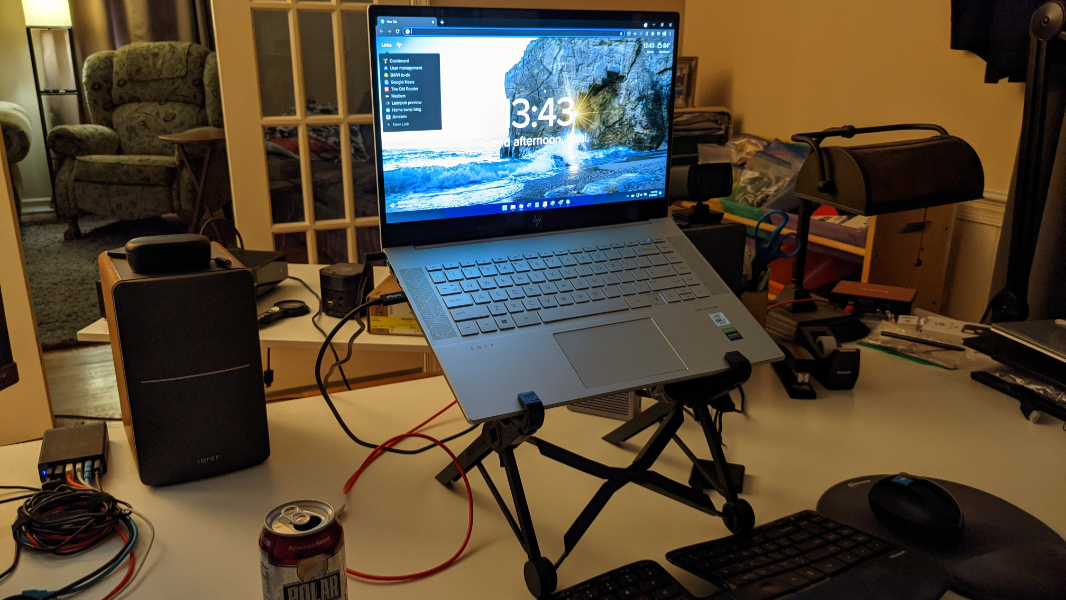
This past week, I wrote about my latest attempt to move to a more mobile computing setup for both productivity and entertainment. This isn’t new, per se, in that I’m always testing new setups, and I often move from computer to computer over time, for review purposes and in general. But this time is also different in that I want to make a permanent change that will better align with my plans to sell our current home as soon as early 2022 and move around more frequently after that.
The problem is manyfold.
Like a lot of people, I’ve accumulated a lot of stuff, and as many have observed, this stuff tends to grow and grow until it fills whatever available space you have. That our current home is humongous is thus a problem, and as I’ve written elsewhere, we’re trying to get on top of that via an ongoing decluttering campaign.
But unlike a lot of people, I’ve been accumulating a lot of tech-related stuff as part of my career over the past few decades. And while I do occasionally get rid of the piles of aging electronics from time to time via “everything must go” events, donations, and the like, this particular stuff is even more problematic.
As important, my decades of experience using technology and writing about it have resulted in some well-established and, for me, efficient habits. This is the workflow issue, where my day-to-day computing setup in my home office does evolve, sure, but at a slower pace. For me to replace something in my existing setup, it has to be demonstrably better than what I’m already using.
And there’s the problem: I’ve been using a desktop PC of some kind at a desk of some kind for over 25 years. And while I’ve tried again and again to switch to a laptop-based setup, it’s just never stuck and for any number of reasons. I just find it more comfortable and efficient to use a desktop PC each day, and to switch to a laptop when I want to work from elsewhere in the house or need to travel. So, for me, a desktop PC is better. It’s the best, most efficient way for me to work.
So I need to get over that. Part of this transition will include an acceptance on my part that this will be the way things are going forward, not just while I’m on a work or personal trip, or swapping homes, or whatever. But all the time. The idea is that this setup can be torn down in minutes and replicated somewhere—anywhere—else just as quickly. And it’s a puzzle, sort of, with a lot of pieces.
My basic home office computing setup has to date included the PC itself, of course, a display, speakers, a keyboard and mouse, a podcasting microphone and associated hardware, and a webcam. Interestingly, much of that could be replaced by a laptop: as a bare minimum, I’d only need an external microphone of some kind. And sure, that can work in a pinch, or occasionally. But moving to that setup for good? No. It’s more complicated than that.
Most obviously, at least to me, is the wellbeing impact of working directly on a laptop, with its small display sitting low on the table and its non-ergonomic keyboard and touchpad. All laptops are ergonomic disasters, and given my writing output, I can’t afford to mess with that over long periods of time. So some adjustments need to be made—some additions, I guess—before a mobile setup can offer the same functionality and comfort that I get with my desktop setup.
Which is this. In recent years, the desktop PC has generally been some kind of Intel NUC, though I’ve been using a larger (and unnecessarily powerful) HP Z2 workstation for the past four or five months. I’ve been using a nice 27-inch HP Z27n G2 display since I purchased it two years ago. And I’ve been using a Microsoft Sculpt Ergonomic Keyboard and Mouse since they were first introduced. I’m easily on my third or fourth version.
Ergonomically, the display is correctly raised so that its top is an inch or two above my eye line, and I use the optional riser on the keyboard to ensure that my wrists and hands sit at a 45-degree angle from my body, which sits in a chair that is correctly configured for the right height as well. The wrist rest on the keyboard is actually a bit above the keys because of its reverse-tilt design, which is ideal. And I use a mouse pad with a cushiony wrist rest to ensure a similar degree of support for my right hand when I’m using that peripheral.
To replicate this with a more mobile laptop-based setup, a few things need to happen. I need to sit the laptop on a stand of some kind so that the top of its display is at approximately the same height as the top of the external display I was previously using. That display can’t be as big as the 27-inch display I’m currently using, but a 15-inch laptop display may be big enough for day-to-day work, and/or I could incorporate a USB-C external display. (More on that soon.)
I also need to continue using the Microsoft Sculpt Ergonomic Keyboard and Mouse (which annoyingly require a dongle instead of Bluetooth). And I will need to somehow reduce my need for at least some of the peripherals I use today, or add some form of USB or Thunderbolt-based dock, the smaller the better.
For now, however, I’d like to start with the basics of this transition, which is to remove the desktop PC and 27-inch display from desk and replace it with a laptop of some kind. I do already have a Nexstand Laptop Stand that can raise any laptop to the correct height and then collapse down into something quite portable. And I have several laptops from which to choose.
After experimenting with a couple of smaller PCs, including various 13.x- and 14.x-inch laptops, I’ve temporarily settled on a 15.6-inch HP Envy 15 laptop. This is reasonably modern with its 10th-generation Intel Core chipset, NVIDIA graphics, 16 GB of RAM, and 4K display. And because it’s large, for a laptop, I can position it on the stand right in front of the keyboard and it’s easy and comfortable to use.
It’s not perfect. Ideally, this kind of setup would include a single USB-C connection for power and expansion via some dock or whatever. But the Envy is hulking enough that it requires dedicated power via a barrel port. So there are two wires, not one. That’s fine, certainly for now, when I’m literally just going to use it at home anyway.
From a hardware perspective, I have a few docks to choose from, though some of my better choices were ironically decluttered over this past summer. For now, I’m using a CalDigit TS3 Plus Thunderbolt 3 dock that Intel loaned me. But it’s big and heavy, and designed for permanent use on a desk. And I will eventually need a smaller, more portable solution.
But this is all fine for testing. I can plug my webcam, Focusrite Scarlett Solo microphone interface, keyboard/mouse dongle, Ethernet cable, and some USB cables into the dock and pretty much replicate my normal desktop setup, albeit with a smaller display. And an occasionally hissy laptop. Which I suspect I’ll just need to get used to.
And you know what? It works, mostly. Brad noted some video jitteriness during our Friday recording of First Ring Daily, and I’ll see whether I can figure that out before next week’s Windows Weekly. And I’ve had some connectivity issues between the keyboard/mouse and the dongle, something I’d experience in the past when I used this set with a dock. But I feel like it could get there.
And are there any good 16-inch laptops? Even with a 15-inch display, I have to use most applications full-screen, which limits my normal workflow of saving items (like documents and images) to the desktop and then dragging them into app windows. This has me thinking about external displays, of course. But again, we’ll get to that.
Obviously, I’m also thinking about what I could do without. There are four obvious candidates.
First, if the laptop’s webcam was decent enough, I could lose the external webcam, which would be nice.
Second, if I had a USB microphone with great quality, I could lose the enormous HEIL microphone setup I have, plus that USB mic interface, both of which are too large to travel with, so I will need to do that at some point.
Third, those speakers. I’m using some nice but very large bookshelf speakers and I think it’s fair to say that they’re superfluous. They also sound about 100x better than the laptop speakers.
Finally, it would be better to not even need a dock. I think it’s possible.
For now, I’m going to try to live with this basic setup, though I will probably experiment with other laptops over the coming weeks and months. Familiarity leads to experience, which leads to better comfort and efficiency. And that takes time.
More soon.

Gain unlimited access to Premium articles.
With technology shaping our everyday lives, how could we not dig deeper?
Thurrott Premium delivers an honest and thorough perspective about the technologies we use and rely on everyday. Discover deeper content as a Premium member.