Microsoft Releases Two New Windows 11 23H2 Builds For Insiders
- Laurent Giret
- Jan 17, 2025
-
0

Microsoft has just released two new Windows 11 23H2 preview builds for Insiders on the Beta and Release Preview channels. The two flights bring different sets of changes for Windows 11 Insiders on these two channels, and Windows 10 testers on the Release Preview Channel are also getting a new build today that will automatically install the new Outlook for Windows app.
Let’s start with the biggest changes included in the builds 22635.4800 and 22631.4825 for Windows 11 Insiders on the Beta and Release Preview channels, and we’ll finish with the new Windows 10 build 19045.5435. As usual, most of these changes are rolling out gradually to Insiders, and those who turned on the Windows Update toggle to get new features as soon as they’re available will receive them first.
Windows 11 Beta build 22635.4800
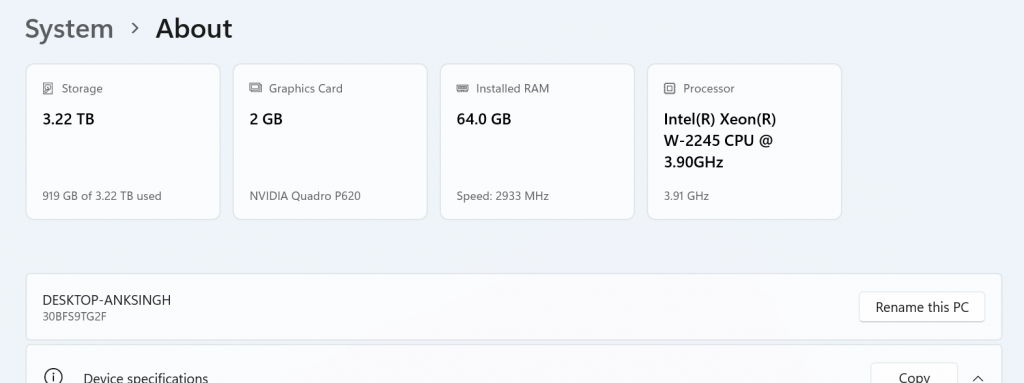
Settings app: The app will now show new “top cards” at the top of the “About” settings page displaying a PC’s processor, RAM, storage, and GPU specifications. Managed PCs won’t get these new cards yet, but they will get the new Settings homepage highlighting Recommended settings, Bluetooth devices, and more.
Widget board: This build adds support for new interactive widgets that developers can create using existing web content.
Windows Search: This build improves support for alternative web search providers in Windows Search in Europe to ensure compliance with the Digital Markets Act.
Windows 11 Release Preview build 22631.4825
File Explorer: When signed in with a Microsoft account or Microsoft Entra ID account, the Shared tab of File Explorer will now show shared items including files, emails, Teams chats, and more.
Windows Share: Users can now share content directly to apps that support sharing in Windows by right-clicking local files in File Explorer or on the desktop.
OneDrive continuity feature: Windows will now ask users recently working on OneDrive files on their phones if they want to pick up where they left off on their PC. Users must be signed into OneDrive and their PC using the same Microsoft account to see these Resume notifications that will appear within five minutes of using their phones. Work and school accounts do not support this feature yet.
Taskbar: Microsoft improved the previews and animations that show when the mouse cursor hovers over apps on the taskbar.
Windows Studio Effects: On PCs with NPUs, an icon will now appear in the system tray when an app that supports Windows Studio Effects is in use. Clicking on the icon will open the Studio Effects page in Quick Settings where the app currently using the camera can be seen.
Magnifier app: The new CTRL + ALT + Minus keyboard shortcut can now be used to quickly switch between the current zoom and 1X zoom. This update adds buttons to reset the zoom level.
Windows 10 Release Preview build 19045.5435
As I mentioned earlier, this build will automatically install the new web-based Outlook for Windows app that replaces the now deprecated Windows Mail app. For users who had pinned the Mail app to the taskbar, it will automatically be replaced by the new Outlook for Windows.
The release notes also mention a “new calendar” with weather information, but it’s not clear if this is an update to the existing Calendar app. Otherwise, the new Outlook for Windows also has a built-in calendar and address book.
This new Outlook client will also ship in the Windows 10 optional update to be released in the last week of January, and all Windows 10 users will get it with next month’s Patch Tuesday update.