Microsoft Starts Testing New Battery Icons and Snap Layout Improvements on Windows 11
- Laurent Giret
- Jan 24, 2025
-
0

Microsoft is once again wrapping up the week with new Windows 11 Insider flights, and testers on the Dev and Beta Channels are being treated with various new features. The highlights today include new colored battery indicators in the system tray, Snap Layouts improvements, and a new version of the Gamepad keyboard layout for the Windows 11 touch keyboard.
For Dev Channel testers, today’s preview build 26120.3000 introduces new battery iconography for the system tray area of Windows 11. The OS will now show a green icon when the battery is charging and in a good state, and a yellow icon when energy-saving mode is enabled. The battery icon will still stay black when the battery is not charging and in a good state, and turn red when it’s critically low.
Microsoft plans to show these new battery icons on the Windows 11 Lock screen in a future flight. With today’s build 26120.3000, Microsoft is also rolling out the option to show the battery percentage next to the battery icon in the system tray, which was a highly requested feature according to the Windows Insider team.
For Insiders on the Beta Channel, the just-released preview build 22635.4805, Microsoft is testing different variants of a new Snap Layouts experience designed to make the feature more easily discoverable. Many Windows 11 users probably aren’t familiar with these preconfigured ways to organize windows on the screen, and inline messaging will now appear at the top of the Snap Bar when users accidentally drag an app to the top middle of their desktops.

Additionally, inline messaging will also appear at the top of the Snap Flyout when hovering over the Minimize or Maximize button of an app. “This messaging is designed to provide guidance on snapping app windows and educating users on the keyboard shortcuts for quickly snapping app windows in the future,” the Windows Insider team explained.

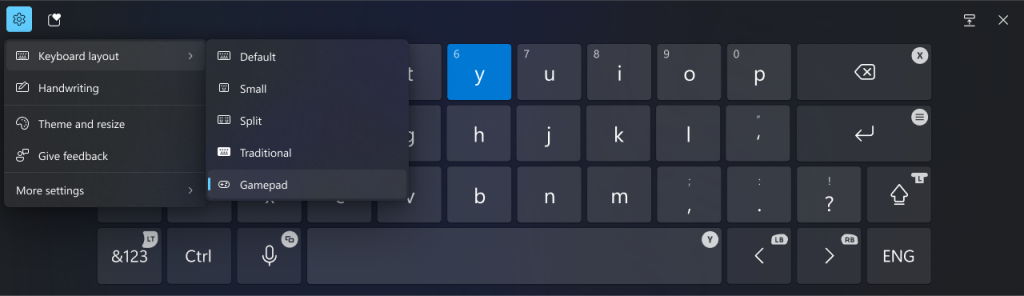
After temporarily disabling it, Microsoft is also bringing a new version of the Gamepad-optimized layout for the Windows 11 touch keyboard. This Gamepad keyboard layout supports the ability to use an Xbox controller to navigate and type, similar to how the on-screen keyboard works on Xbox consoles.
As usual, all these changes will roll out first to Insiders who turned on the Windows Update toggle to get the latest updates as soon as they’re available.