OCR Support in Microsoft’s Photos App is Live Again For All Insiders
- Laurent Giret
- Feb 06, 2025
-
2
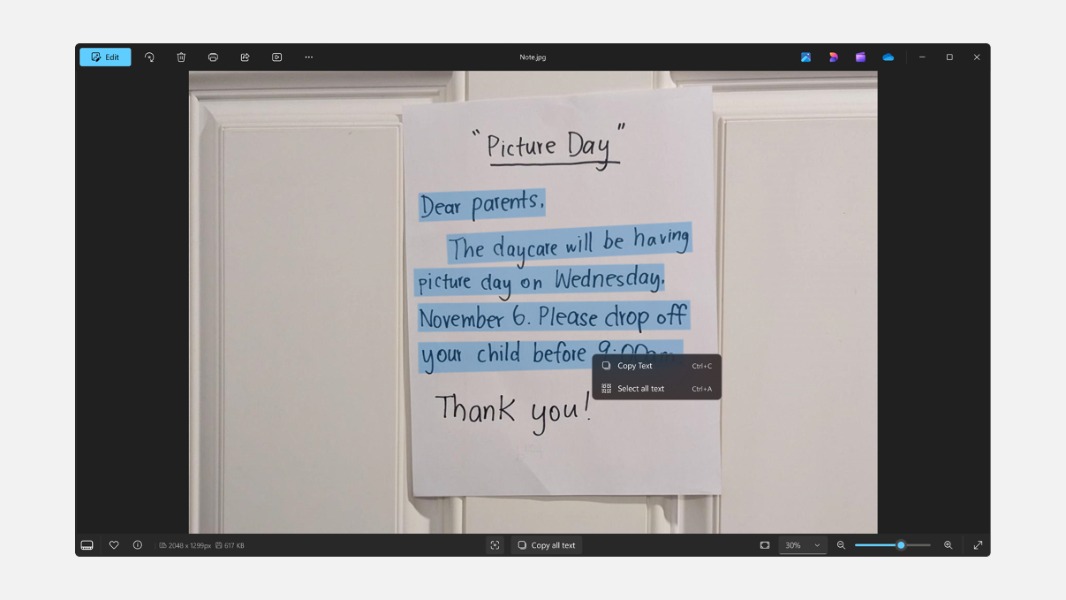
Windows 11 Insiders can once again test the new optical character recognition (OCR) feature in Microsoft’s Photos app after the company temporarily disabled it in November to address some issues. OCR support is now live again on all Insiders channels, and Microsoft is inviting testers to check out minor improvements to the experience.
OCR in the Photos app first became available for Insiders in October, and the feature makes it easy to extract text from images and paste it into other apps. At launch, OCR in the Photos app supported over 160 languages on Windows 11 and Windows 10.
We are beginning to roll out OCR support in the Photos app again to Windows Insiders on Windows 11 across all Insider Channels with some improvements to the experience! https://t.co/EZLWlYLccr pic.twitter.com/AErxBgALEW
— Windows Insider Program (@windowsinsider) February 6, 2025
With the new OCR experience that’s now available for Insiders, the OCR button at the bottom section of the app has been redesigned and it will now appear for all images. When an image doesn’t have any text, the Photos app will show a new notice explaining that OCR isn’t available. Lastly, Microsoft added a new loading animation for this OCR feature.
OCR support in the Photos app was initially available for Insiders on both Windows 11 and Windows 10 PCs, but yesterday’s announcement only mentioned Windows 11 Insiders on all channels. If you’re still on Windows 10, you may have to wait to see the feature come back on your PC.