Microsoft Starts Testing Text Formatting in Notepad
- Laurent Giret
- May 30, 2025
-
7
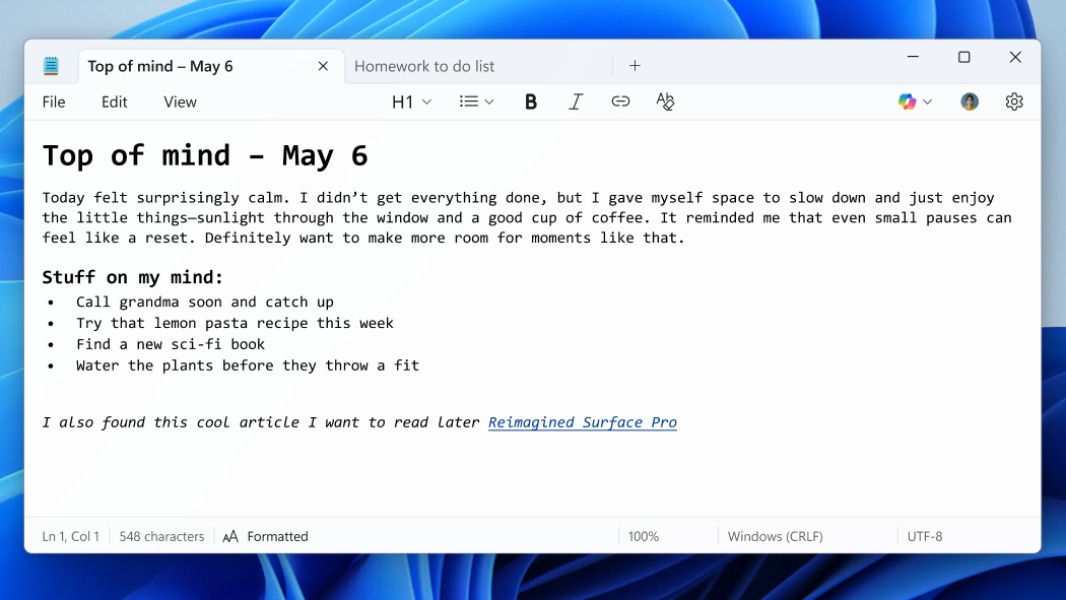
Microsoft’s Notepad app is finally adding support for lightweight text formatting. A new Notepad update that’s now rolling out to Windows Insiders on the Canary and Dev Channels introduces a new formatting toolbar that makes it easy to apply formatting to content.
Using the new formatting toolbar, Notepad users will be able to add bold and italic styling, hyperlinks, simple lists, and headings. “The experience supports Markdown style input and files for users who prefer to work directly with the lightweight markup language,” the Windows Insider team explained. It’s also possible to switch between formatted Markdown and Markdown syntax views on the fly.
Last week, a previous Notepad update for Insiders on the Canary and Dev Channels also added the ability to write new content in Notepad using generative AI. This feature is now rolling out to Insiders in the Beta and Release Preview Channels, but it requires testers to be signed into their Microsoft account.
These updates and features for Paint, Snipping Tool, and Notepad are now rolling out to Windows Insiders in the Beta and Release Preview Channels. https://t.co/iuFBISwSCc
— Windows Insider Program (@windowsinsider) May 30, 2025
The new Paint and Snipping Tool updates that were previously rolled out to Canary and Dev testers last week are also available on the Beta and Release Preview Channels today. New features include a Paint Sticker generator and smart selection tool in Paint, plus new Perfect screenshot and Color picker tools in Snipping Tool.