Redesigned Windows 11 Start Menu is Now Available for Canary Testers
- Laurent Giret
- Oct 09, 2025
-
6
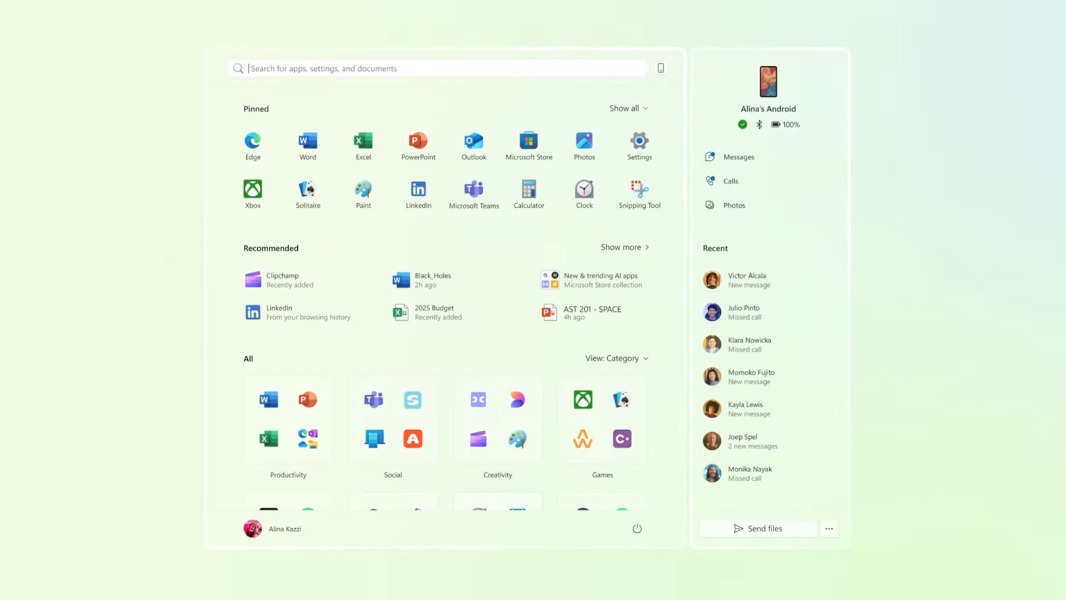
Windows Insiders on the Canary Channel can now test the redesigned Windows 11 Start Menu that Microsoft first made available for Dev and Beta testers in June. The new design still puts pinned and recommended apps at the top, but adds a scrollable “All” section with two new views for installed apps.
The Category view, which is enabled by default, intelligently groups apps by category. The Grid view, however, is ordered alphabetically like the existing List view, but it groups apps using their first letter.
With this new design, the Start Menu is now responsive and displays more content if you’re using a big display. “On larger devices, users can expect to see 8 columns of pinned apps, 6 recommendations, and 4 columns of categories in the Start menu,” the Windows Insider team explained. It’s still possible to hide recommended apps and files in the Settings app.
The Phone companion side panel is still available, and it can now be opened by clicking a new expand/collapse button in its upper right of the Start Menu. However, the cross-device integrations with Android and iOS devices won’t be available in the European Economic Area until later this year.
This redesigned Start Menu will be rolling out gradually to Insiders on the Canary Channel who installed the build 27965 released yesterday. This new build will also automatically install the lightweight Edit command-line text editor and remove the legacy .NET Framework 3.5, which will remain available as an optional Windows component.