Microsoft Issues New Prerelease 24H2 Builds to Dev and Beta Channels
- Paul Thurrott
- Jun 09, 2025
-
0
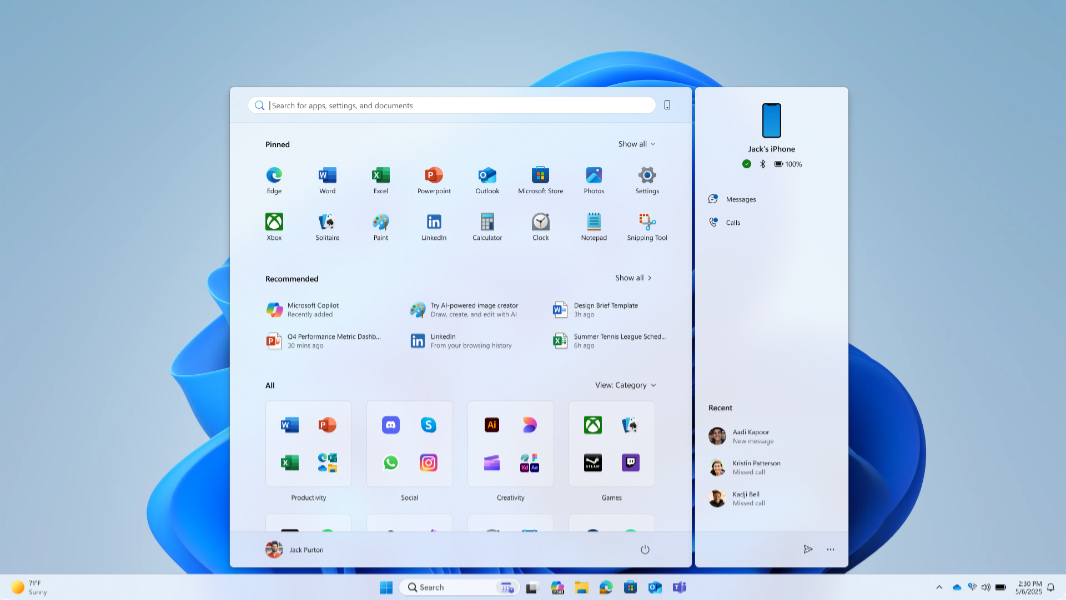
If you have a PC enrolled in the Windows Insider Program’s Dev and Beta channels, you’ve got a big update to install for Windows 11 version 24H2. The features appear largely identical in both.
Cumulative update KB5060824 is available now for Insiders in the Dev channel, and it will upgrade your PC to Windows 11 version 24H2 build 26200.5641. On the Beta channel, you’re looking at cumulative update KB5060820 and an upgrade to build 26120.4250.
Key new features in each include:
New Start menu. The Windows 11 Start menu is getting a major update with in-place scrolling to all content and no need to open secondary pages, two new views–Category and Grid, in addition to List–in the “All section,” a larger size with more content if you’re using a big display, a responsive design that allows “Pinned” and “Recommended” to finally resize as needed on the fly, and improved customization.
Phone companion. The Phone companion pane that attaches to the left side of Start if you use Phone Link is already shipping in stable, but it works better with the new Start menu: You’ll find a expand/collapse button in its upper right so you can toggle Phone companion.
Lock screen widget customization. With this update, you can finally determine which, if any, Lock screen widgets appear and the order in which they appear next to each other. You can also add more widgets: Any widget that supports a small sizing option works now.
Screen Curtain in Narrator. This new Narrator feature blacks out the display while you’re using it to preserve your privacy. “This is especially useful in public spaces or shared environments,” Microsoft notes, “allowing users to read and work with sensitive information without revealing it to others nearby.” Narrator also gets a nicer and more modern onboarding experience for new users.
Windows Search improvements. The settings for Windows Search have all been moved to a single place in the Settings app at Privacy & security > Search.
Windows touch keyboard improvements. The Gamepad layout was updated with enhanced controller navigation, improved focus handling for child keys, flyout menus, word suggestions, language switching, settings, and more, and a new PIN sign-in for the Windows 11 Lock screen that’s optimized for gaming controllers.