Microsoft is Simplifying its Naming scheme for Windows Updates
- Laurent Giret
- Oct 30, 2025
-
2
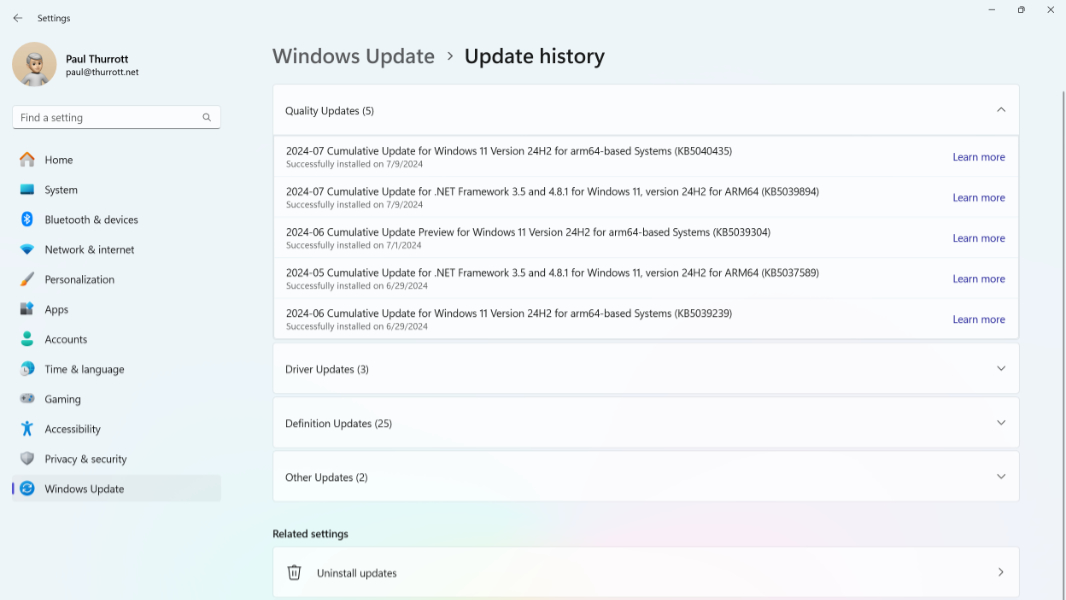
Microsoft announced today that it’s simplifying its naming scheme for Windows updates to make them easier to understand and more consistent. Windows Update titles are overly long and complex compared to something like « macOS 26.0.1 », but Microsoft won’t go as far as removing KB numbers and complex build numbers.
“The updated titles follow a clear and predictable structure across multiple update types. Each title now refers to the update by a more user-friendly name. It also includes just the most relevant identifiers, such as KB number and build or version. What we omit are the unnecessary technical details like platform architecture or date prefixes,” Microsoft explained on its Windows IT Pro blog.
The simplified Windows Update titles will apply to new build releases, as well as updates for the .NET Framework, drivers, AI components, and Visual Studio updates. For Windows monthly (Patch Tuesday) updates, something like « 2025-10 Cumulative Update for Windows 11, version 25H2 for x64-based Systems (KB5066835) (26200.6899) » is being replaced by a slightly simpler « Security Update (KB5066835) (26200.6899) »
Microsoft gave other examples of simplified titles for other types of updates:
- Monthly preview non-security updates: Preview Update (KB5062660) (26100.4770)
- NET Framework security updates: .NET Framework Security Update (KB5056579)
- NET Framework non-security updates: .NET Framework Preview Update (KB5056579)
- Driver updates: Logitech Driver Update (123.331.1.0)
- AI component updates: Phi Silica AI Component Update (KB5064650) (1.2507.793.0)
These simplified update titles are now visible in Windows Update and the Update history page. However, IT Pros deploying updates through Microsoft Update Catalog or Windows Server Update Services (WSUS) will continue to see the existing titling system, except for Visual Studio updates.