Microsoft Starts Rolling Out Redesigned Start Menu to All Windows 11 Users
- Laurent Giret
- Nov 11, 2025
-
4
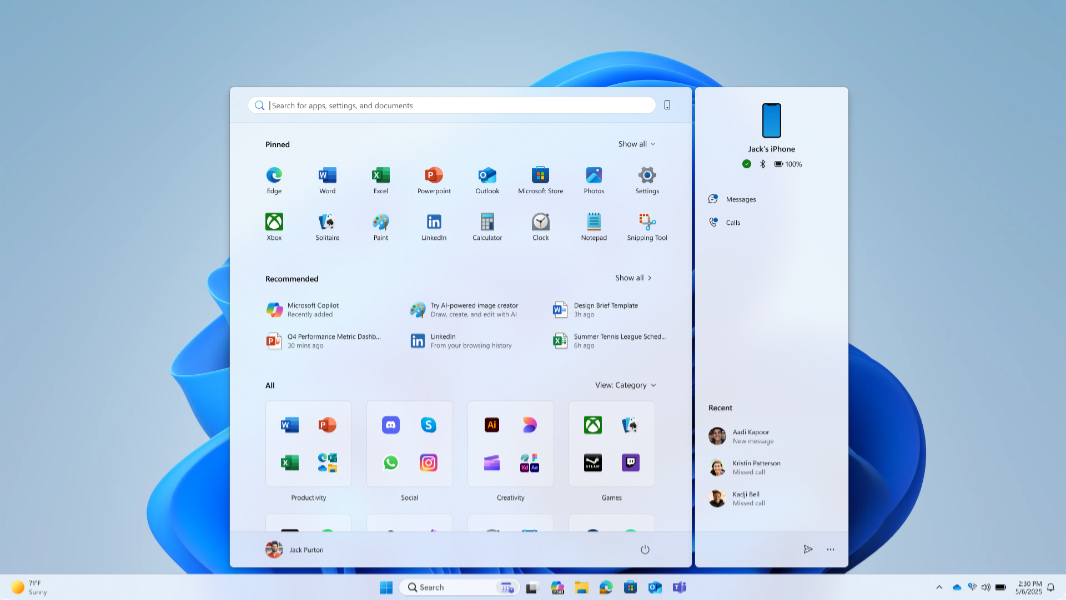
Microsoft has just released the November 2025 Patch Tuesday updates for Windows 11, which bring a redesigned Start Menu and a couple of other new features to the versions 25H2 and 24H2 of the OS. There are also Click to Do updates and other changes for Copilot+ PC users, but as usual, most of these new features will be rolling out gradually.
Here are the main changes included in the KB5068861 update for the versions 25H2 and 24H2 of Windows 11
Click to Do improvements (Copilot+ PCs only): The prompt box has been streamlined to interact with Copilot more seamlessly. You can also use Click to Do to translate on-screen text, convert units (length, area, volume, height, temperature, and speed), and select objects on-screen with Freeform selection and Rectangle selection
File Explorer improvements (Copilot+ PCs only): When signed in with a Microsoft account, hovering the mouse cursor over a file in the Home view will now display quick action commands like “Open file location” and “Ask Copilot.”
Voice Access improvements (Copilot+ PCs only): Voice action now supports Fluid Dictation to help with grammar, punctuation, and filler words in real time.
Windows Search improvements (Copilot+ PCs only): The improved Windows Search (semantic search) is now available on all Copilot+ PCs.
Redesigned Start menu: The new Start menu has a scrollable All section with category and grid views, a responsive layout that adapts to the size of your display, and Phone Link integration with an expandable and collapsible side panel via a new mobile device button next to the search box.
Taskbar improvements: The battery icon has been updated with colors that indicate whether the battery is charging and in good health (green), in battery saver mode (yellow), or is critically low (red). And you can now display the battery life percentage. The new battery icons from the Taskbar now appear in the lower-right corner of the lock screen, too.
Administrator Protection: This disruptive new security control is available in preview and can be enabled in Windows Security (in Account protection) or via Microsoft Intune or Group Policy.
Quality updates: This update fixes the issue where closing Task Manager with the Close button didn’t fully end the process. It also addresses another issue preventing gaming handheld devices from staying in low-power states, which caused faster battery drain.
Lastly, Microsoft mentioned in the release notes that two File Explorer changes have now been delayed to a future update. One of the changes will display recommended files in File Explorer Home if you sign in with an MSA (users will be able to disable it). The second change will allow third-party cloud storage providers to integrate with File Explorer Home.