Microsoft Issues New Windows 11 Builds to Insider Dev, Beta, and Release Preview Channels
- Paul Thurrott
- May 17, 2024
-
0
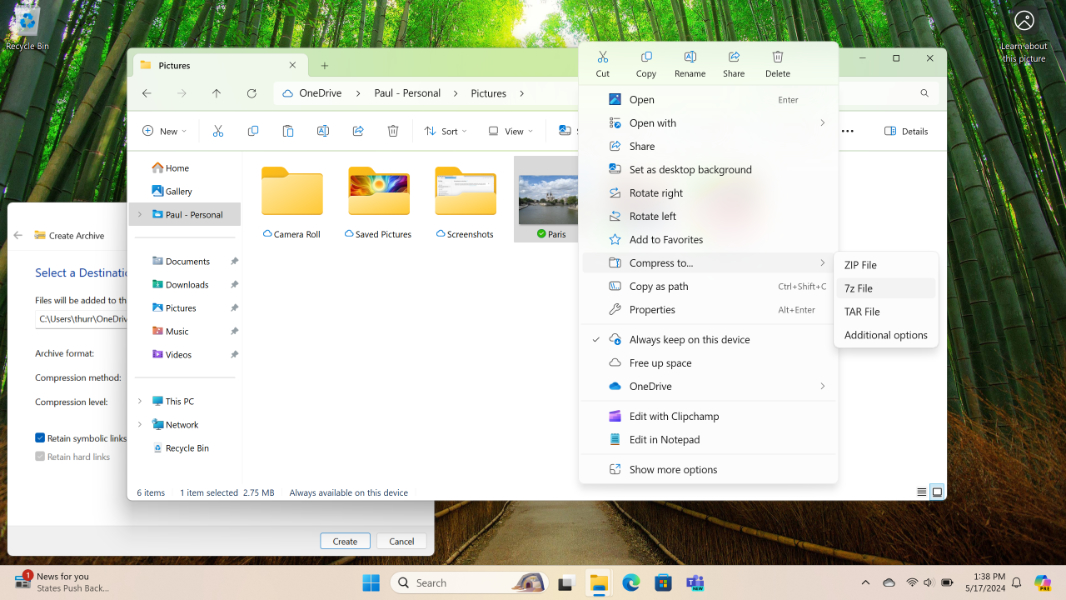
Microsoft has issued new pre-release builds of Windows 11 to the Windows Insider Program’s Dev, Beta, and Release Preview channels, coincidentally on the eve of Build 2024. The Release Preview builds–there are separate versions for 22H2 and 23H2–are particularly interesting because they add several new features we can expect to see in the General Availability channel (stable) soon.
Here’s what’s new.
Release Preview channel
Cumulative update KB5037853 updates Windows 11 to 22621.3668 (23H2) and 22631.3668 (23H2). New features include:
- PC Manager app as an in-box app in China only.
- Windows Share no longer closes if you click outside the window. Now, you need to dismiss the window using its close window button.
- Windows Share now supports sharing to specific Microsoft Teams channels and group chats, but only for users who sign in to Windows using an Entra ID (work or school account).
- Windows Share can now create QR (quick response) codes for web URLs and “cloud files” when triggered from Microsoft Edge.
- Windows Share can lets you share a file via email (by emailing yourself).
- File Explorer drag-and-drop in the address bar is back.
- There’s a new Linked devices page in Settings > Accounts if you sign in to Windows with a Microsoft account (MSA). This page lets you manage your PCs and Xbox consoles.
- Account manager in Start lets you see your MSA benefits at a glance and manage account settings.
- Windows gets its first new settings sync in several years with the addition of sound settings (including sound scheme) sync. Microsoft says you will see this change when you restore a backup during Windows Setup, but you should see it on any PC if you just sign in with that account.
- You can add a recovery email to your MSA sign in acccount in Settings > Account now.
- Windows Backup now supports MSA sign-in, presumably so you can back up to a different account. Clear as mud, as always.
- Numerous bug fixes, of course, including for that profile picture bug.
Beta channel
Cumulative update KB5037867 will update Windows 11 23H2 to build 22635.3640. Changes include:
- Support for creating 7-ZIP and TAR archives with the context menu in File Explorer.
- Emoji 15.1 support.
- Several bug fixes.
Dev channel
Cumulative update KB5037869 will update Windows 11 24H2 to build 26120.670. There are no new features. Instead, “this update includes a small set of general improvements and fixes that improve the overall experience for Insiders running this build on their PCs,” Microsoft says. There are several bug fixes as well.