Microsoft Issues Windows 11 Insider Builds to Dev and Beta Channels
- Paul Thurrott
- Sep 20, 2024
-
1
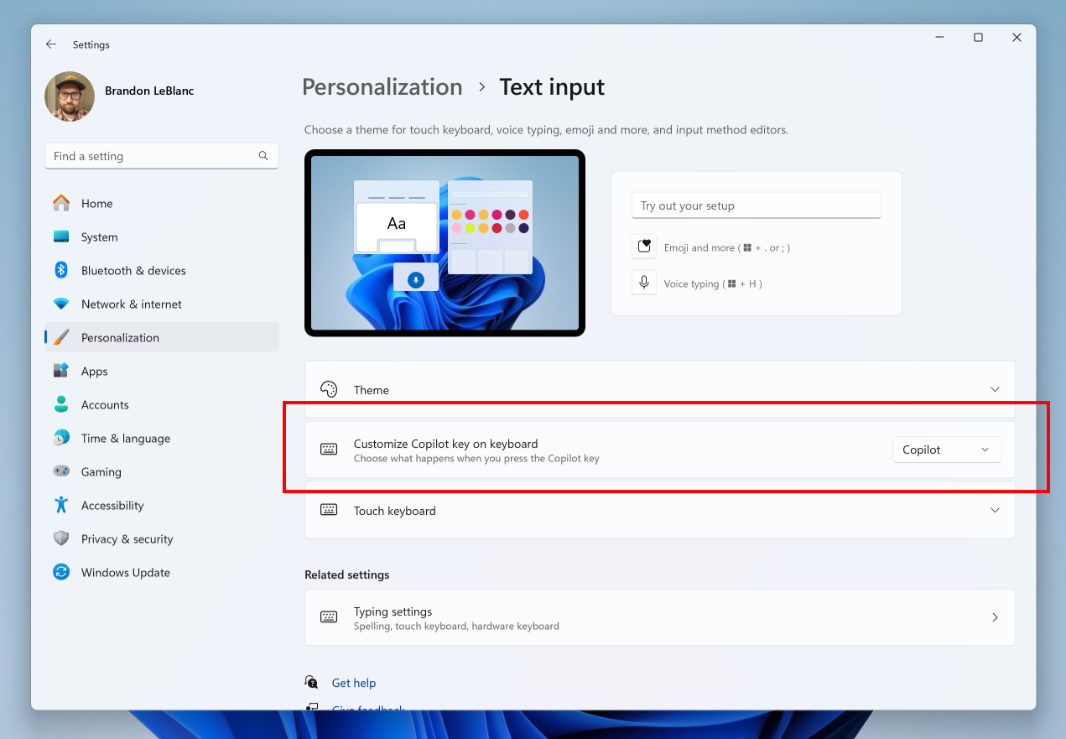
With Windows 11 version 24H2 pretty much complete, Microsoft is now testing new features that will arrive in stable after that release via two new Windows Insider Preview builds. The first, to the Beta channel, targets Windows 11 version 23H2, which will remain supported alongside 24H2. And the second, to the Dev channel, targets the post-release 24H2.
There’s at least one significant change in each build. And there’s a separate Snipping Tool update heading out to PCs enrolled in the Canary and Dev channels, too.
Beta channel
Those with PCs enrolled in the Beta channel will receive update KB5043186, bringing the Windows 11 build number up to 22635.4225. Here’s what’s new:
Copilot key configuration. A new addition to the Personalization > Text input page in the Settings app will let you choose what happens when you tap the Copilot key on your laptop’s keyboard. It’s set to the Copilot app by default, of course, but you can choose another app instead, as long as it’s an MSIX-packaged and signed app (as one might get from the Microsoft Store). This option will appear even if your PC doesn’t have a Copilot key, but it won’t do anything when configured.
Send to My Phone in Explorer context menus. A new “Send to My Phone” entry will appear when you right-click compatible content in File Explorer (including the Desktop) and have configured Phone Link to work with an Android device.
Note that Beta channel updates are delivered randomly–Microsoft calls this “technology” Controlled Feature Release, or CFR–so you may not see either of these changes immediately.
Dev channel
Those with PCs enrolled in the Dev channel will receive update KB5043185, bringing the Windows 11 build number up to 26100.1843. Here’s what’s new:
Shared tab in File Explorer Home page. The Home page in File Explorer will now displayed a tabbed area under Quick access with tabs for Recent, Favorites, and Shared, the latter of which is new. The Shared view displays files that others have shared with you via OneDrive, of course, but also view email and Teams chats. If you’re signed in with a commercial Entra ID instead of a Microsoft account, this view will also display files you’ve shared with others in your organization.
Improved file support in File Explorer Home view. The Recent, Favorites, and Shared views in the Home page in File Explorer now display more types of files, including those created by Designer, Loop, Power BI, Forms, and more.
Windows Sandbox client preview. This build also includes the new client preview version of Windows Sandbox that will be deployed and updated via the Microsoft Store. This version includes runtime clipboard redirection, audio/video input control, runtime folder sharing with the host, and “a super early version” of command line support.
Microsoft 365 on the Taskbar. If you sign in to Windows 11 with a commercial Entra ID for the first time, you’ll find the Microsoft 365 app pinned to the Taskbar by default. If you’re upgrading, the previous Copilot (pane) experience will be replaced by the new Copilot web app.
Media controls on the Lock screen. Building on its previous pointless updates to the Lock screen, Microsoft has added Media controls to the four widgets, though they only appear when media is playing.
Jump lists in Start. Now, when you right-click a pinned app in Start, you’ll see a Jump list, just as you do with apps pinned to the Taskbar.
Account manager update in Start. Speaking of pointless, the new Account manager in Start has been criticized for hiding often-needed features like “Sign out” and “Lock PC” behind additional steps. So this build pulls “Sign out” (and other user account choices) out of a sub-menu and puts it right in the Account manager menu that appears when you click your profile picture in Start.
Share local files in Search results. Now, when you search for a file using system Search (“Start search”), a “Share” option will appear next to local files in the results.
There are a few other minor changes. You can check out the original post for the full list.
Note that, as with the Dev channel, many of these changes are being rolled out via CFR, so God only knows when you’ll get them.
Snipping tool
The Snipping tool is getting an update in the Insider Canary and Dev channels that lets you configure the folder in which screenshots and and recordings are saved.