Microsoft is Adding a Mini Edge Browser to Game Bar
- Paul Thurrott
- Nov 23, 2024
-
1
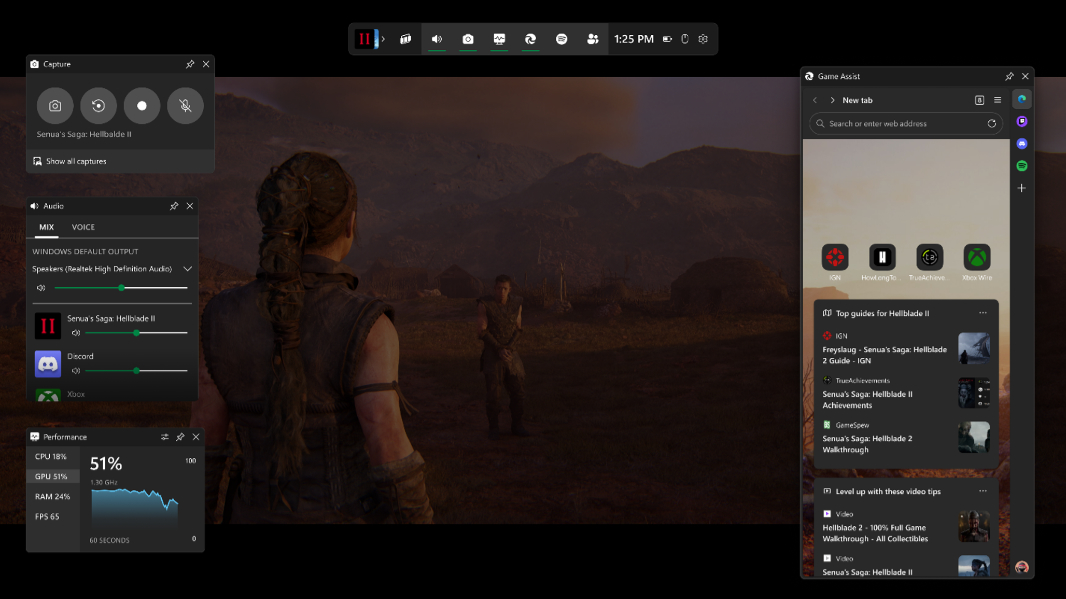
Because so many gamers use a web browser to get help while playing games, Microsoft is bringing Edge to those games via the Game Bar in Windows 11. Or, at least mini version of that browser, called Microsoft Edge Game Assist. It’s available now in preview.
“88 percent of PC players use a web browser while gaming to get help, track their progress, or even listen to music or chat with friends,” Microsoft’s William Devereux explains. “These actions require you to pull out your phone or Alt-Tab to the desktop on your PC, taking you out of your game. Unless you have multiple monitors, you also can’t see what’s happening in the game while you’re in the browser or reference a guide while you play.”
To make this process more seamless, Microsoft is now testing a new Edge Game Assist widget in Game Bar, the set of overlays that appears on top of games when you type Winkey + G or press the Xbox button on a controller. Game Assist is a “special version of Edge,” Microsoft says, that’s optimized for using while gaming and is game-aware so it can suggest relevant tips and guides. It uses the same browsing data as the full Edge browser–including your favorites, history, cookies, form fills, and more–so you don’t need to re-sign in to sites and more quickly access services like Discord, Twitch, and Spotify.
To test Microsoft Edge Game Assist now, you have to first install Microsoft Edge Beta version 132 or higher in Windows 11. Then, you simply play a game, open the Game Bar, and enable the Game Assist widget, resizing and placing it on-screen as preferred. This first preview is English-only, but more languages are coming soon. And it appears that it only works, or maybe works best, with certain games for now, including Baldur’s Gate 3, Diablo IV, Fortnite, Hellblade II: Senua’s Saga, League of Legends, Minecraft, Overwatch 2, Roblox, and Valorant–assuming you’re after instant tips and guides. More is coming soon, of course.
As with other Game Bar widgets, you can pin Game Assist so that it’s always available on-screen, over the game. And you can adjust its transparency so it’s not distracting. It supports a sidebar–Microsoft is addicted to sidebars–so you can pin favorite sites and services for quick access.
Honestly, this looks pretty useful.