Dev and Beta Channel Insiders Get a New 24H2 Build
- Paul Thurrott
- Mar 10, 2025
-
1
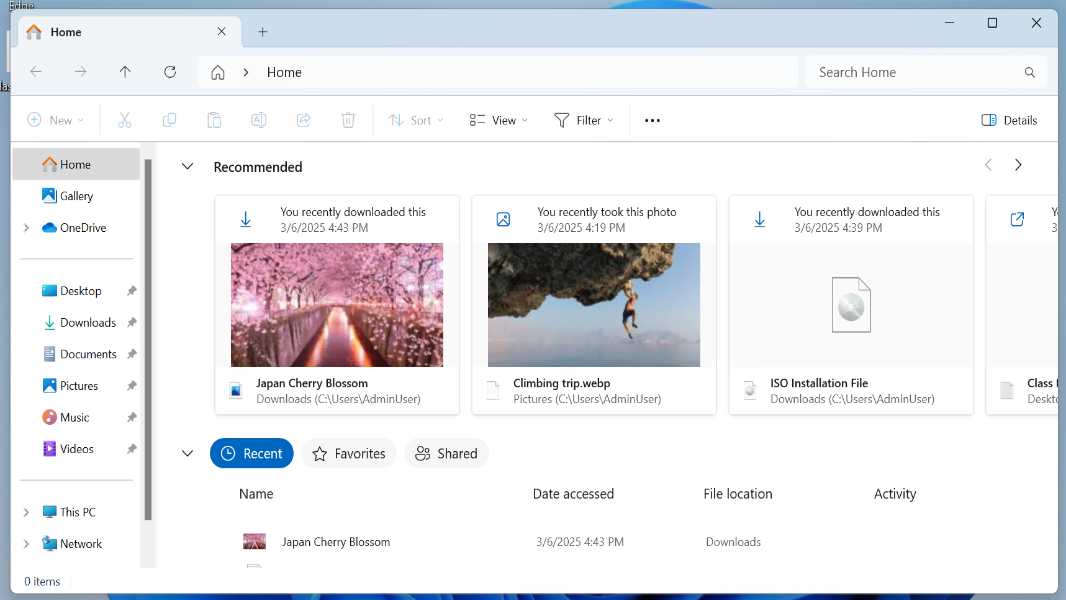
Those with PCs enrolled in the Dev and Beta channels can install cumulative update KB5053660 for Windows 11 version 24H2 and upgrade the OS to build 26120.3380.
There are a few new features:
Recommended files for everyone. Microsoft previously added a Recommended files section to the File Explorer home view, but it’s now its testing the feature for those with Microsoft account (MSA) sign-ins as well. “These files will provide you quick access to relevant files based on your activity,” Microsoft notes. “The Recommended section … is displayed as a carousel with thumbnail previews. This includes content such as files you frequently use, have recently downloaded, or added to your File Explorer Gallery.” Interestingly, Microsoft seems to hint that this new Recommended section will replace the Quick access section that we see today, in noting that “Quick access folders will continue to be available in the navigation pane for easy access to pinned folders.”
Live captions with real-time translation. This feature is already available to those with Snapdragon X-based Copilot+ PCs, but with this update, it’s rolling out to those with AMD- and Intel-based Copilot+ PCs. Supported languages include Chinese (Simplified). Supported languages include Arabic, Bulgarian, Czech Danish, German, Greek English Spanish, English, Estonian, Finnish, France, Hindi, Hungarian, Italian, Japanese, Korean, Lithuanian, Norwegian, Dutch, Polish, Portuguese, Romanian, Russian, Slovak, Slovene, and Swedish.
Recommended snap groups. Microsoft is testing out a pointless change in which it will recommend snap groups with two apps in the Recommended section of the Start menu.
New MSA notification. Microsoft is introducing a new “toast” (meaning, banner) notification for those who sign-in with a Microsoft account to prompt you to add a secondary email account or phone number to your account. It will only appear if your MSA is missing those account proof types.
Emoji and more in the system tray. Microsoft is making it easier to use emojis by putting an “Emoji and more” icon in the system tray that opens the Emoji and more pane you usually access with Winkey + . (period).
Top cards in Settings > System > About. This will change how your system information displays in Windows 11 … if you have a non-commercial desktop PC. So just about no one. If you do have that kind of a PC, you will see cards displaying its storage, graphics card, RAM, and processor at the top.
Beyond that, there are numerous bug fixes and various known issues.