Microsoft Releases New Windows 11 Pre-Release Build to Canary
- Paul Thurrott
- Sep 08, 2025
-
1
No one has any idea what the Windows Insider Program’s Canary channel is for, but it just got a build with new features. For some reason.
Build 27938 is now available to those with a PC enrolled in the Canary channel. It includes the following new features that, yes, have been available in other channels for a while now:
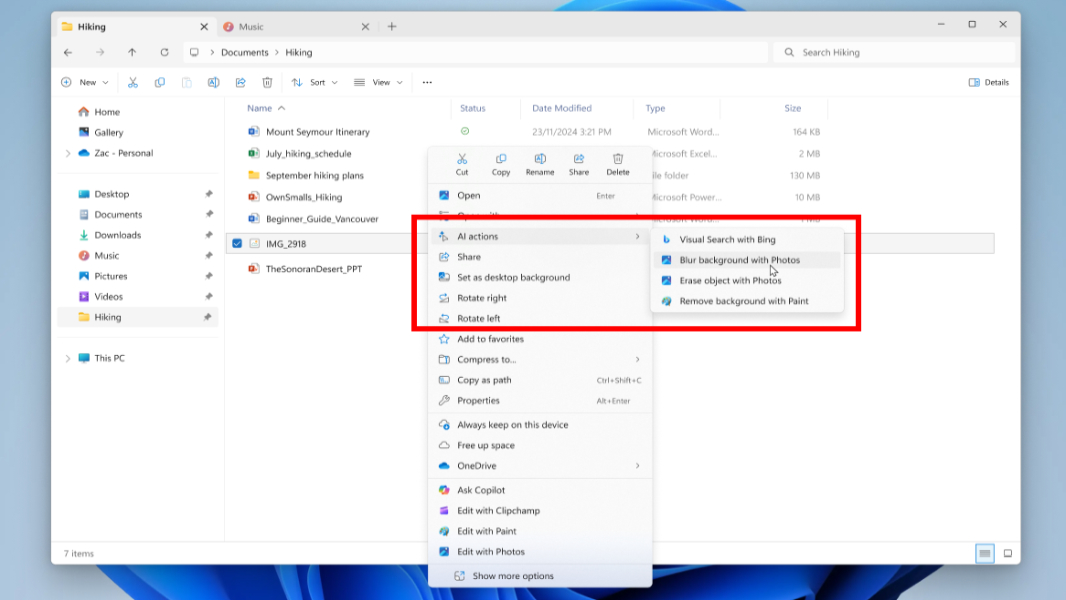
Image actions in File Explorer. You can right-click on an image file and in File Explorer and access a new AI actions sub-menu with features like Visual Search with Bing, Blur background with Photos, Erase objects with Photos, and Remove background with Paint. This supports PNG and JPEG images today.
Bigger clock returns. This Windows 10 feature is making a comeback: You can now display a bigger clock with seconds above the date and calendar in the Notification center. To enable it, open Settings, navigate to Time & language > Date & time and enable the option “Show time in the Notification Center.”
See recent generative AI activities. You can now see which third-party apps recently used generative AI by opening Settings and navigating to Privacy & security > Text and image generation > Recent activity. Note that this feature is already available in the stable versions of Windows 11.
So, yeah. Not much. As usual.