PowerToys 0.1 Arrives With Improvements to Several Utilities
- Paul Thurrott
- Jun 11, 2026
-
10
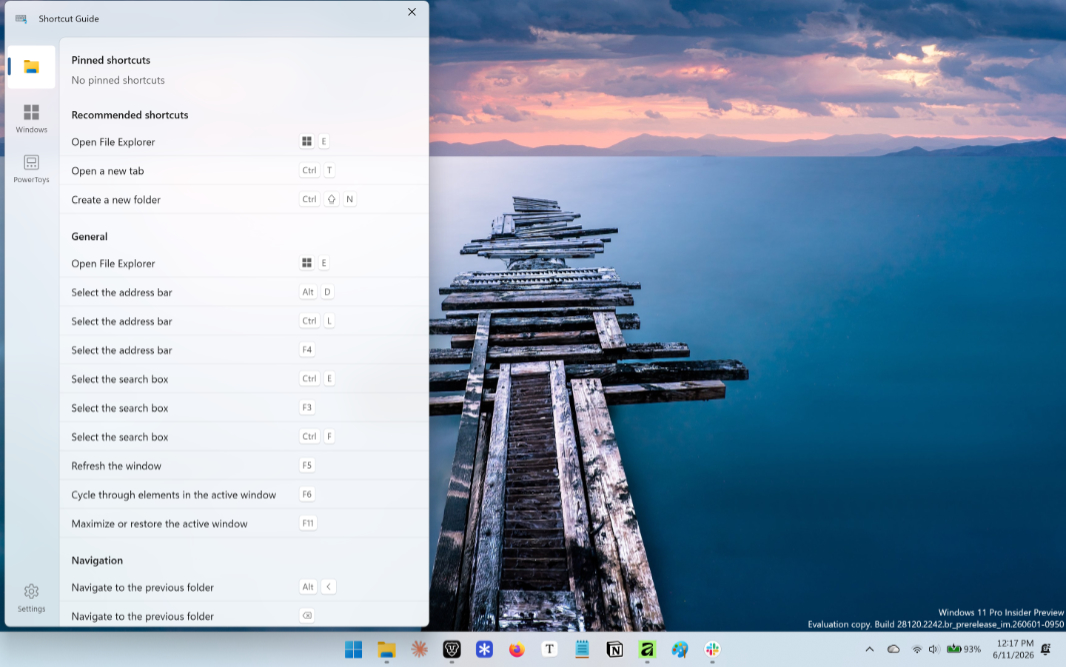
Microsoft this week released PowerToys 0.1 with nice improvements across several of its utilities and no change at all to its bizarre version numbering scheme.
“PowerToys 0.100 introduces the brand-new Shortcut Guide, a major Command Palette update with the new Extension Gallery and multi-monitor Dock support, and a wave of improvements to Power Display,” the release notes explain. “We’ve also upgraded PowerToys to .NET 10, improved auto-update reliability, reduced installer size, and continued modernizing the app experience across the suite.”
Here’s what’s new.
Shortcut Guide improvements. The Shortcut Guide utility used to take over the entire screen, but now it’s been completely rebuilt and redesigned to display as pane on the side of the screen. It automatically detects the active application when it launches and then shows you only the relevant shortcuts, while including a wider range of shortcuts from Windows and enabled PowerToys utilities.
Command Palette improvements. Command Palette adds an extension gallery so you can easily browse, discover, install, update, and remove extensions without leaving the app. The dock now supports multiple monitors, each with its own dock configuration. And there’s a new Battery widget for the performance monitor.
PowerDisplay improvements. PowerDisplay now starts up significantly faster, offers more reliable monitor identification and more reliable settings preservation, and there’s a new Max compatibility mode for displays that aren;t working correctly.
ZoomIt improvements. Mark Russinovich’s ZoomIt has found a second life in PowerToys and this release adds support for a webcam overlay while recording and the ability to append multiple clips with transitions.
Platform improvements. PowerToys has been updated to .NET 10, which improves the performance and reduces the install footprint by 15 percent. Auto update is more reliable now, Quick Access and Workspaces have moved from WPF to WinUI, and the latter utility got a nice user interface refresh with updated typography, spacing, layout improvements, and a cleaner overall experience.
More improvements. Some of the other notable improvements in this release include Keyboard Manager using the new WinUI editor by default, a Refresh Connections feature in Mouse Without Borders, improved high DPI and multimonitor reliability in Quick Accent, a way to disable file preview tooltips in Peek, and calculator improvements in PowerToys Run.
You can download PowerToys from the Microsoft Store, the Windows Package Manager (winget), or the web.