Point-in-Time Restore for Windows 11 is Generally Available
- Paul Thurrott
- Jun 24, 2026
-
3
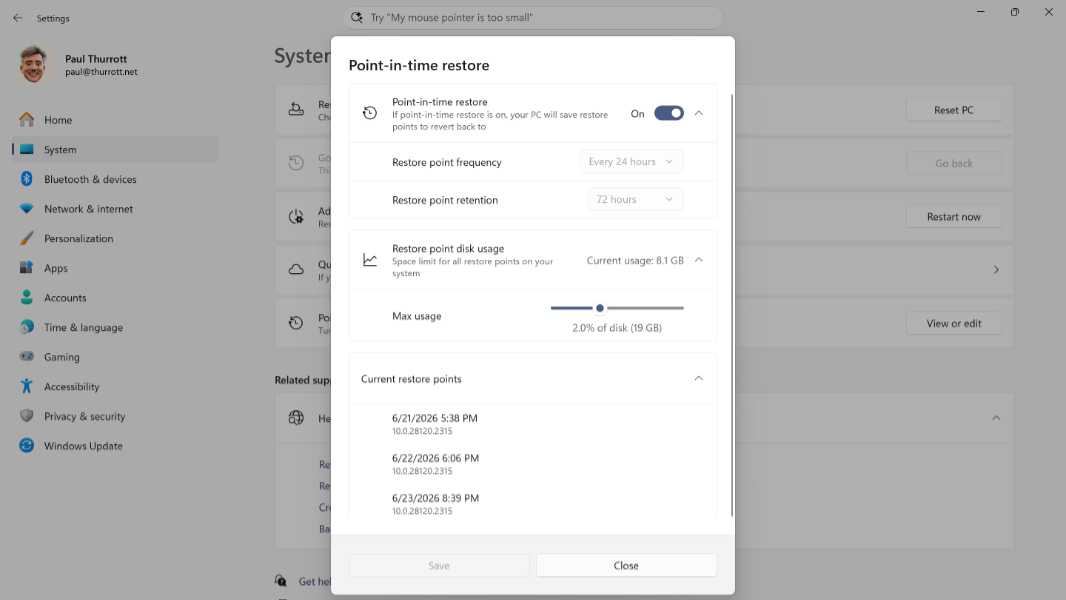
Microsoft announced that Point-in-time restore is now generally available in Windows 11. Which is a bit of a stretch in that it currently requires you to install June’s Week D preview update ahead of Patch Tuesday. And even if you do that, it’s on a gradual rollout, which means it’s a Controlled Feature Release (CFR) that will appear randomly on your PC in the future.
But, yes. Generally available.
“We’re excited to announce the general availability of point‑in‑time restore for Windows 11, a new built-in recovery capability designed to recover in minutes instead of hours, with confidence, by safely rolling a device back to a previous state,” Microsoft’s Lin Vargas writes. “Available in Windows 11 Enterprise, Pro, and Home SKUs, point-in-time restore provides admins and employees a quick, built‑in ability to go back in time to a moment before the issue occurred.”
Point-in-time restore is the modern replacement for System Restore, and while both features use the Volume Shadow Copy Service (VSS) under the covers, Point-in-time restore has several advantages over its predecessor. Restore points are automatic and include user files, there are strict retention and cleanup policies for improved reliability, it’s integrated into the Settings app, it has a lower impact on storage, and it will support “robust remote management capabilities.” (That is, Microsoft plans Intune-based management capabilities that will, among other things, enable remote management of this feature.)
Point-in-time restore is enabled by default in Windows 11 Home and Pro for individuals on versions 24H2 and 25H2, and it can be configured in the Settings app at System > Recovery > Point-in-time restore. I will be adding a write-up about this feature to the Windows 11 Field Guide this week.