Report: Windows 11 is Getting New File Sharing UI and More This Year
- Laurent Giret
- Feb 04, 2025
-
3

The release of Windows 11 version 24H2 last year wasn’t exactly a highlight for the company, with the flagship AI-powered Recall feature being delayed over privacy concerns. While Microsoft is still working on other AI features like Click to Do and an AI-powered search experience for Copilot+ PCs, other upcoming changes have been recently discovered in recent Windows 11 preview builds.
As reported by Windows Central’s Zac Bowden today, Windows enthusiast @phantomofearth has been sharing details about several unannounced Windows 11 features on X and BlueSky. These hidden features can be enabled with ViveTool, a well-known third-party console app.
The design of the Windows 11 Start Menu received quite a lot of criticism at the launch of the OS back in 2021, and it took some time for the company to bring back app folders from the Windows 10 Start Menu. While Microsoft recently introduced a new Phone Link side panel that makes it easy to access phone features right from the Start Menu, the company is also working on two alternative layouts: A list view that groups apps in different categories, similar to the App Library on iOS, as well as a new alphabetical grid view.
It looks like another Start menu > All apps view option is coming soon: Category view. Present in build 22635.3930, with some not yet functional categories.
Also, you'll be able to switch between the existing alphabetical and new grid/category views using a dropdown menu. https://t.co/qFtcTm4BnB pic.twitter.com/ABtXZJ2Irl
— phantomofearth ⛄ (@phantomofearth) July 12, 2024
A new file-sharing UI has also been discovered in a Windows 11 Beta build released last month. When dragging files in File Explorer, a new bar will appear at the top of the screen and slide down with a list of share destinations when users drag files over it.
Microsoft is experimenting with a new file sharing UI in Windows 11: the "Drag Tray". When dragging a file, the tray shows up at the top of the screen with a drag here to share hint and lists a few apps. Has a more options button to open the share sheet. (hidden, Beta 22635.4805) pic.twitter.com/LXpkTwKZu2
— phantomofearth ⛄ (@phantomofearth) January 24, 2025
Microsoft is also planning to introduce a new emoji shortcut in the system tray area of the taskbar to make emoji easier to access. The company is apparently testing four different icons for this new emoji button internally.
Microsoft is testing 4 different icons for the emoji button in the system tray, not just one. Here they are as of Dev/Beta 26120.3073. pic.twitter.com/RNqIBBaQUk
— phantomofearth ⛄ (@phantomofearth) January 31, 2025
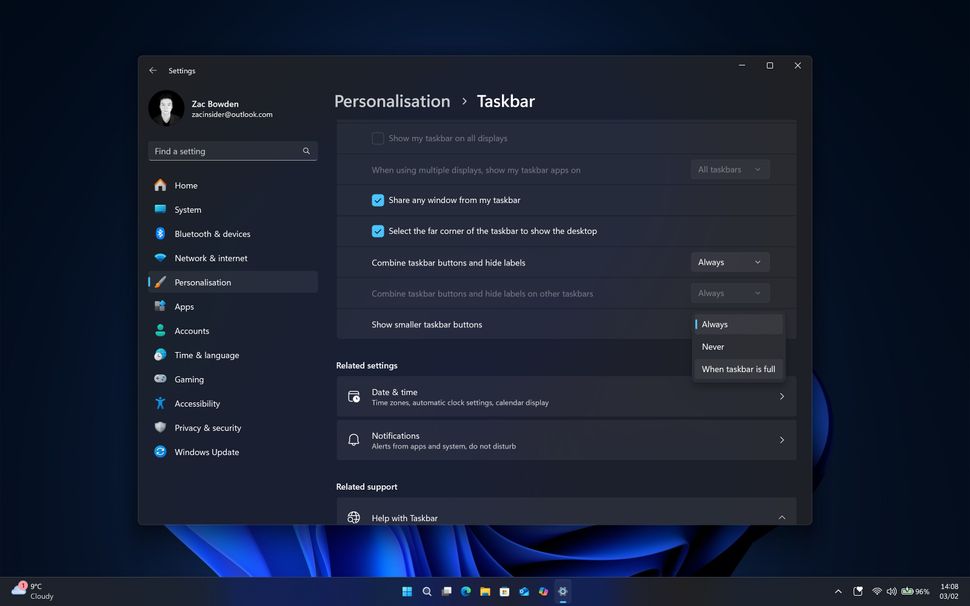
Other upcoming changes include the ability to make taskbar icons smaller without reducing the width of the taskbar. “By default, this feature will be set to come on only when the Taskbar is full and you need more space for additional apps to appear, but you can set it to be on permanently if that is something you like,” Bowden reported today.
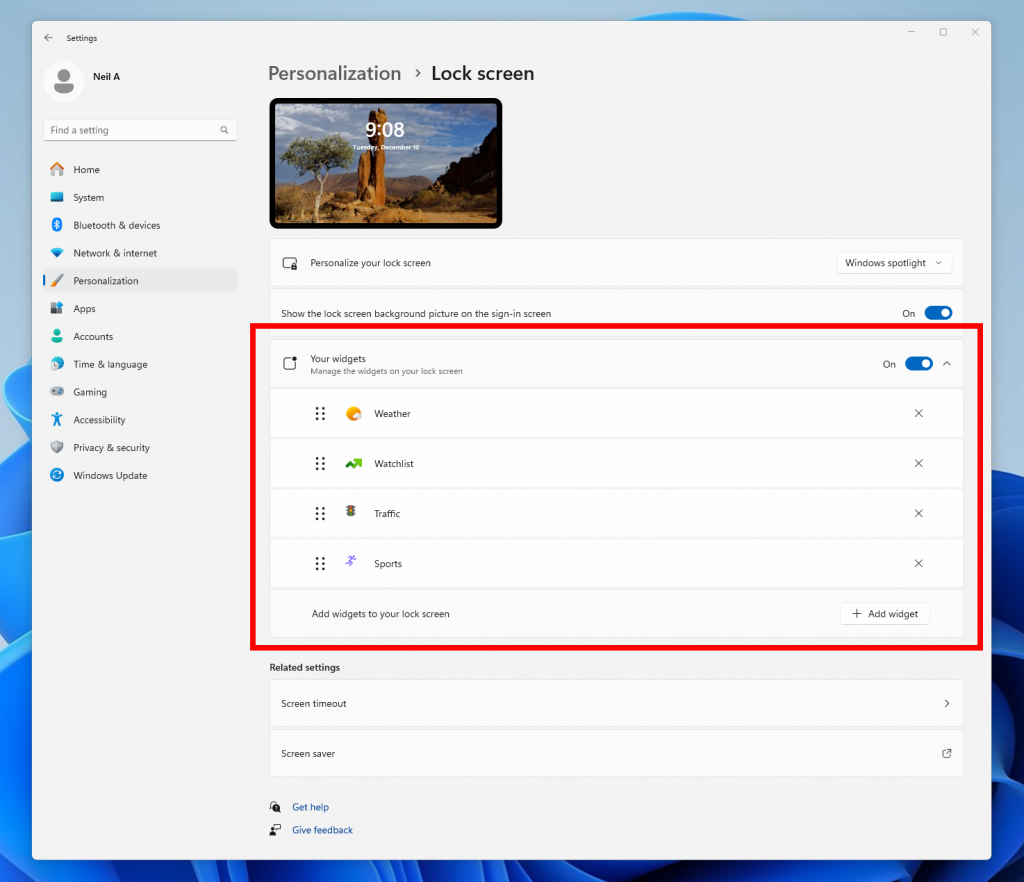
With a new Windows 11 Beta build released yesterday, Microsoft is now allowing Insiders in the EU to choose what widgets appear on the lock screen. There are now dedicated controls for Weather, Watchlist, Sports, Traffic, and other widgets.
If you missed it last month, Microsoft also recently started testing new colored battery icons in the system tray area of the taskbar. The icon will turn green when the battery is charging and in a good state, and become yellow when energy-saving mode is enabled.
We’re likely to see these new Start Menu layouts, file-sharing interface, and taskbar changes becoming available for testers in upcoming preview builds. Last week, the Windows Insider team also announced that the Dev Channel will soon start receiving less stable builds, which is probably a sign of changes to come.