DuckDuckGo Makes It Easier to Customize Duck.ai
- Paul Thurrott
- Jul 22, 2025
-
0
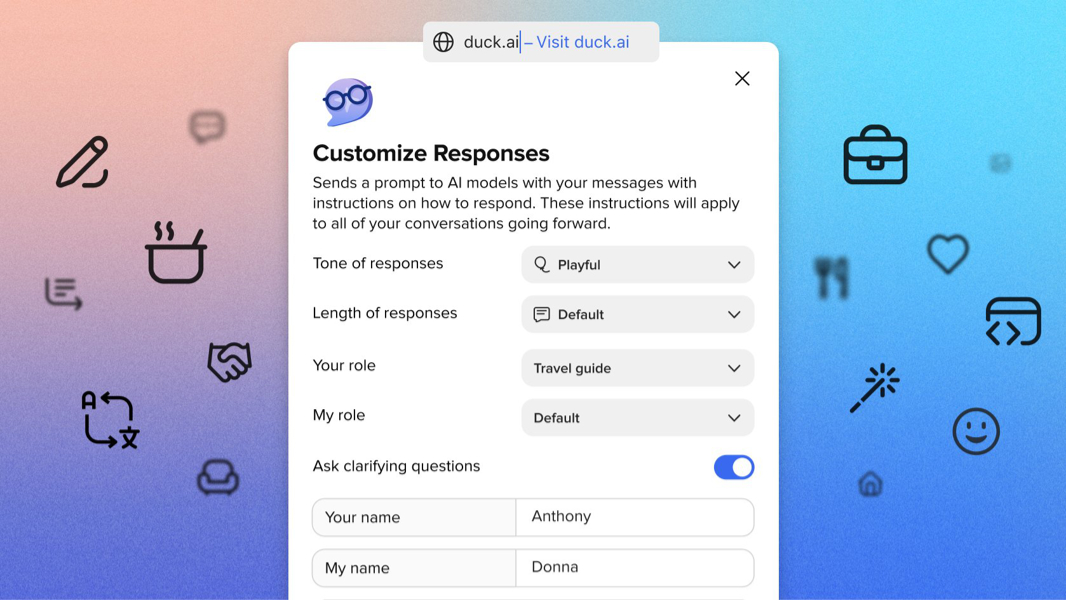
DuckDuckGo has made major changes to the way users can customize its its private and free Duck.ai AI chat service. This looks quite compelling.
“You can control the tone of responses, the length of responses, how you want Duck.ai to act, what you want to be called, and more right from the Duck.ai prompt box,” DuckDuckGo tweeted. “Any customizations get applied to all future conversations until reset or modified. You can see all additional instructions applied with the toggle on the bottom for transparency.”
As you may know, DuckDuckGo launched Duck.ai a little over a year ago–it was originally called DuckDuckGo AI Chat–as a way to use generative AI with third–party AI models for free without compromising your privacy. It exited preview this past March, and has been updated steadily with new features, including AI model switching, support for new models, and more. Duck.ai is available from the DuckDuckGo Search service, or directly at duck.ai.
According to DuckDuckGo founder Gabriel Weinberg, the new changes the company made to Duck.ai are the result of feedback: Some like a chatbot to be exuberant and verbose, while others prefer for it to be less excited and more terse. And so now you can customize how it works: Just click the new “Customize Responses” button next to the prompt box to customize the following options, all of which are optional:
- Tone of responses – Can be Default, Casual, Professional, Friendly, Playful, Empathetic, or Ducky
- Length of responses – Can be Default, Short, or Shortest
- Your role – Meaning Duck.ai’s role, can be Default, Brainstorm partner, Career coach, Chef, or Coding coach
- My role – Can be Default, Parent, Professional, or Programmer
- Ask clarifying questions – Toggle on/off
- Your name – Meaning Duck.ai’s name
- My name – Meaning the user’s name
- You can also fill out a form with additional instructions for Duck.ai to follow
- Show all instructions – Toggle on/off
When you customize Duck.ai, the instructions that this customization creates are appended to the default system prompt and then communicated in the background to whatever models you’re interacting with. The customizations will apply to every chat you make until you change them.
“I’m sure what we’ll do here will continue to evolve as we get feedback,” Weinberg says. “But … it make the responses feel better, and it can make the actual content significantly better as well.”
As with everything DuckDuckGo, Duck.ai remains private. The system prompt customizations are stored locally on your device only, as are recent chats if you choose to save them. DuckDuckGo plans to add a Duck.ai settings and chat sync feature, but when that happens, it will be part of the company’s end-to-end encrypted sync service, which DuckDuckGo cannot decrypt.
“Our approach to AI is to make features that are useful, private, and optional,” Weinberg adds. “We believe these new Duck.ai customization options tick all three boxes.”