What If Siri … Just Worked? ⭐
- Paul Thurrott
- Jul 09, 2026
-
0
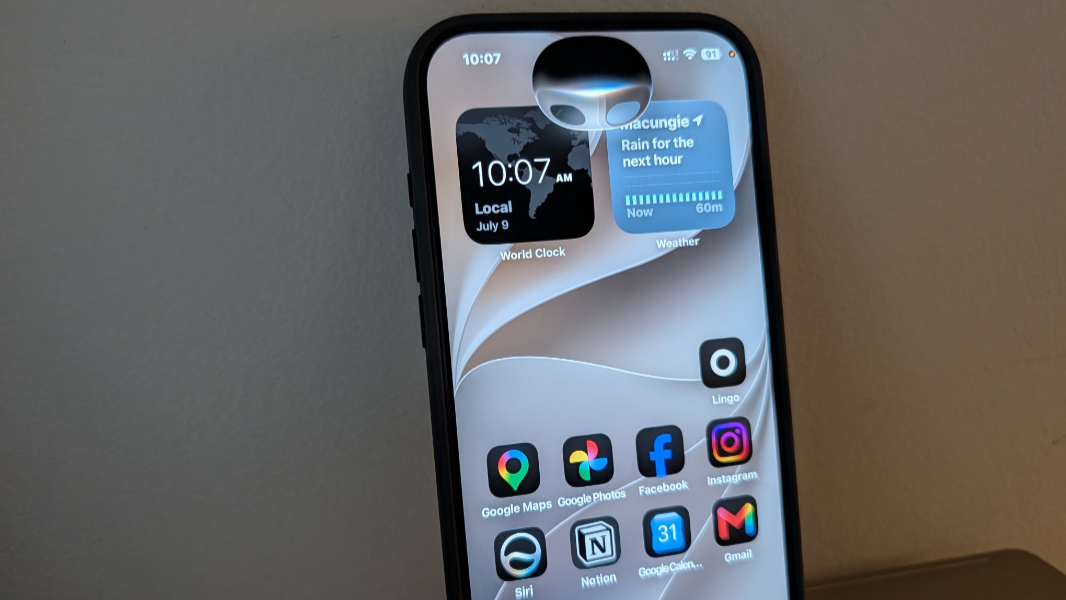
The other day, I was working on a laptop, typing, with no one else in the house and no audio or video playing, when Siri started speaking through my iPhone, startling me a bit. “I’m not sure which Bill you’re referring to,” it said, confusing me.
This is the Siri that Apple users know all too well and, I assume, often disable. The Siri that is pointless and unhelpful and deliriously out of touch when asked even the simplest questions. The Siri that pops up every time I say “seriously” out loud, which I do frequently. The Siri that complains that she will not listen to that kind of talk when I complain to it that I never asked for it in the first place.
This is not a healthy relationship. It’s been like that, controversially, for years, but the issues reached a frantic apex in June 2024, when Apple promised a massive overhaul to its dimwitted digital assistant. Through this year, Siri has endured a years-long Flowers for Algernon experience while rivals like Gemini surged forward. Apple’s 2024 announcements were vaporware and lies, and the subsequent marketing of features that never arrived resulted in the company settling a class-action lawsuit. But Apple’s ongoing mishaps with Siri finally sent it running back to the more capable arms of Google in their second high-profile and high-stakes partnership, one that would use Gemini on the backend to deliver the first truly useful Siri since the original in 2011.
Given the history, it’s far too easy to be dismissive of anything Siri or Siri adjacent, a reaction the Microsoft community is all-too-familiar with thanks to Copilot. But the past two years passed slowly for anyone who was waiting for Apple to pull a rabbit out of the hat, so to speak. In early June, Apple finally revealed its new plans for Siri, which include a standalone chatbot-style app the company’s leadership originally claimed was unnecessary, deeper integration into Apple’s apps and services, and a unique new Dynamic Island-based pop-up experience on iPhones, among other changes. It’s like 2024 never happened. And 2025.
The new Siri and related Apple Intelligence updates will come to Apple’s ecosystem via ’27 software updates like iOS 27 and iPadOS 27. But developers could get started immediately on early beta versions of these platforms, and as I write this, there have been second and now third developer beta releases ahead of an expected public beta sometime this month. I am registered with the Apple Developer program, so I immediately enrolled all my eligible devices in these betas. And though there was a waitlist for the new Siri, I got in immediately.
It’s not bad.
Actually, it’s better than that.
The iPhone interfaces are perhaps the most interesting, in part because it’s the device Apple users interact with the most and in part because the use of the Dynamic Island is unique to that device. When I say “Hey, Siri” (or just “Siri”), my iPhone issues a soft chime and the Dynamic Island appears to expand into a throbbing bubble. These two cues, one audible, one visual, indicate that Siri–the new Siri, what Apple seems to be calling Siri AI now–is ready to answer questions.
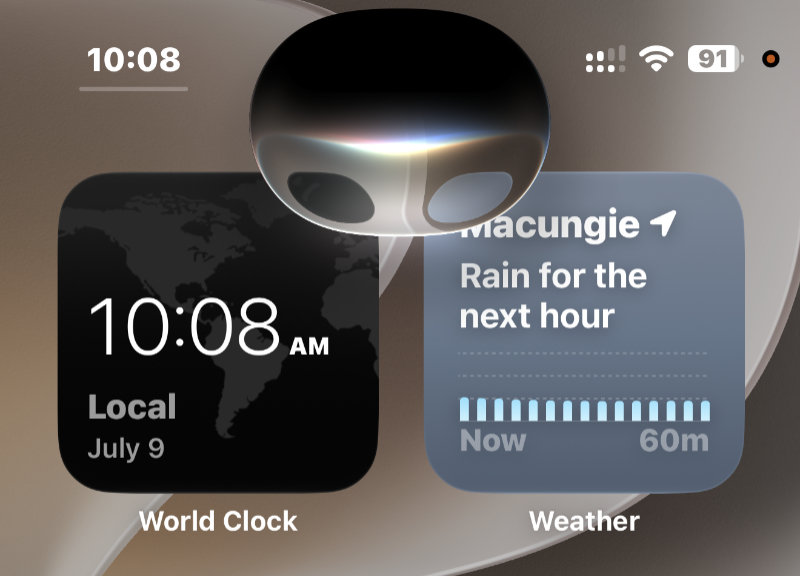
We were in Nashville with the kids when I first gained access to these updates, so my first test was a contextual take on a common AI assistant test prompt I use, albeit usually for Mexico City. “We are in Nashville for five days. What can you recommend for sites, food, drink, and music?”
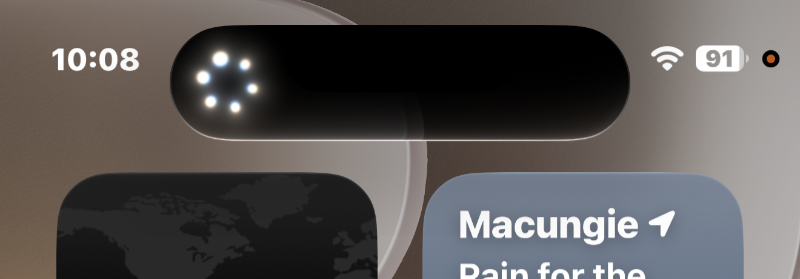
After a short “thinking” animation, the Dynamic Island-based bubble expanded into a resizable overlay initially covering the top of the screen. That pane contained the text of a nicely formatted report and Siri spoke aloud its summary, which is at the top of the report, prompting me at the end about potential follow-ups.
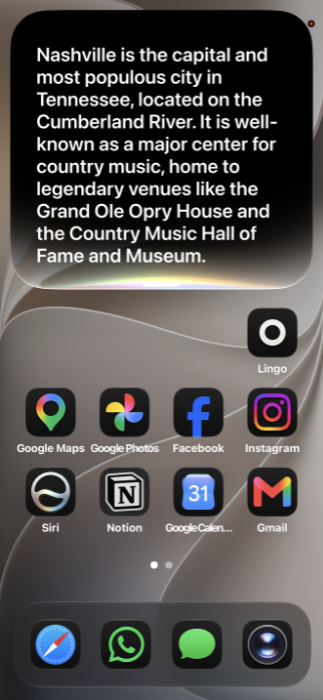
The result–visible in the initial on-screen overlay and later in the standalone Siri app (on the iPhone and anywhere else)–was surprisingly competent and on-par with what I see these days from Google Gemini, Anthropic Claude, or whatever other top-tier AI assistants. Siri generated lists of music, food and drink, and sites and activities recommendations, with multiple links to original sources. Because we had all done some research before heading to Nashville, my family and I all recognized at least some of the recommendations, and had earmarked some already. In short, it was well done.

A similar query made while writing this article delivered a similar report about Mexico City, a place I know very well. And here again the recommendations were all on-point.
Siri pops up in many other ways on the iPhone. I still miss the ability to swipe down from the middle of the home screen to view notifications, as I can do on Pixel devices, but Apple has expanded the system-wide swipe gestures in this release from 2 to 3, and the new one is all about Siri.
As before, you can swipe from the top left of the home screen to see notifications, which require a bit of a stretch on a big iPhone like my 17 Pro Max. And as before, you can swipe from the top right of the screen to display the Control Center. But now you can swipe from the top middle of the screen–or, while on the home screen, any middle part of the screen, to invoke a Siri-based update to Spotlight Search.
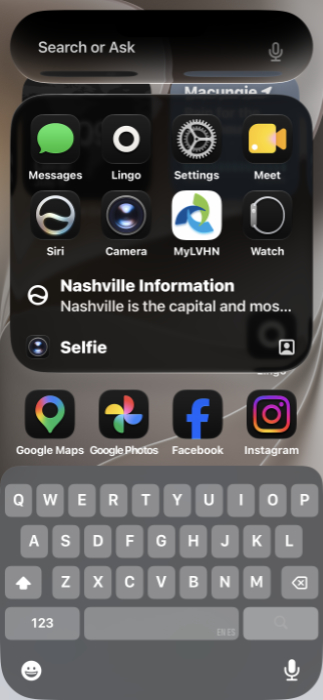
Now, the search box at the top is bigger and takes on the bubble shape of the new Siri, with “Search or Ask” text to help you understand what you can do. There are recent app recommendations in a grid below the search box, and a weather forecast, and the on-screen keyboard’s there if you want to just type.
You can also summon Siri by pressing and holding the side button (what I think of as the power button).
The new standalone Siri app is about as minimalist as possible, and I find myself imagining Apple bulking it out with additional functionality like Projects, Code, Cowork, and whatever else all the other AI assistants have. But for now, and maybe for the duration, it’s as simple as can be, just a list of your conversations so you can review and continue them as needed, with search and New conversation buttons.

As with other AI assistants, Siri supports multiple voices, and the voice you select and customize will be used in Apple Maps and Safari too. For now, the new Siri is U.S. English only, but there’s a toggle that will eventually let you choose different languages and variants. And you can customize the pace and expressiveness of whichever voice you choose. Which I do appreciate, since many digital/AI assistant voices are cloying and annoying. These things will all expand in time; the expressive voice options are currently a preview.
Visual Intelligence was perhaps the best Apple Intelligence feature to come out of the initial wave of updates that started two years ago. That may still be true today, but this feature has gotten a Siri makeover in the Camera app, which now sports a “Siri” button between the “Photo” and “Portrait” buttons.

I wasn’t initially happy with this prominent placement, but it works about as well as any other visual search feature in other AIs. You can point the camera at an object and tap the centered Siri button to get an overview of what you’re looking at. That’s not particularly useful if you’re looking to buy or at least learn more about a particular product, as the information is usually general; it’s better for sites and basic information.
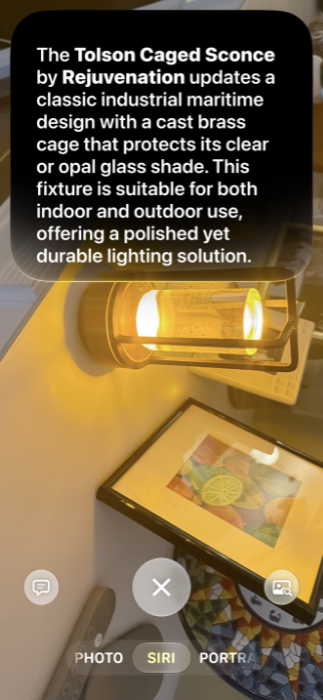
But if you configure Siri to automatically send the image you’re looking at to third parties, you can then use the Visual Intelligence button on the right of this view to get results from Google and Amazon side-by-side. And this is quite useful and accurate.

You can also tap an Ask Siri button on the left on-screen to bring up a Siri chat overlay with the image pasted in for context. Overall, this is a nicely rounded-out set of functionality that, yes, works much like more well-respected AI assistants.
I’m sensing a trend here.
Siri pops up sometimes in response to certain notifications. When there’s a text messaging thread with my wife and kids, it will display a summary of the conversation parts I’ve not yet seen, for example. These are the types of things that can be incredibly annoying or helpful, and I’m still on the fence there. But the short summaries are at least accurate and inoffensive.
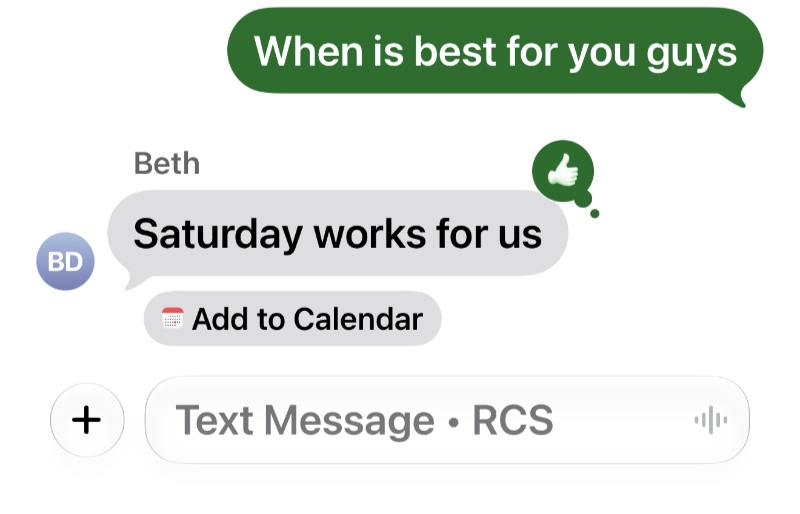
Siri–or Apple Intelligence–also still pops up through the system in the form of writing help in apps like Messages, but now expanded with useful–and, if we’re being honest–Google-like contextual integrations. For example, my sister and brother-in-law texted about us getting together soon to make a few plans for their trip to Mexico City, and after one of them texted with “Saturday works for us,” and I gave that a thumbs-up emoji, Apple added an “Add to Calendar” link under the interaction. Smart.
It’s not perfect, but none of these AI assistants are. When I prompt the iPhone with “Hey Siri” or “Siri” in my living room, Siri will respond on my HomePod speakers sometimes. But not all the time. And I have yet to figure out a way to redirect it where I want it, with Siri reverting to her old self, replying, “Sorry, I don’t understand.” Oddly, if I just ride it out and let her keep going on the speaker, she sometimes–but not all time–concludes with something like, “To learn more, say ‘Open on iPhone’.” If I just start with “Open on iPhone,” Siri says from the HomePod, “Hm, sorry I can’t do that.”
Some things never change, I guess.
But to be fair, this experience is much better than it’s ever been and, as noted, it feels like it’s roughly on par with what other AI assistants can do on mobile. Plus, I’ve only stumbled into most of these interactions, and there is a lot more to explore. And, I assume, a lot more to come in future updates.
For Apple, this is a redemption of sorts. A belated redemption, yes, but in fulfilling the promises of 2024 and delivering new enhancements announced just last month, Apple is finally moving forward decisively. We’re just days away from a public beta and about two months away from the initial stable release in the Apple ’27 software updates and on new devices.
There will be more controversies, of course. Some Siri and Apple Intelligence features will only work on the very latest devices with the most powerful processors and the most RAM. Many of the new features will be English-only at launch, as we see so much through the industry, and will expand over time. We can expect the usual grousing on both counts, deservedly.
Apple’s path was not so much a choice but rather a circumstance, some of it partially inflicted by the company’s go-it-alone preferences. But in fumbling its AI strategy for two years, the company could emerge on the other side of this debacle in great shape. It hasn’t flushed hundreds of billions of dollars down the datacenter toilet like all its competitors. And it has the richest and healthiest ecosystem with the most affluent and one of the biggest customer bases there is.
So, yes, it failed with AI. But in doing so, Apple was forced to just focus on adding value with AI everywhere it makes sense across its offerings, rather than trying to sell AI as the product. It created a private compute system that it can sell–as a benefit of its ecosystem–instead. This feels right to me, and as AI improves, Apple can shift to its own models as possible or to whatever models, because it’s all just back-end infrastructure and we, as users, don’t need to worry about that part.
So I’m not applauding Apple for finally getting it right per se. But I am applauding the outcome, which is right for its users and in-line with the company’s market positioning. And I think Siri is going to surprise people, and in a good way, for the first time in many, many years.

Gain unlimited access to Premium articles.
With technology shaping our everyday lives, how could we not dig deeper?
Thurrott Premium delivers an honest and thorough perspective about the technologies we use and rely on everyday. Discover deeper content as a Premium member.