Google Issues Major Updates to Gemini in Chrome
- Paul Thurrott
- Jan 28, 2026
-
1
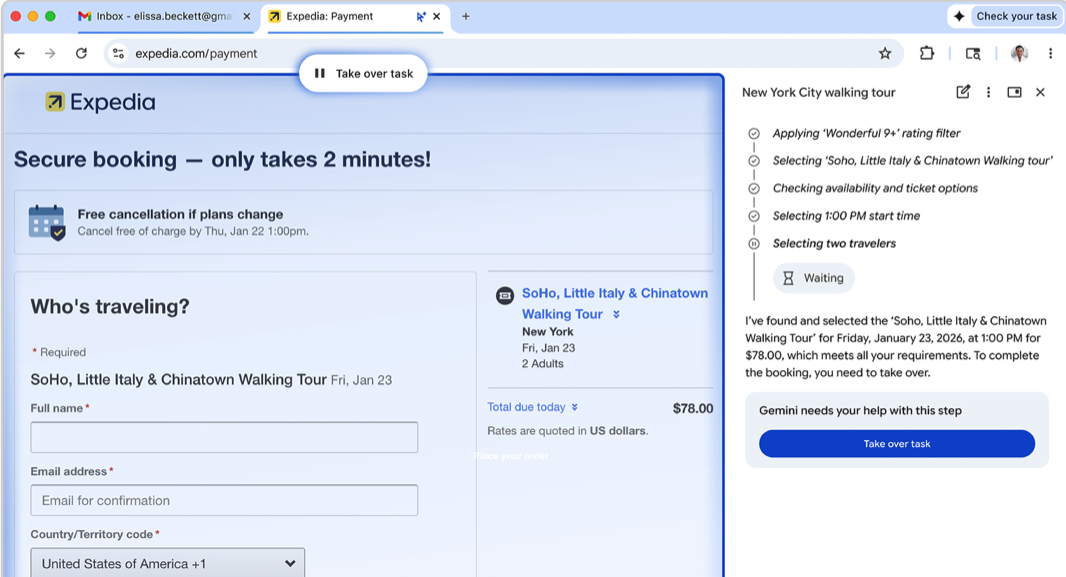
Chrome for Windows, macOS, and Chromebook Plus is getting a powerful set of new Gemini 3-powered features that includes a new side panel, deeper integration with popular Google apps, and auto-browse functionality.
“The new Gemini in Chrome is like having an assistant that helps you find information and get things done on the web easier than ever before,” Google vice president of Chrome Parisa Tabriz writes. “And, in the coming months, you’ll get more contextually relevant help with Personal Intelligence.”
Here’s what’s new.
Side panel. This new side panel for Gemini users in Chrome helps you multitask by keeping a tab open while open a second view that can be used to handle a different task. Google’s examples include comparing options across tabs, summarizing product reviews across different sites, and helping find time for events in your calendar. It starts rolling out on Wednesday, January 28.
Auto browse. This agentic feature will help Gemini AI Pro and Ultra subscribers in the U.S. assign multi-step chores to Gemini so that it can finish them on your behalf. This can include such things as “scheduling appointments, filling out tedious online forms, collecting tax documents, getting quotes for plumbers and electricians, checking if bills are paid, filing expense reports, managing subscriptions, and speeding up renewing driving licenses,” Google says. It can optionally use Google Password Manager if a sign-in is required. Auto browse launches in preview in the U.S. on January 28.
Nano Bana integration. All Gemini in Chrome users will be able to generate photorealistic images directly from a prompt in the side panel using Gemini 3’s powerful Nano Banana model. This is also rolling out on January 28.
Connected Apps. Gemini in Chrome can connect to Gmail, Calendar, YouTube, Maps, Google Shopping, and Google Flights. After enabling app access in Gemini settings, Gemini can take advantage of any data you have in those apps. “Gemini can dig up that old email with event details, reference context from Google Flights to provide some recommendations, and later draft an email letting your colleagues know your arrival time,” Google notes. This feature went live on January 12.
Chromebook Plus support. Gemini in Chrome is coming to Chromebook Plus devices on January 28.
UCP support. Chrome will support Google’s Universal Commerce Protocol (UCP), a new open standard for agentic commerce co-developed with Etsy, Shopify, Target, and Wayfair. This new open standard ensures that AI agents can understand and interact with different websites seamlessly.
Personal Intelligence. Google added Personal Intelligence to Gemini in the U.S. two weeks ago, and then it added it to AI Mode in Google Search last week. In the coming months, it’s coming to Gemini in Chrome as well. “Chrome will remember context from past conversations so you get uniquely tailored answers to whatever you’re looking for across the web and you can already add specific instructions to Gemini to get more tailored responses,” Google notes. “Personal Intelligence in Chrome transforms the browsing experience from a general purpose tool into a trusted partner that understands you and provides relevant, proactive, and context-aware assistance. With Personal Intelligence, you’re always in control. You can opt-in and choose whether to connect your apps and disconnect them at any time.”