Snapdragon X Copilot+ PC: More Thoughts on Battery Life
- Paul Thurrott
- Jul 02, 2024
-
27
It’s finally coming together: Thanks to years of software and hardware improvements, Windows 11 on Arm is off the No Fly List and is a viable, even desirable, alternative to the mainstream x64 version of this platform. But we still have so many questions. And with the performance and compatibility issues largely settled, the biggest of these questions is battery life. How well do these Snapdragon X-based Copilot+ PCs really work?
I wrote about this topic before, just days ago, and I’ll be writing about it again, given how important this is. But each new PC, each passing week, gives me a bit more data and experience. This isn’t about building an opinion, it’s about grounding my knowledge of this thing in the real world. And it takes time.
With Copilot+ PC, I’m doing things differently. This platform is coming in hot, so to speak, not just because of the unnecessary Recall drama but because PC makers are pushing out their first Snapdragon X-based PCs on whatever schedules. And you can feel Intel and AMD—but especially Intel—breathing heavily in the rear-view, eager to ship alternatives based on the aging but proven x64 architecture. We’re in a weird bubble right now, and it’s all hanging in the balance.
To address this fluid dynamic, I’ve been publishing articles about various aspects of this new platform as I experience them. This isn’t typically necessary with laptop reviews: After publishing a first impressions article, I create the shell of what will become the final review and take notes there as things happen. And then I flesh that out over time and, in 4 to 6 weeks, I publish the review.
We don’t have 4 to 6 weeks. I don’t have 4 to 6 weeks. In the time it would normally take me to review each of these laptops as they come in, everything is going to change: IFA opens on September 6 in Berlin, Germany, and it’s there, I think that AMD, Intel, and its PC maker partners will unleash the second wave of Copilot+ PCs, and the first built on their new x64 designs. This holiday season is going to be incredible. An incredible mess, but also incredibly exciting.
But that’s the schedule, and I would like to gain as much experience with as many of these new PCs as I can before then. And that’s not just how much time we have, it’s how much time I need to fully understand where certain Snapdragon X attributes land. The key metric is battery life, of course. (There’s more: I do wonder about how the different Snapdragon X Elite chips, and the single X Plus chip, impact things too. That is more difficult to gauge, in part because the supply of the higher-end chips is currently limited to non-existent.)
Anyway, battery life.
It’s impossible to think about Windows on Arm and battery life without going back to the first Windows 10 on Arm PCs that shipped in early 2018. The HP Envy x2 was emblematic of those first Arm-based Windows 10 PCs, a Surface Pro-like 2-in-1 tablet that was hobbled by all kinds of issues, from its lackluster performance to its 32-bit Windows 10 S Mode and app limitations. The Envy x2 succeeded in only one area: Battery life. HP claimed that this PC would get about 20 hours of battery life, and in my real-world testing, I confirmed that figure. By the time I published my review, I was routinely seeing almost exactly 20 hours of battery life.
That review contains the kernel of an idea that would come to define the Windows on Arm conversation: Sure, 20 hours of battery life is incredible, but ideally there would be some compromise in which the performance (and compatibility) would improve as the battery life came down. That is, we know to charge our phones every night, and doing so with a PC is not onerous. Most don’t need 20 hours of battery life. Most just need the thing to last for an entire day. An entire day being, what? 8 hours? 10 hours? Something realistic.
The interim is well understood. Qualcomm improved the hardware. And Microsoft improved the software. And today, Windows 11 on Arm is in a good place: It is much more compatible with modern software than was the original Windows 10 on Arm, and the performance improved slowly and then, suddenly, very quickly with Snapdragon X.
But the flipside here is that the battery life went down. By 2021, roughly the halfway point between today and the 2018 debut of the Envy x2, the discussion shifted to whether improvements in x64 would negate the benefits of Arm: After all, some x64 laptops were delivering 10 to 15 hours of real-world battery life at a time when Microsoft’s Snapdragon-based Surface Pro X claimed 15 hours but really delivered about two-thirds that amount. I didn’t review that device, but the 2021-era HP Elite Folio saw just under 10 hours of real-world battery life. Remember that number.
And remember the debate: If “real” Windows laptops could deliver the performance, compatibility, and uptime we all needed, what was the point of Arm again? This question will arise again when the new Intel and AMD chips arrive later this year. We’re living in Groundhog Day.
We’ll cross that bridge when we get to it. For now, the conversation centers on Snapdragon X and where it lands in the continuum of Windows 11 on Arm. If you look at the “cons” in my review of the Snapdragon 8cx Gen 2-based HP Elite Folio in 2021, a laptop I could not recommend, you will see something interesting: Each is addressed by the first wave of Snapdragon X-based laptops. Windows 11 on Arm is no longer so limited, the performance and compatibility issues have been addressed, these PCs are reasonably priced, and while the expansion capabilities vary by PC, we typically see at least three USB ports of whatever types on each.
That PC, as noted, delivered almost 10 hours of real-world battery life. To me, that’s the baseline that Snapdragon X-based should try to achieve. That’s an “in the ballpark” number compared to the MacBook Air we’re all understandably obsessed with, and as I noted in my review, that computer is capable of 15 hours of real-world battery life. The same battery life as a 2021-era Snapdragon-based PC but with none of the downsides. That feels like the right target.
Last week, I noted that the Snapdragon X-based Lenovo Yoga Slim 7x 14 had started off badly with battery life, with roughly 4.5 hours of uptime over each of the first two days. And that this figure was creeping up as my usage normalized: 6 to 6.5 hours over the next few days and then an expected 9 hours last Thursday.
I have a few updates to discuss since then.
I kept an eye on Yoga Slim usage and uptime, of course. And my notes from that Thursday indicate that that day ended as I had predicted, with just under 9 hours of battery life. On Friday, it hit just over 10 hours, right where I’d like it to be. And then Saturday was a bit of an anomaly in that we flew home from Mexico, so I had a good travel day experience with it. The flight was just 4.5 hours, and we were offline for roughly half that as Wi-Fi only works over the continental U.S. But I used the laptop at the airport before the flight as well, and I took a lot of notes the entire day. Based on the literal uptime and the Windows battery life estimates as the day progressed, it was tracking to that magical 10 hour mark again.
This is good news.
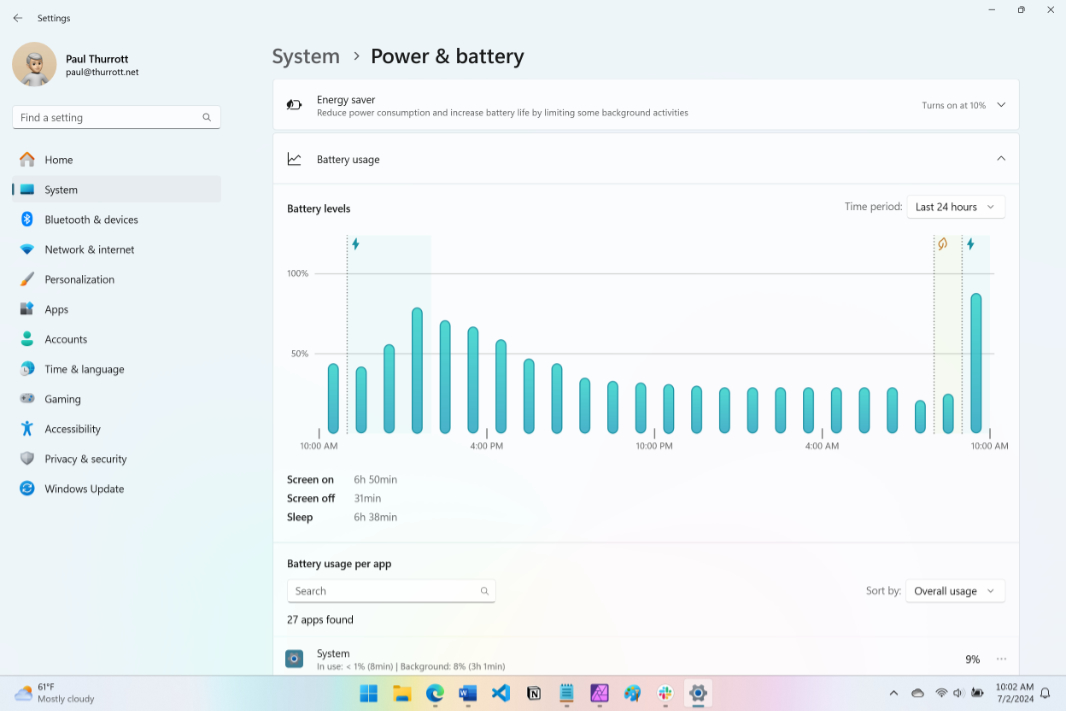
That evening, I set up the Surface Laptop when we got home, and I spent all day Sunday with it. Today, I’m at roughly where I was when I first wrote about Yoga Slim battery life, and I’m seeing something similar: Initial battery life started off poorly based largely on estimates—less than 4 hours on the truncated first day, 4.5 hours on Sunday—but now it’s trending up, just like the Yoga. The Surface Laptop’s battery life yesterday was roughly 7.5 hours, and that’s pretty good given that some of that time was spent playing games and encoding video on battery.
Will it hit—or exceed—10 hours? I don’t know yet, of course. This morning, I left it on battery until it hit an Energy Saver warning at 10 percent life, and it’s charging now. I’ll keep it on battery once it’s fully charged, as I’ve been doing. And we’ll see.
But I have a pretty good feeling about it. So far, Surface Laptop is delivering the MacBook Air-like experience I wanted. I don’t expect to see 15 hours of battery life, but anything in the 10-hour range would be nice. Maybe I’m rationalizing.
Tied to this, I’ve been opening the Surface Laptop lid first thing each morning to see how it reacts. Like the Yoga (and MacBook Air), it comes right on. And like the Yoga, it seems to use up 2 to 3 percent battery each night while asleep. Last night, it was asleep from 9:00 pm until 7:00 am this morning, and the battery life went from 32 percent to 29 percent during that time. This is actually worse than the Mac, which seems magical in this regard. But it’s not bad. Not bad at all. And it sat steady at 29 percent from 1:00 am until 7:00 am. That is terrific.
More soon.