Microsoft is Testing New Recent, Favorites, and Shared Tabs in File Explorer
- Laurent Giret
- Jul 12, 2024
-
2
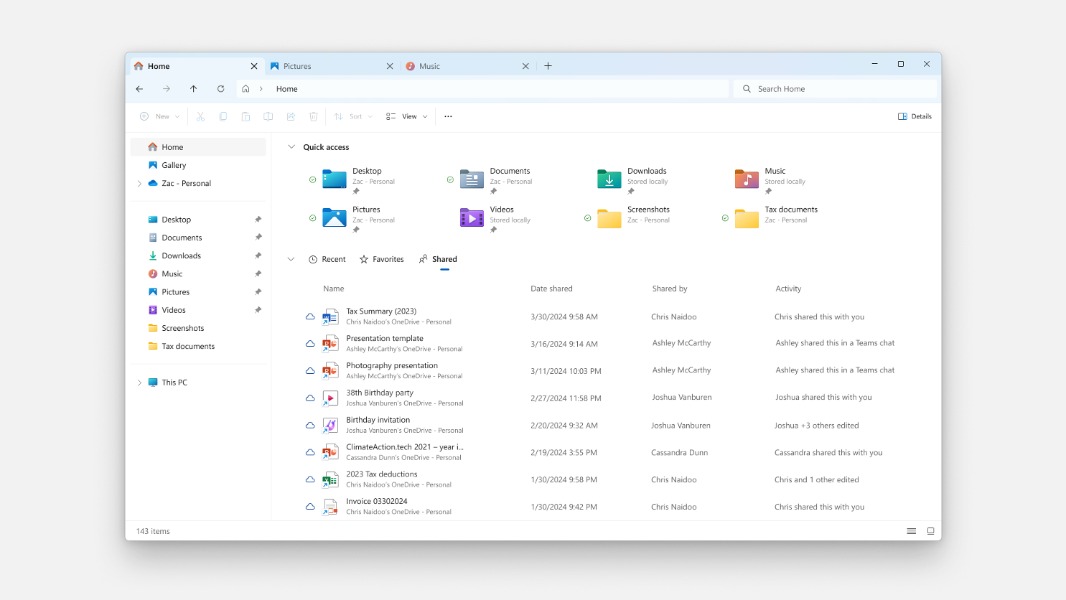
Microsoft has started testing a new design for the Home page in File Explorer with Recent, Favorite, and Shared tabs below the Quick Access section. The new design is now rolling out with the just-released Windows 11 Beta build 22635.3930, and it will be available first for Insiders who enabled the Windows Update toggle to get new features first.
As of today, File Explorer shows ‘Favorites’ and ‘Recent’ as separate sections below the Quick Access section at the top. For Windows 11 users signed in with a Microsoft Entra ID account, File Explorer also shows a “Recommended” section with AI-powered file suggestions.
“If you are signed into Windows with your Microsoft account, you will be able to view files that have been shared with your account, such as email, Teams chat, etc. If you are a commercial customer who is signed in with your Microsoft Entra ID account, you will additionally be able to view files that they have shared with others,” the Windows Insider team explained.
In addition to this new Shared tab, File Explorer will also start showing a broader set of file types in the Recent and Favorites tabs, including Designer, Loop, Power BI, and Forms. Overall, this new design is more consistent with the office.com UI, which also has three separate tabs for Recent, Shared, and Favorites files.
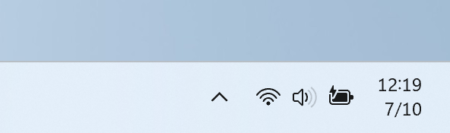
Microsoft is testing a couple of other changes in today’s Windows 11 Beta build 22635.3930, including a simplified system tray. In the new design below, you can see the date/time information in a shortened form, and the bell icon for notifications has also been removed. With this new design, Insiders can check their notifications by clicking the date and time, which will open the Notification Center. This new design can be disabled in the system tray settings.
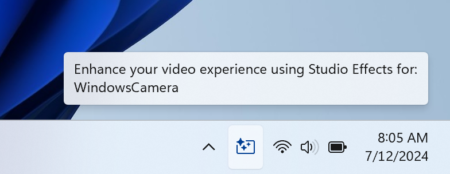
With today’s build, Microsoft is also testing a new Windows Studio Effects icon that will appear in the system tray when an app is using the AI-powered camera effects. Additionally, Microsoft has improved the animations for the preview that show up when users mouse-over/hover over apps on the taskbar.
There are two taskbar changes that are worth mentioning today: The first one is first letter navigation to jump to open or pinned apps more easily, and the second one is the ability to press the Home and End keys to move keyboard focus to the first and last items in the taskbar, respectively.
Microsoft released other builds for Insiders on other channels this week. The Windows 11 Canary build 26252 brought improvements to lock screen widgets, and there are also new builds with minor changes for Windows 11 and Windows 10 Insiders on the Release Preview ring.