Windows 11 Canary Build 26257 Lets Insiders Duplicate File Explorer Tabs
- Laurent Giret
- Jul 24, 2024
-
0

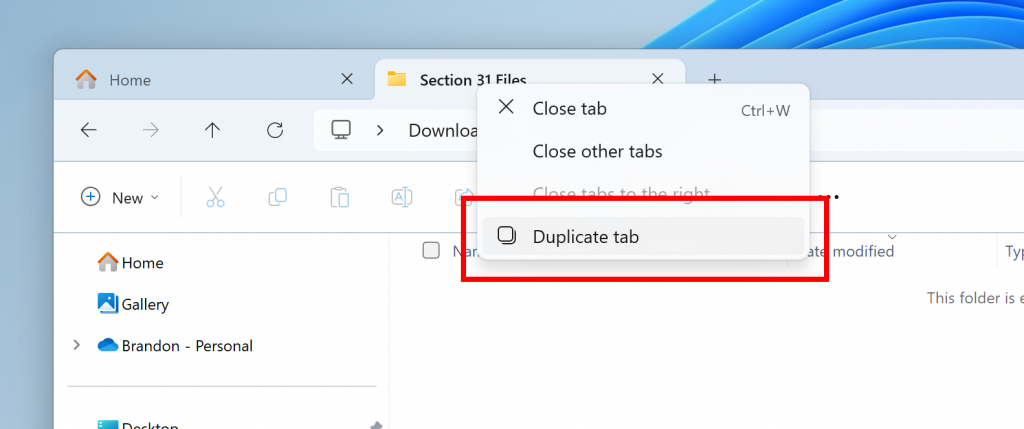
Microsoft has released today the Windows 11 build 26257 for Insiders on the Canary Channel, and the main change is a new option to duplicate tabs in File Explorer. This feature was first made available on the Beta Channel in May, and it also made its way to the Release Preview Channel earlier this month. Yes, the way Microsoft rolls out new features to Insiders doesn’t always make sense.
The ability to duplicate a tab will show up when right-clicking on a tab in File Explorer. The Windows Insider team noted that this new feature will roll out gradually to Insiders on the Canary Channel.
There are also a couple of minor improvements in today’s Canary build 26257. Microsoft fixed an issue causing the address bar dropdown to appear unexpectedly while using File Explorer. Another bug causing some Insiders to see kernel security-related bug checks in recent builds has been addressed.
The Canary build 26257 follows the release of the Beta build 22635.3936 on Monday. With this new flight, Microsoft started testing updated designs for the “Open with” dialog where the group headers are removed. Moreover, the company disabled the simplified system tray area that was introduced in the build 22635.3930 earlier this month, and it will likely come back after some polishing.