New Windows 11 Canary Build Brings Shared Content in File Explorer Home
- Laurent Giret
- Jan 29, 2025
-
0
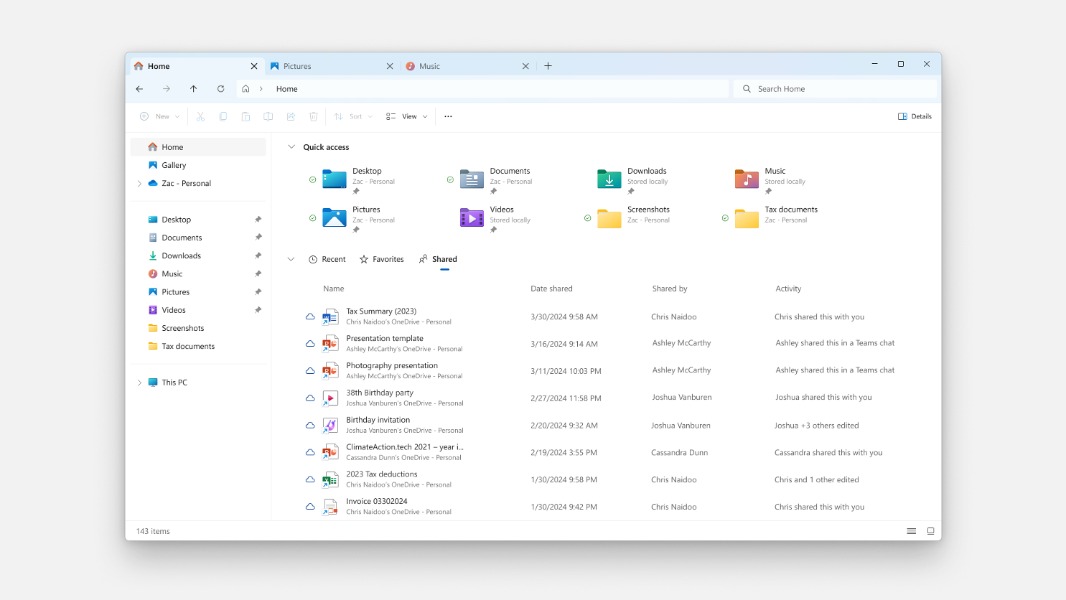
Microsoft has just dropped the Windows 11 preview build 27783 on the Canary Channel. This Channel is currently lagging behind the Dev and Beta Channels when it comes to new features, and today Canary testers are getting File Explorer improvements that rolled out first to the Beta Channel in July 2024.
When signed in to Windows with a personal Microsoft account or Microsoft Entra ID account, Canary Insiders will now see shared content in File Explorer Home. Below the Quick Access section at the top, the Home view now displays Recent, Favorites, and Shared tabs, and the latter can show files that have been shared with users such as email, Teams chats, and more.
Today’s Canary build 27783 also brings a couple of improvements to the Magnifier app that previously rolled out to other Insider Channels: There’s a new CTRL + ALT + Minus new keyboard shortcut for quickly toggling between the current zoom and 1X zoom, and new buttons to reset zoom to fit to screen and reset zoom to your last or preferred magnification.
In the release notes, the Windows Insider team also indicated that it’s investigating reports pointing out that Hyper-V and other features that rely on it such as the Windows Subsystem for Linux (WSL) were no longer working as expected in the previous build.