Windows 11’s Simplified System Tray Won’t Come Back Due to Negative Feedback
- Laurent Giret
- Jul 16, 2025
-
5
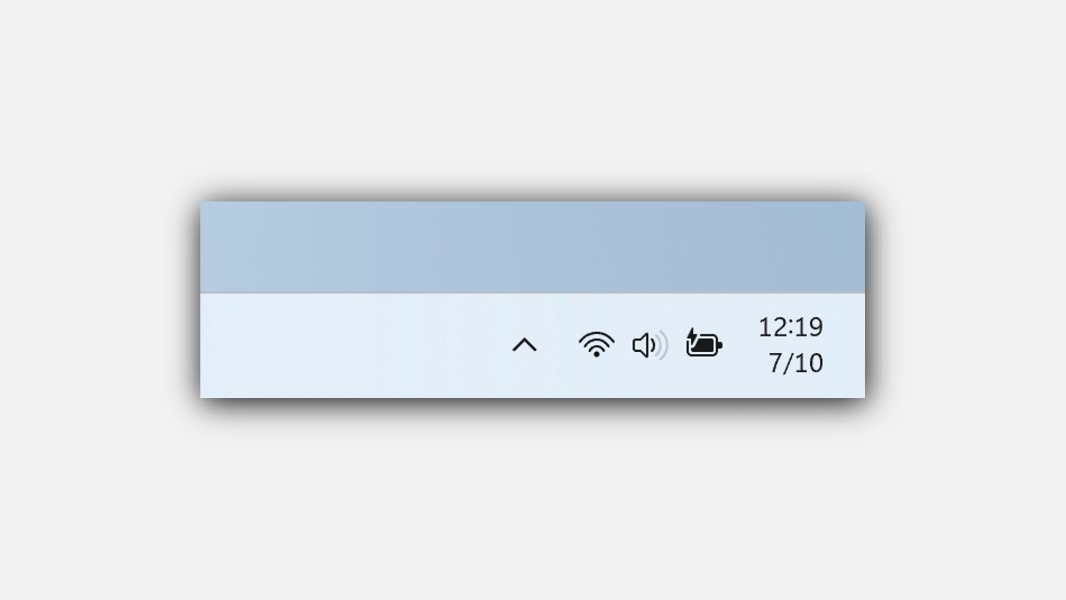
Microsoft won’t ship the simplified system tray area of the Windows 11 taskbar it started testing with Insiders last year. The new design, which only showed the time without the AM/PM and year info, first appeared on the Beta Channel a year ago. It also hid the notification bell icon, forcing Windows Insiders to click the date and time in the system tray to open the Notification Center.
Microsoft later said that it was temporarily disabling this more simplified system tray design to “address several issues,” promising to bring it back in a future flight. However, that’s not going to happen.
Even though this new design was optional, Brandon LeBlanc, Principal Program Manager on the Windows Insider Program team, told Windows Central’s Zac Bowden on X that Insiders didn’t like this new design. “The feedback we got about that was not pleasant. That’s why it disappeared,” LeBlanc said.
The feedback we got about that was not pleasant. That’s why is disappeared.
— Brandon LeBlanc (@brandonleblanc) July 12, 2025
When asked why Microsoft didn’t keep this simplified system tray design as an optional feature for users who liked it, LeBlanc joked that the number of people who may have been interested in it was probably very, very low.
Well, new features that show up in Windows Insider builds are never guaranteed to ship to all users, so this is another example of that. You may remember the “Sets” feature on Windows 10 that added the ability to get tabs within apps, but Microsoft quickly killed the feature (https://www.thurrott.com/windows/windows-10/205433/sorry-but-sets-is-dead).
Do you think Microsoft was wrong to get rid of this simplified design for the Windows 11 system tray? Sound off in the comments below.