Microsoft Released the July Week D Preview Update for Windows 11 Version 24H2 This Week
- Paul Thurrott
- Aug 02, 2024
-
0
Last week, Microsoft belatedly issued a July Week D preview update for Windows 11 versions 22H2 and 23H2, but not version 24H2. Coincidental to this, it also issued a new build of Windows 11 version 24H2 to the Release Preview channel in the Windows Insider Program. And so I surmised that perhaps that pre-release build was a replacement, of sorts, for the Week D update that Microsoft might issue it in stable—as a preview update or even a Patch Tuesday cumulative update—in August.
The plot thickens.
I was right about that Release Preview update. But my guess about the timing was off, as Microsoft shipped its functional contents in a belated Week D preview update for Windows 11 version 24H2 this past Tuesday (Week E?), one week later than normal (and five days after the Week D update for 22H2/23H2). That’s not surprising, it’s impossible to predict when things happen with Windows 11 anymore. But I didn’t even notice this Week D update for 24H2 until today, somehow. Despite having installed it on several PCs.
Cough this one up to a busier than usual summer work week, I guess. But this Week D update for 24H2 is basically the same thing as the Week D update for 22H2/23H2 and last week’s Release Preview build for 24H2. I guess that makes sense, given the current strategy to keep all supported Windows 11 versions in lock-step from a new features perspective.
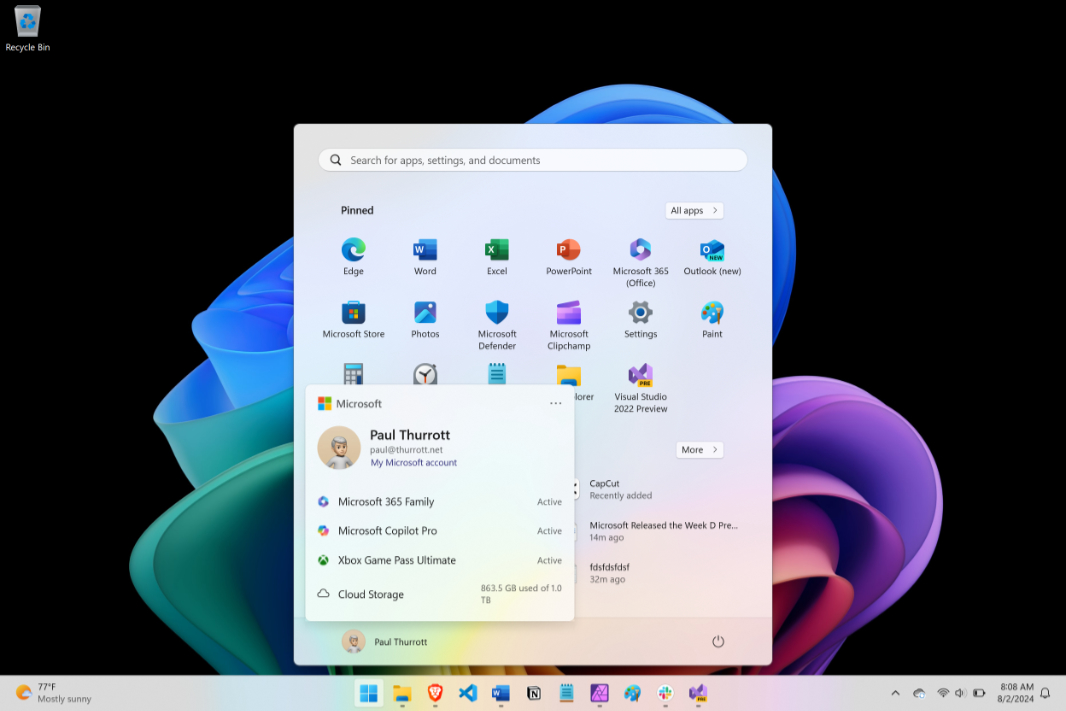
Oddly, I did notice at least one of the changes (the Start menu-based “account manager”) on at least two of my PCs but didn’t think much of it. To be fair to myself, keeping track of what’s where is literally impossible when it comes to Windows 11 these days: Many of the features in each update are rolled out randomly over time, so every PC one uses could have different features, even if they’re all on the same build.
Anyway.
This 24H2 preview update is KB5040529, and, as noted, it maps to the Week D preview update (KB5040527) that those on Windows 11 versions 22H2 and 23H2 were offered last week. (Remember, preview updates are optional.) And to last week’s 24H2 build in the Release Preview. That is, it offers the same new features, some of which will be installed on all PCs immediately and some of which, in Microsoft’s infinite wisdom, will be “rolled out gradually.”
Key new features include:
Start (gradual). There’s a new account manager in Start (per the screenshot at the top of the post) and you can drag app shortcuts from the Pinned area in Start to the Taskbar to pin them there as well.
File Explorer (gradual). After breaking File Explorer address bar drag-and-drop in the 23H2 update, Microsoft has fixed this regression, so you can copy and move files and folders normally again. (And it works as before, where you can drop files onto any folder location (“breadcrumb”) in the path.
Lock screen (gradual). All four Lock screen widgets–Sports, Traffic, Finance, and Weather—will be available, instead of just Weather.
Windows Share (gradual). We get new updates to Share just about every month now, and this update adds five of them. You can share via the Clipboard (“Copy”), by emailing yourself, by generating a QR code, and directly to a Microsoft Teams channel (if you’re signed in with an Entra ID account, in the latter case). And the Share pane will no longer close if you accidentally click outside it.
Widgets. Microsoft has upgraded the look and feel of the Widgets icon in the Taskbar with higher resolution animated icons.
Windows Backup (gradual). Windows Backup now syncs your sound settings to your Microsoft account too.
Good luck understanding any of this. 🙂