Microsoft Announces Passkey Improvements for Windows 11
- Paul Thurrott
- Oct 08, 2024
-
0
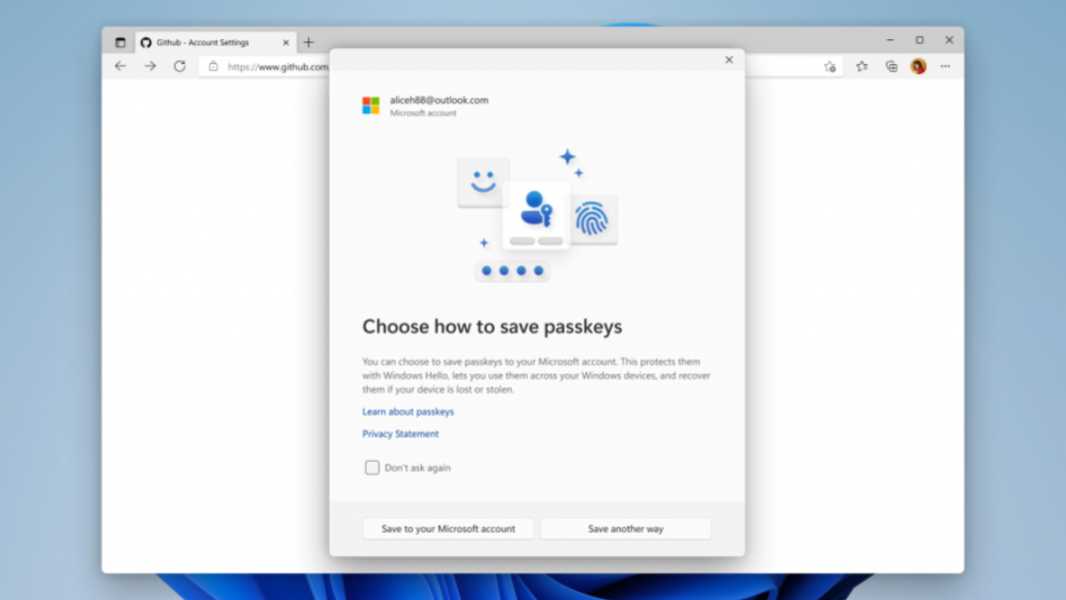
Windows 11 supports passkeys, but only in the most basic way imaginable. But that’s about to change. Microsoft says. In the coming months, it will begin publicly testing some enhancements to this support.
“As part of Microsoft’s vision for a passwordless future, we are working to make passkeys on Windows simple and intuitive,” Microsoft’s Katharine Holdsworth explains. “We are introducing a plug-in model for third-party passkey providers, enhanced native UX for passkeys, and a Microsoft synced passkey provider, [all of] which will be available in our Windows Insider channels in the coming months.”
Microsoft partnered with1Password, Bitwarden, and others to create an API (application programming interface) for Windows that third-party passkey providers–password managers, in other words–can use to plug their services into Windows 11. This by itself should dramatically improve the lame passkey support in Windows 11 today because you’ll be able to use passkeys created elsewhere (like your smartphone) in Windows 11.
Microsoft is also redesigning the Windows Hello user experience (UX) to make it more obvious that it can be used to authenticate you and then save passkeys to your Microsoft account. (As I noted in The Secret Lives of Passkeys (Premium) in late 2023, when you sign in to Windows 11 with your Microsoft account and authenticate with Windows Hello, it quietly–secretly?–creates a passkey for that account on your PC.) Now, you will be asked to save a passkey using Windows Hello (to your MSA, really). And once you do this, the passkey will be portable, meaning you can use it on other PCs you sign in to with the same MSA. This feature is already offered by third-party password managers like Dashlane and Proton Pass, of course.
It’s nice to see Microsoft finally address these issues. After all, it’s been a year since it added passkey support to Windows 11 and it hasn’t moved the needle since. Its support for passkeys MSA is also, to put it mildly, half-assed. Maybe they can finish that up too.