Stardock Releases Fences 6
- Paul Thurrott
- May 28, 2025
-
3
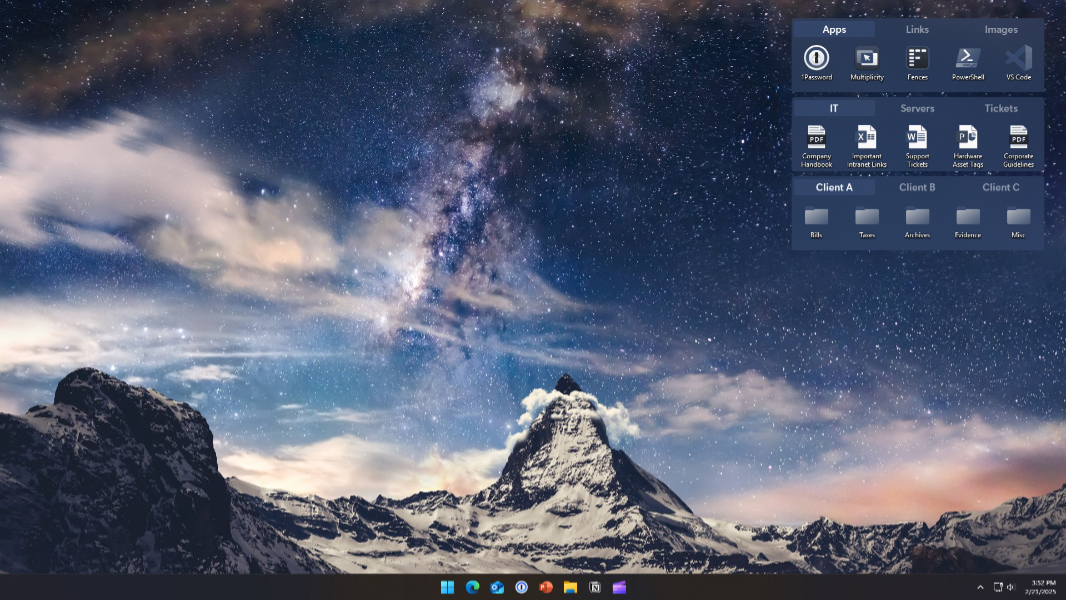
Stardock has taken Fences 6 out of beta, making the latest version of the desktop organizational utility generally available.
Fences lets you “organize your PC by intelligently placing your desktop content into shaded areas called fences,” Stardock explains. You can automate this organization using rules, or just manually add files and folders to fences as desired. Version 6 adds the following new features and changes:
Tabs. You can drag one fence onto another to create a space-saving tabbed fence that works exactly as you’d expect.
Color tinted icons. Similar to the home screen feature we see in recent Android and iOS releases, you can create a distraction-free look by tinting the icons in fences to a certain color, or have it automatically adapt to the desktop wallpaper.
Folder Portals improvements. The Folder Portals feature lets you mirror any folder on your desktop as a fence, including cloud storage folders.
Stardock issued the first Fences 6 beta back in March, but it’s since improved the utility based on feedback, adding desktop icon tinting outside of fences, file and folder drag-and-drop support for tab headers, and the ability to customize the color of each tab header. It also added small changes to Fence groups and made bug fixes, as expected.
Fences 6 is $9.99 for new customers, or $19.99 for those who needed to use it on multiple PCs. It’s also part of Object Desktop. You can learn more about Fences 6 on the Stardock website.