Dev and Beta Channels Get a New Preview Quality Update, Bigger Changes to Come
- Paul Thurrott
- Oct 31, 2025
-
0
. In other words, if you have a PC enrolled in the Dev or Beta channel, you have a new update to install.
And that update is Windows 11 Insider Preview Quality Update KB5067115. When installed in Dev, it will upgrade the PC to Windows 11 version 25H2 build 26220.7051. And when installed in Beta, it will upgrade the PC to … Windows 11 version 24H2 build 26220.7051?
Wait, what.
So there’s something else changing here: KB5067115 is being offered as a recommended update on Beta/24H2, meaning that the Beta channel will soon be switching to testing 25H2 builds. Which means, in turn, that the Dev channel will soon switch to testing future version builds, perhaps a rumored 26H1 that will be delivered as part of the first Snapdragon X2-based PCs in early 2026. And if you are in the Dev channel and wish to keep testing new 25H2 features, you have a short window now to switch to the Beta channel.
New features added with KB5067115 include:
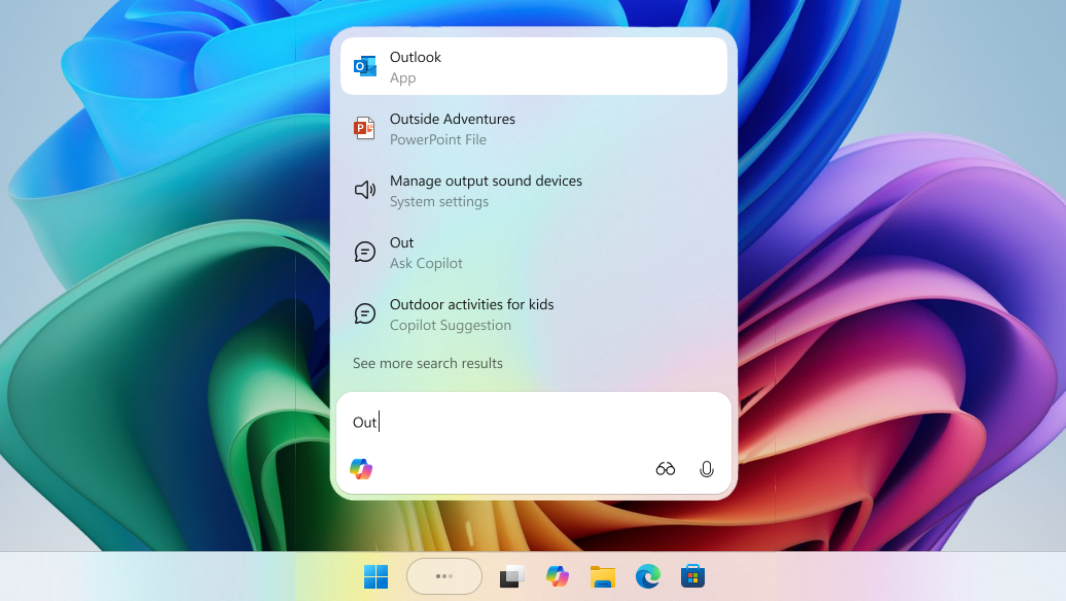
Ask Copilot in the Taskbar. As threatened, Microsoft is adding Ask Copilot to the Search box in the Taskbar. It’s an opt-in experience, lets you access Copilot Voice and Copilot Vision, and it works alongside the standard search experience.
Full-screen experience. The Full-screen experience (FSE) debuted on the Xbox Ally gaming handhelds that debuted earlier this month, and Microsoft is now bringing it to more gaming handheld PCs, starting with the MSI Claw. Additional gaming handheld PCs will come on board in the “coming months,” Microsoft says.
Shared audio (preview). As we see on mobile, Windows 11 will soon support Bluetooth LE-based shared audio broadcasts, at least on Copilot+ PCs. (It’s not clear why this feature would be limited to those PCs.) “Shared audio allows two family members to watch movies together while traveling, or two students to share music while studying,” Microsoft notes. .
Prism improvements. The x64 emulator in Windows 11 on Arm is getting updated with more CPU features under emulation, enabling more apps to run properly. This support is automatic for x64 (64-bit) apps, but