Windows 11 Beta Build 22635.4440 Modernizes the Windows Hello Experience
- Laurent Giret
- Nov 01, 2024
-
0

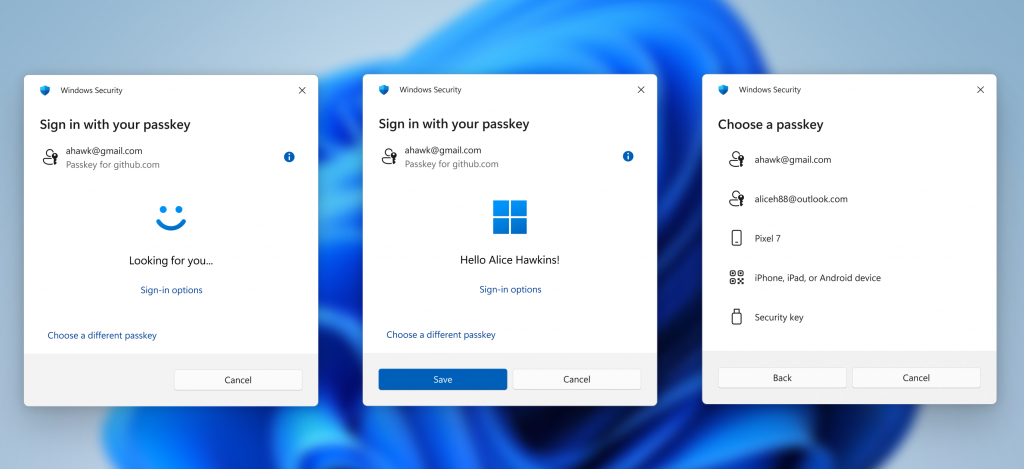
If Microsoft failed to deliver on its promise to bring its new Recall feature to Insiders on Copilot+ PCs in October, Windows Insiders on the Beta Channel have something new to test today. Indeed, the Windows 11 Beta build 22635.4440 introduces a modernized Windows Hello experience with new iconography and some UX changes.
“This represents a significant update to Windows Hello, aligning it with contemporary Windows visual design standards,” the Windows Insider team said today. “The primary focus is on making authentication intuitive and seamless.”
The last big update for Windows Hello was when Microsoft launched enhanced passkey features with last year’s “Fall Update” for Windows 11. Microsoft is now refreshing the Windows Hello visuals that appear when using the Windows Sign-in screen, passkeys, the Microsoft Store, and other places with a sign-in flow.
This build also introduces redesigned passkey sign-in flow screens that will make it easier for users to switch between authentication options and select passkey/devices. The Windows Insider team said that this new experience will also be applied to the the new administrator protection feature that’s currently being tested with Canary Channel Insiders.
This modernized Windows Hello experience will roll out first to Beta Channel testers who have turned on the Windows Update toggle to get the latest features as soon as they’re available. Please note that today’s Beta build 22635.4440 will also temporarily disable the new Gamepad keyboard layout for the Windows 11 on-screen keyboard to address some issues. This feature was also included in the October optional patches for Windows 11 versions 24H2 and 23H2/22H2, so it looks like Microsoft released it a bit too early.