Microsoft Brings Restyle to Paint in Preview
- Paul Thurrott
- Oct 22, 2025
-
2
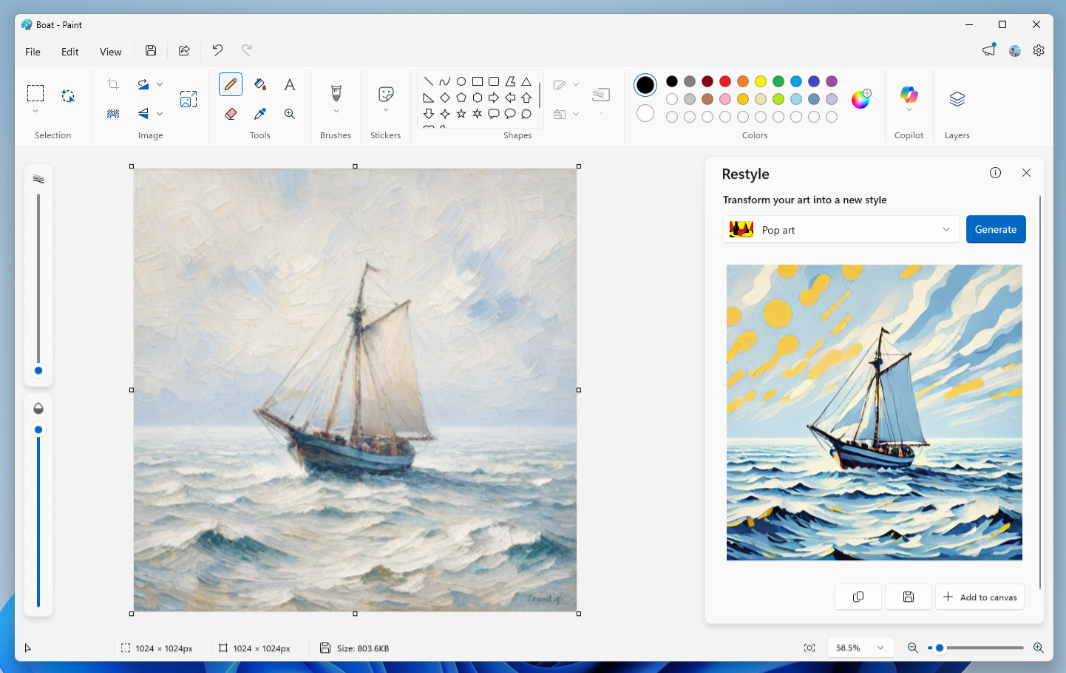
Those with a PC enrolled in the Canary, Dev, or Beta channel of the Windows Insider Program have an app update to install. The in-box Paint app is being updated with a Restyle feature similar to the Restyle Image feature in the Photos app.
“Restyle is an AI-powered feature that lets you transform the art style of images on the canvas,” Microsoft’s Dave Grochocki explains. “To get started, open Paint and select the Restyle option from the Copilot menu. Choose from a preset list of styles and select the Generate button. Once the restyled images are generated, you can click on the Add to canvas button, copy, or save it for later use.”
Restyle is being made available first on Snapdragon X-based Copilot PCs, and as with the similar feature in Photos, you have to sign in with a Microsoft account. Assuming this feature is the same as with Photos, you should see multiple styles to choose from, including Fantasy, Anime, Surrealism, Impressionist, Cyberpunk, and several others.
If you do have a compatible PC, you’re looking for Paint version 11.2509.441.0 or higher.